On Docker hub, the MongoDB folks have an official image for several versions of mongo.
But for those who want to create and test images, here is an image created from Debian.
The previous articles about Docker are:
-
Starting Django with docker using docker-compose with postgresql as a microservice.
-
Creating a Continuous Integration and Deployment environment with Docker for node.js.
-
Setting up a Platform as a Service (PaaS) with Dokku (docker).
-
Provisioning a cluster with docker swarm and docker-machine.
-
Installing Jenkins through Docker and creating a Jenkins Docker image
The Dockerfile is on github at the following link. Its content is the following:
FROM debian
MAINTAINER Ernesto Crespo <ecrespo@gmail.com>
USER root
WORKDIR /code
RUN echo "deb http://ftp.debian.org/debian jessie main contrib non-free" > /etc/apt/sources.list
RUN apt-key adv --keyserver keyserver.ubuntu.com --recv 7F0CEB10
RUN echo "deb http://repo.mongodb.org/apt/debian wheezy/mongodb-org/3.0 main" |  tee /etc/apt/sources.list.d/mongodb-org-3.0.list
RUN apt-get update && apt-get install -y mongodb-org
RUN apt-get install -y sudo vim less mc locate
RUN apt-get clean
RUN mkdir -p /data/db
RUN echo "mongodb ALL=NOPASSWD: ALL" >> /etc/sudoers

EXPOSE 27017
ENTRYPOINT ["/usr/bin/mongod"]
To build the image, run:
docker build -t <nombreImagen> .In this case it was:
docker build -t mongo3-custom .For anyone who wants to download the image, run:
docker pull ecrespo/mongo3-customTo run a container using data persistence in /srv/data/db, run:
docker run -p 27017:27017 -v /srv/data/db:/data/db:rw --name mongo_instance_001 -d mongo-custom3 --smallfilesTo see the container's log, run docker logs <idcontenedor|nombrecontenedor>
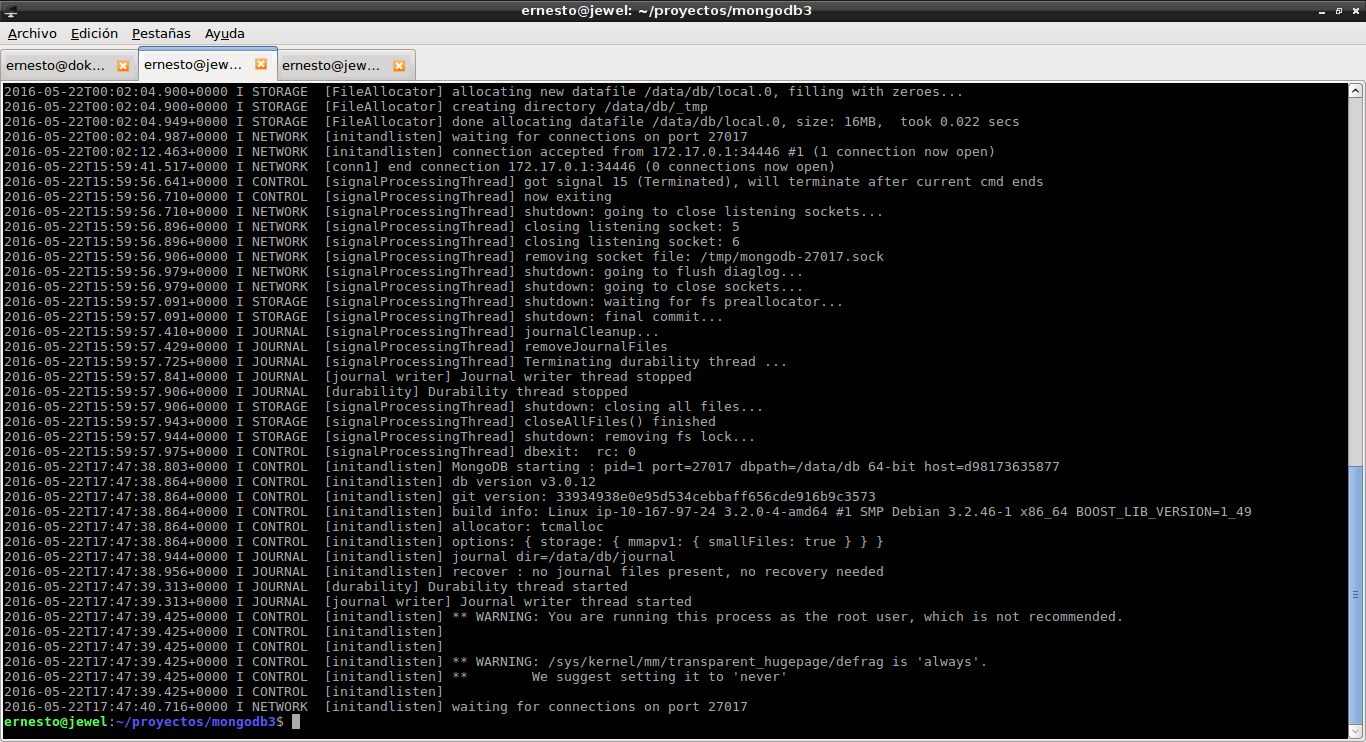
To see the running container, run docker ps:

To access mongo, run:
mongo
To see the container's information, run the docker inspect command:
docker inspect mongo_instance_001
[
    {
        "Id": "d981736358770a23b5123ca1e6490c35bacf40ecf571b265bf98296420b97131",
        "Created": "2016-05-22T00:01:48.049849422Z",
        "Path": "/usr/bin/mongod",
        "Args": [
            "--smallfiles"
        ],
        "State": {
            "Status": "running",
            "Running": true,
            "Paused": false,
            "Restarting": false,
            "OOMKilled": false,
            "Dead": false,
            "Pid": 3984,
            "ExitCode": 0,
            "Error": "",
            "StartedAt": "2016-05-22T17:47:36.658752846Z",
            "FinishedAt": "2016-05-22T16:53:45.66317329Z"
        },
        "Image": "sha256:a17c12c4f560fbc39e8e30bf561c76d86947e2926112bc87d12744e63be7eaa7",
        "ResolvConfPath": "/var/lib/docker/containers/d981736358770a23b5123ca1e6490c35bacf40ecf571b265bf98296420b97131/resolv.conf",
        "HostnamePath": "/var/lib/docker/containers/d981736358770a23b5123ca1e6490c35bacf40ecf571b265bf98296420b97131/hostname",
        "HostsPath": "/var/lib/docker/containers/d981736358770a23b5123ca1e6490c35bacf40ecf571b265bf98296420b97131/hosts",
        "LogPath": "/var/lib/docker/containers/d981736358770a23b5123ca1e6490c35bacf40ecf571b265bf98296420b97131/d981736358770a23b5123ca1e6490c35bacf40ecf571b265bf98296420b97131-json.log",
        "Name": "/mongo_instance_001",
        "RestartCount": 0,
        "Driver": "aufs",
        "MountLabel": "",
        "ProcessLabel": "",
        "AppArmorProfile": "",
        "ExecIDs": null,
        "HostConfig": {
            "Binds": [
                "/srv/data/db:/data/db:rw"
            ],
            "ContainerIDFile": "",
            "LogConfig": {
                "Type": "json-file",
                "Config": {}
            },
            "NetworkMode": "default",
            "PortBindings": {
                "27017/tcp": [
                    {
                        "HostIp": "",
                        "HostPort": "27017"
                    }
                ]
            },
            "RestartPolicy": {
                "Name": "no",
                "MaximumRetryCount": 0
            },
            "AutoRemove": false,
            "VolumeDriver": "",
            "VolumesFrom": null,
            "CapAdd": null,
            "CapDrop": null,
            "Dns": [],
            "DnsOptions": [],
            "DnsSearch": [],
            "ExtraHosts": null,
            "GroupAdd": null,
            "IpcMode": "",
            "Cgroup": "",
            "Links": null,
            "OomScoreAdj": 0,
            "PidMode": "",
            "Privileged": false,
            "PublishAllPorts": false,
            "ReadonlyRootfs": false,
            "SecurityOpt": null,
            "StorageOpt": null,
            "UTSMode": "",
            "UsernsMode": "",
            "ShmSize": 67108864,
            "ConsoleSize": [
                0,
                0
            ],
            "Isolation": "",
            "CpuShares": 0,
            "Memory": 0,
            "CgroupParent": "",
            "BlkioWeight": 0,
            "BlkioWeightDevice": null,
            "BlkioDeviceReadBps": null,
            "BlkioDeviceWriteBps": null,
            "BlkioDeviceReadIOps": null,
            "BlkioDeviceWriteIOps": null,
            "CpuPeriod": 0,
            "CpuQuota": 0,
            "CpusetCpus": "",
            "CpusetMems": "",
            "Devices": [],
            "DiskQuota": 0,
            "KernelMemory": 0,
            "MemoryReservation": 0,
            "MemorySwap": 0,
            "MemorySwappiness": -1,
            "OomKillDisable": false,
            "PidsLimit": 0,
            "Ulimits": null,
            "CpuCount": 0,
            "CpuPercent": 0,
            "BlkioIOps": 0,
            "BlkioBps": 0,
            "SandboxSize": 0
        },
        "GraphDriver": {
            "Name": "aufs",
            "Data": null
        },
        "Mounts": [
            {
                "Source": "/srv/data/db",
                "Destination": "/data/db",
                "Mode": "rw",
                "RW": true,
                "Propagation": "rprivate"
            }
        ],
        "Config": {
            "Hostname": "d98173635877",
            "Domainname": "",
            "User": "root",
            "AttachStdin": false,
            "AttachStdout": false,
            "AttachStderr": false,
            "ExposedPorts": {
                "27017/tcp": {}
            },
            "Tty": false,
            "OpenStdin": false,
            "StdinOnce": false,
            "Env": [
                "PATH=/usr/local/sbin:/usr/local/bin:/usr/sbin:/usr/bin:/sbin:/bin"
            ],
            "Cmd": [
                "--smallfiles"
            ],
            "Image": "mongo-custom3",
            "Volumes": null,
            "WorkingDir": "/code",
            "Entrypoint": [
                "/usr/bin/mongod"
            ],
            "OnBuild": null,
            "Labels": {}
        },
        "NetworkSettings": {
            "Bridge": "",
            "SandboxID": "9aff46c57baeb071a5762c2fcdac37ab5612901c15d78f61f5188185757699bd",
            "HairpinMode": false,
            "LinkLocalIPv6Address": "",
            "LinkLocalIPv6PrefixLen": 0,
            "Ports": {
                "27017/tcp": [
                    {
                        "HostIp": "0.0.0.0",
                        "HostPort": "27017"
                    }
                ]
            },
            "SandboxKey": "/var/run/docker/netns/9aff46c57bae",
            "SecondaryIPAddresses": null,
            "SecondaryIPv6Addresses": null,
            "EndpointID": "f548e847fd8d031f26ebe687c24c709332efa10a2d5752679e6458cf1fbad356",
            "Gateway": "172.17.0.1",
            "GlobalIPv6Address": "",
            "GlobalIPv6PrefixLen": 0,
            "IPAddress": "172.17.0.2",
            "IPPrefixLen": 16,
            "IPv6Gateway": "",
            "MacAddress": "02:42:ac:11:00:02",
            "Networks": {
                "bridge": {
                    "IPAMConfig": null,
                    "Links": null,
                    "Aliases": null,
                    "NetworkID": "b0796b4ed424447971b67d367f762d83141a38e0aacb0a8bc37e70a965d36ac0",
                    "EndpointID": "f548e847fd8d031f26ebe687c24c709332efa10a2d5752679e6458cf1fbad356",
                    "Gateway": "172.17.0.1",
                    "IPAddress": "172.17.0.2",
                    "IPPrefixLen": 16,
                    "IPv6Gateway": "",
                    "GlobalIPv6Address": "",
                    "GlobalIPv6PrefixLen": 0,
                    "MacAddress": "02:42:ac:11:00:02"
                }
            }
        }
    }
]
It shows the container's name, the port used to access it, its IP, its mac address, among other things.
Make a donation! If you liked the article you can make a donation with Bitcoin (BTC) using the digital wallet of your choice to the following address: 17MtNybhdkA9GV3UNS6BTwPcuhjXoPrSzV
Or by scanning the QR code from your wallet:
