I have read about all the infrastructure that needs to be installed to have a private Docker image registry system.
But no, let's use Docker!!!
With this idea, you can pull a Docker registry image from the following link.
Before continuing I will leave you the list of articles about Docker that I have covered on the blog:
The first thing to do is pull the Docker image of the registry; the official version is 2, or the latest.
$docker pull registry:2or
$docker pull registryStart the container on port 5000:
$ docker run -d -p 5000:5000 registry:2
3c0719746d75f46220328c08209b3e716c8e883ad6f3df7bbae0d70e50656a45
To verify that the registry is running, use curl to connect to localhost on port 5000 at v2/:
$ curl -i http://localhost:5000/v2/
HTTP/1.1 200 OK
Content-Length: 2
Content-Type: application/json; charset=utf-8
Docker-Distribution-Api-Version: registry/2.0
X-Content-Type-Options: nosniff
Date: Thu, 25 Feb 2016 18:40:25 GMT
Now you can try uploading an image to the private registry system; let's try with busybox:
Create a tag:
$docker tag busybox localhost:5000/busyPush the image:
$ docker push localhost:5000/busy
The push refers to a repository [localhost:5000/busy]
5f70bf18a086: Pushed
9508eff2c687: Pushed
latest: digest: sha256:b58c00d636b25f40fc7605b1b807af81c1a79a7bbb2179b4753b9dc7e0d1dcd7 size: 711
To be able to access the private registry insecurely, you have to modify the /etc/default/docker file and add the following line (keep in mind that the container is running on localhost):
DOCKER_OPTS="--insecure-registry localhost:5000"Restart the docker service:
# service docker restartFor more information about the Docker registry options you can check the following link.
To check the images stored in the private registry system, run:
curl http://localhost:5000/v2/_catalog
{"repositories":["busy"]}
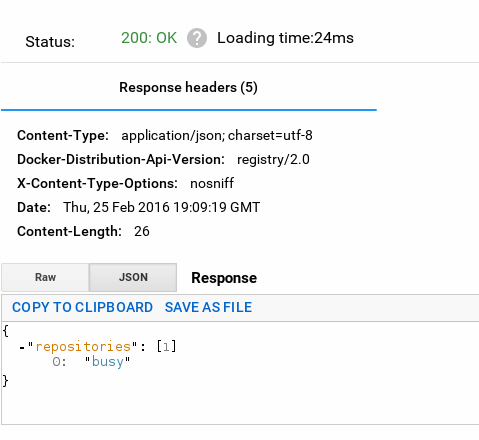
The catalog shows that we have the busy image.
You can create another busybox tag named busy1 and push it to the server:
$docker tag busybox localhost:5000/busy1

$ docker push localhost:5000/busy1
The push refers to a repository [localhost:5000/busy1]
5f70bf18a086: Mounted from busy
9508eff2c687: Mounted from busy
latest: digest: sha256:b58c00d636b25f40fc7605b1b807af81c1a79a7bbb2179b4753b9dc7e0d1dcd7 size: 711
When querying the catalog again there are two images:
$curl http://localhost:5000/v2/_catalog
{"repositories":["busy","busy1"]}
Each image has a manifest:
$curl http://localhost:5000/v2/busy1/manifests/latest

$ curl http://localhost:5000/v2/busy1/manifests/latest
{
   "schemaVersion": 1,
   "name": "busy1",
   "tag": "latest",
   "architecture": "amd64",
   "fsLayers": [
      {
         "blobSum": "sha256:a3ed95caeb02ffe68cdd9fd84406680ae93d633cb16422d00e8a7c22955b46d4"
      },
      {
         "blobSum": "sha256:d7e8ec85c5abc60edf74bd4b8d68049350127e4102a084f22060f7321eac3586"
      }
   ],
   "history": [
      {
         "v1Compatibility": "{\"architecture\":\"amd64\",\"config\":{\"Hostname\":\"ea7fe68f39fd\",\"Domainname\":\"\",\"User\":\"\",\"Memory\":0,\"MemorySwap\":0,\"CpuShares\":0,\"Cpuset\":\"\",\"AttachStdin\":false,\"AttachStdout\":false,\"AttachStderr\":false,\"PortSpecs\":null,\"ExposedPorts\":null,\"Tty\":false,\"OpenStdin\":false,\"StdinOnce\":false,\"Env\":null,\"Cmd\":[\"sh\"],\"Image\":\"5c5fb281b01ee091a0fffa5b4a4c7fb7d358e7fb7c49c263d6d7a4e35d199fd0\",\"Volumes\":null,\"WorkingDir\":\"\",\"Entrypoint\":null,\"NetworkDisabled\":false,\"MacAddress\":\"\",\"OnBuild\":null,\"Labels\":null},\"container\":\"f63d86f7f85b3207532327b6e484bf09d8a0d1a0979cf7bdce1bd5268666fdd3\",\"container_config\":{\"Hostname\":\"ea7fe68f39fd\",\"Domainname\":\"\",\"User\":\"\",\"Memory\":0,\"MemorySwap\":0,\"CpuShares\":0,\"Cpuset\":\"\",\"AttachStdin\":false,\"AttachStdout\":false,\"AttachStderr\":false,\"PortSpecs\":null,\"ExposedPorts\":null,\"Tty\":false,\"OpenStdin\":false,\"StdinOnce\":false,\"Env\":null,\"Cmd\":[\"/bin/sh\",\"-c\",\"#(nop) CMD [\\\"sh\\\"]\"],\"Image\":\"5c5fb281b01ee091a0fffa5b4a4c7fb7d358e7fb7c49c263d6d7a4e35d199fd0\",\"Volumes\":null,\"WorkingDir\":\"\",\"Entrypoint\":null,\"NetworkDisabled\":false,\"MacAddress\":\"\",\"OnBuild\":null,\"Labels\":null},\"created\":\"2015-12-08T18:31:51.481948133Z\",\"docker_version\":\"1.8.3\",\"id\":\"a997905216262e309de0dccc4c8ed39ee475a9d0e6b3f3c3a40b4ccf28af9b15\",\"os\":\"linux\",\"parent\":\"3d030bd4e34f5ed0b05de21a56503d80881fb1464afdde1c06a2b39c59260a22\"}"
      },
      {
         "v1Compatibility": "{\"id\":\"3d030bd4e34f5ed0b05de21a56503d80881fb1464afdde1c06a2b39c59260a22\",\"created\":\"2015-12-08T18:31:50.979824705Z\",\"container_config\":{\"Cmd\":[\"/bin/sh -c #(nop) ADD file:c295b0748bf05d4527f500b62ff269bfd0037f7515f1375d2ee474b830bad382 in /\"]}}"
      }
   ],
   "signatures": [
      {
         "header": {
            "jwk": {
               "crv": "P-256",
               "kid": "FO3A:MIWL:JVJW:5O62:N7RK:GZXL:ACGC:WRUQ:PM4P:FVDL:PBAQ:X3IG",
               "kty": "EC",
               "x": "8eTT88WGU5NVLCrp5qGa4cO_nCo00e1L-eNLKF_0eeE",
               "y": "QwgEYEkJDxz4vihT3Mc6OitZ9uraF_TwbfpvZm72dJ8"
            },
            "alg": "ES256"
         },
         "signature": "LkmuupCii3CgtJKkKbasvkKc1jo7V0rZP9k4EFXuVMQL08-7n8s8TWzNB_Wx8oTv4qMb-Bpqhv3A2jdemu6eSA",
         "protected": "eyJmb3JtYXRMZW5ndGgiOjIyMTQsImZvcm1hdFRhaWwiOiJDbjAiLCJ0aW1lIjoiMjAxNi0wMi0yNVQxOToxNjoxNFoifQ"
      }
   ]
}
To list all the tags of an image:
$ curl http://localhost:5000/v2/busy1/tags/list
{"name":"busy1","tags":["latest"]}
$ curl http://localhost:5000/v2/busy/tags/list
{"name":"busy","tags":["latest"]}
You can do a pull from the local registry system to verify that the image is up to date:
$ docker pull localhost:5000/busy1
Using default tag: latest
latest: Pulling from busy1
Digest: sha256:b58c00d636b25f40fc7605b1b807af81c1a79a7bbb2179b4753b9dc7e0d1dcd7
Status: Image is up to date for localhost:5000/busy1:latest
For more information about deploying the registry system you can check the following link.
Make a donation! If you liked the article you can make a donation with Bitcoin (BTC) using the digital wallet of your choice to the following address: 17MtNybhdkA9GV3UNS6BTwPcuhjXoPrSzV
Or by scanning the QR code from the wallet:
