Continuing with the articles about Docker.
In this case I will explain how to set up and use Dokku, a tool that makes it easy to set up a Platform as a Service (PaaS) in the style of Heroku on Linux (in this case Debian Jessie).
In this case there is no DNS server or hostname for the machine, so the IP 192.168.1.102 will be used.
The previous articles about docker are:
-
Starting Django with docker using docker-compose with postgresql as a microservice.
-
Creating a Continuous Integration and Deployment environment with Docker for node.js.
To install and use Dokku I will be working with a virtual machine (so as not to use my own machine directly); for that, docker was installed in that virtual machine (see article 1).
You can find the Dokku installation procedure in its project on github or at the following link (broken link).
Installation (for this procedure docker-engine is installed):
wget https://raw.githubusercontent.com/dokku/dokku/v0.5.6/bootstrap.sh
chmod a+x bootstrap.sh
sudo DOKKU_TAG=v0.5.6 bash bootstrap.sh
Another installation option is to download the dokku repository:
git clone https://github.com/progrium/dokku.git
cd dokku
sudo make install ; #es necesario tener make instalado; sudo apt-get install make
To see which version you have:
dokku version
v0.5.6-7-g851ca59
Configure the ssh key:
- Go to the local machine, go to the
.sshdirectory, and if you do not have an RSA key generated, generate one:
cd .ssh
ssh-keygen -t rsa- View the public key:
cat id_rsa.pub- Copy the content of the key.
- On the server, as a user, run the following:
echo "ssh-rsa ..... ernesto@crespo.org.ve"| sudo sshcommand acl-add dokku ernestoDeploying a node.js and express.js application:
For this there is a github repository with a node.js and express.js application that has a hello world page.
Clone the repo (from the local machine):
git clone https://github.com/ecrespo/prueba-nodeexpress.gitThe file and directory structure is:
prueba-nodeexpress/
├── app.json
├── index.js
├── LICENSE
└── package.json
The github repository is at the following link.
Add the remote dokku repo (192.168.1.102):
git remote add dokku dokku@192.168.1.102:prueba-nodeexpressEdit the index.html file, and push it to the dokku repository:
git add public/index.html
git commit -m"Agregado texto"
git push dokku master
Pushing produces the following output:
....
-----> Discovering process types
       Default types for  -> web
-----> Releasing prueba-nodeexpress (dokku/prueba-nodeexpress:latest)...
-----> Deploying prueba-nodeexpress (dokku/prueba-nodeexpress:latest)...
-----> Attempting to run scripts.dokku.predeploy from app.json (if defined)
-----> App Procfile file found (/home/dokku/prueba-nodeexpress/DOKKU_PROCFILE)
-----> DOKKU_SCALE file not found in app image. Generating one based on Procfile...
-----> New DOKKU_SCALE file generated
=====> web=1
-----> Running pre-flight checks
       For more efficient zero downtime deployments, create a file CHECKS.
       See http://dokku.viewdocs.io/dokku/checks-examples.md for examples
       CHECKS file not found in container: Running simple container check...
-----> Waiting for 10 seconds ...
-----> Default container check successful!
-----> Running post-deploy
-----> Attempting to run scripts.dokku.postdeploy from app.json (if defined)
=====> renaming container (2dacd928c2bb) clever_tesla to prueba-nodeexpress.web.1
=====> no global VHOST set. disabling vhost support
-----> Setting config vars
       NO_VHOST: 1
-----> no nginx port set. setting to random open high port
-----> Setting config vars
       DOKKU_NGINX_PORT: 53541
-----> Creating http nginx.conf
-----> Running nginx-pre-reload
       Reloading nginx
-----> Setting config vars
       DOKKU_APP_RESTORE: 1
=====> Application deployed:
       http://192.168.1.102:53541 (nginx)

To dokku@192.168.1.102:prueba-nodeexpress
 * [new branch]      master -> master
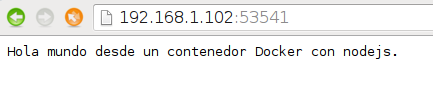
Opening the browser at http://192.168.1.102:53541 shows the following:
For installing plugins you can check the following link (broken link).
There are other tools similar to dokku:
This is a small demonstration of how to have a deployment environment similar to Heroku.
Make a donation! If you liked the article you can make a donation with Bitcoin (BTC) using the digital wallet of your choice to the following address: 17MtNybhdkA9GV3UNS6BTwPcuhjXoPrSzV
Or by scanning the QR code from your wallet:
