Level 4 of the series on silverpoint puts the pieces of the previous levels together in one application. Article 23 built it in React with Next.js. This one builds it in Vue 3, with Vite and vue-router: the same application, with the same three pages and the same data.
It does not explain each component again. Each section links the article where it was introduced and stops at what changes when they come together: a shared store, the theme of the whole page, the routes and the deployment.
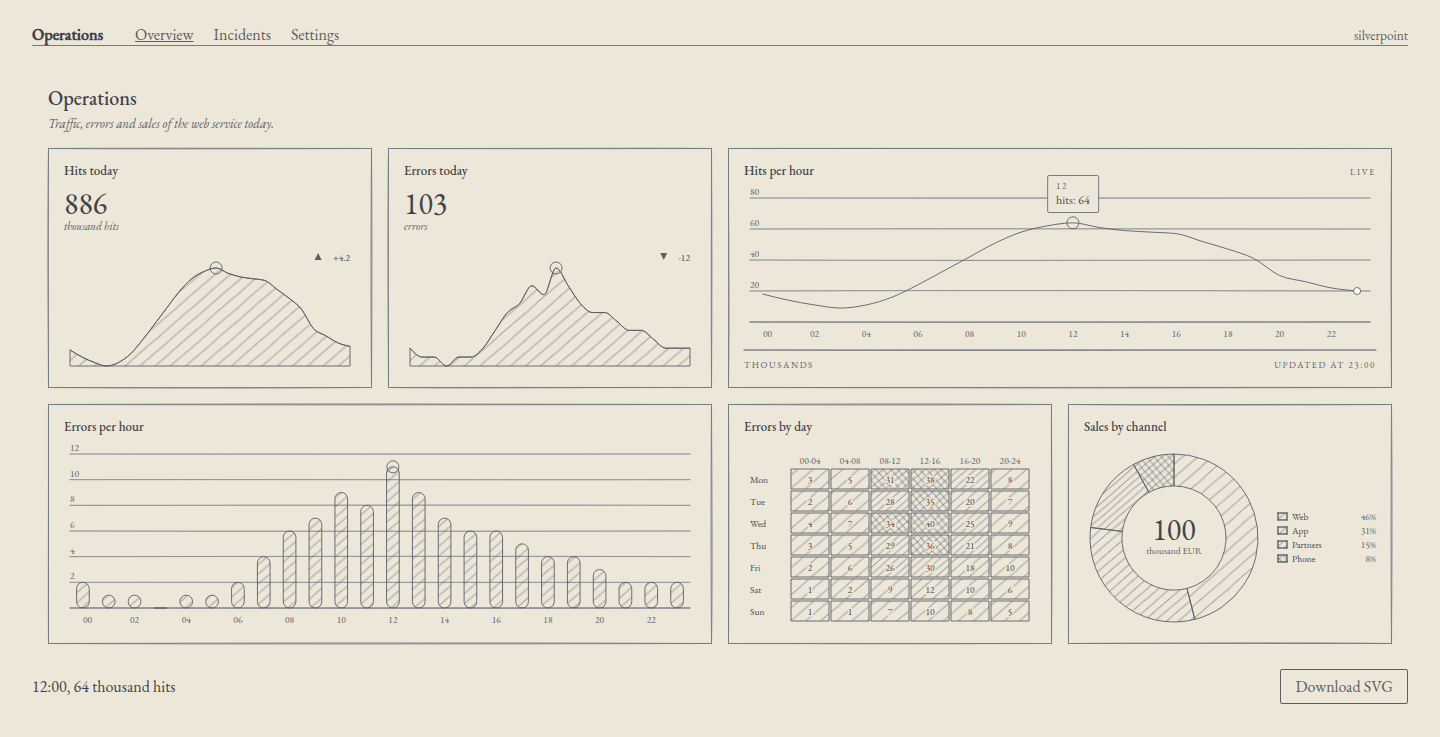
The main page at 1440 pixels wide. The pointer is on 12:00 of the traffic: the chart shows its tooltip, hour 12 is marked on the error bars and on the two indicators, and the readout below says "12:00, 64 thousand hits".
The application
It is called Operations and has three routes:
| Route | Page | What it brings together |
|---|---|---|
/ | Overview | The linked dashboard (13) with live data (20), the readout of the active item (11) and the SVG download (18) |
/incidents | Incidents | The incidents table with sorting, pagination, modal window and toast (17) |
/settings | Settings | The alert rule form (16) and the theme: palette and ground (09 and 12) |
The settings are kept in a store that the three pages share. Changing the theme in Settings changes the charts, the components and the page itself, and the change holds when you navigate and when you reload.
The project
It starts from the project of article 04, with two more packages: the Vue router, and the silverpoint engine as a direct dependency, because the application imports its palettes and its sort function.
npm create vite@latest ops-panel -- --template vue-ts --no-interactive
cd ops-panel
npm install @silverpoint/vue @silverpoint/grounds @silverpoint/fonts @silverpoint/core vue-router
The versions I used: Vue 3.5.45, vue-router 5.5.0, Vite 8.3.8 and silverpoint 0.10.1. Pinia is not needed: a reactive object in a module is enough as a store.
As in article 04, the example the template brings in src/ is replaced by the application's files. The full structure:
ops-panel/
├── index.html
├── package.json
├── vercel.json
├── vite.config.ts
├── public/
│   └── favicon.svg
└── src/
    ├── main.ts
    ├── router.ts
    ├── settings.ts
    ├── App.vue
    ├── style.css
    ├── data/
    │   ├── ops.ts
    │   └── incidents.ts
    ├── lib/
    │   ├── live.ts
    │   └── svg.ts
    ├── components/
    │   └── AlertRuleForm.vue
    └── views/
        ├── OverviewView.vue
        ├── IncidentsView.vue
        └── SettingsView.vue
vite.config.ts and the tsconfig files are the template's, unchanged. In index.html only the title changes. src/data/ops.ts has the panel rows of article 13 and src/data/incidents.ts, the 12 incidents of article 17.
The entry point and the routes
src/main.ts imports the stylesheets once, as in article 04, plus the one for the interface components of article 16, and registers the router:
import { createApp } from 'vue';
import '@silverpoint/fonts/fonts.css';
import '@silverpoint/grounds/styles.css';
import '@silverpoint/grounds/ui.css';
import './style.css';
import App from './App.vue';
import { router } from './router';

createApp(App).use(router).mount('#app');
src/router.ts declares the three routes:
import { createRouter, createWebHistory } from 'vue-router';
import OverviewView from './views/OverviewView.vue';

export const router = createRouter({
  history: createWebHistory(),
  routes: [
    { path: '/', name: 'overview', component: OverviewView, meta: { title: 'Overview' } },
    {
      path: '/incidents',
      name: 'incidents',
      component: () => import('./views/IncidentsView.vue'),
      meta: { title: 'Incidents' },
    },
    {
      path: '/settings',
      name: 'settings',
      component: () => import('./views/SettingsView.vue'),
      meta: { title: 'Settings' },
    },
  ],
});

router.afterEach((to) => {
  document.title = `${String(to.meta.title)} · Operations`;
});
Overview is imported normally, because it is the first page almost everyone sees. Incidents and Settings are loaded with import() the first time they are visited, and Vite splits them into their own files with no further configuration. afterEach sets the tab title: "Incidents · Operations".
createWebHistory gives clean addresses, like /settings, without #. The price is in the deployment: the server has to return index.html for any route. We see it at the end.
The settings store
src/settings.ts keeps the theme and the alert rule, and computes from them what the rest of the application needs:
import { computed, reactive, watch } from 'vue';
import type { GroundName, Palette } from '@silverpoint/core';
import { PALETTES, paletteStyle, type PaletteName } from '@silverpoint/core/palettes';

export type AlertRule = {
  metric: string;
  threshold: number;
  channel: string;
  active: boolean;
  notes: string;
};

export type Settings = {
  palette: PaletteName;
  cyanotype: boolean;
  rule: AlertRule;
};

const KEY = 'ops-settings';

const defaults: Settings = {
  palette: 'silverpoint',
  cyanotype: false,
  rule: { metric: 'errors', threshold: 10, channel: 'email', active: true, notes: '' },
};

function load(): Settings {
  try {
    const saved = JSON.parse(localStorage.getItem(KEY) ?? 'null') as Partial<Settings> | null;
    return { ...defaults, ...saved, rule: { ...defaults.rule, ...saved?.rule } };
  } catch {
    return defaults;
  }
}

export const settings = reactive<Settings>(load());

watch(settings, (value) => {
  try {
    localStorage.setItem(KEY, JSON.stringify(value));
  } catch {
    // Private mode or blocked storage: the settings last for this visit only.
  }
});

// What the provider receives: the cyanotype ground has its own colours, so no palette.
export const theme = computed<{ ground: GroundName; palette?: Palette }>(() =>
  settings.cyanotype
    ? { ground: 'cyanotype' }
    : { ground: 'silverpoint', palette: PALETTES[settings.palette] },
);

// The cyanotype ground's colours, for the elements that are not silverpoint's.
const CYANOTYPE: Palette = {
  substrate: '#1B3F6B',
  ink: '#E2EAF2',
  rule: '#8AA8C7',
  text: '#F4F6F8',
  textMuted: '#B8CBDE',
};

// The same --sp-* properties on the page itself: nav, headings and background follow the theme.
export const shellStyle = computed(() =>
  paletteStyle(settings.cyanotype ? CYANOTYPE : PALETTES[settings.palette]),
);
It has three parts:
- The state.
settingsis a module-levelreactiveobject. Any component that imports it reads and writes the same object, and Vue redraws whatever depends on it. - Persistence.
watchsaves it tolocalStorageevery time it changes, andloadrestores it at startup. Both calls are wrapped intry/catch: with storage blocked, the settings last as long as the visit. - The derived values.
themeis what the provider of article 09 receives: the ground and the palette.shellStyleis the same--sp-*properties as text, for the page.
Since silverpoint 0.10.0, PALETTES is typed with the six palette names, the PaletteName type, imported from @silverpoint/core/palettes. That is why palette is a PaletteName: with a string, PALETTES[settings.palette] does not compile. The list of names comes from PALETTE_NAMES.
With cyanotype no palette applies. The six palettes of article 12 are variations of the silverpoint ground: all of them have a light substrate and dark ink. Putting them on Prussian blue would break the contrast.
The theme of the whole page
The provider only paints silverpoint's elements. Article 12 left it as a common problem: the page background does not change with the theme. In a complete application it has to change, or cyanotype ends up as blue boxes on cream paper.
src/App.vue solves it with a wrapper:
<script setup lang="ts">
import { SilverpointProvider } from '@silverpoint/vue';
import { settings, shellStyle, theme } from './settings';
</script>

<template>
  <SilverpointProvider :ground="theme.ground" :palette="theme.palette">
    <div class="app" :style="shellStyle" :data-ground="theme.ground">
      <header>
        <strong>Operations</strong>
        <nav aria-label="Main">
          <RouterLink to="/">Overview</RouterLink>
          <RouterLink to="/incidents">Incidents</RouterLink>
          <RouterLink to="/settings">Settings</RouterLink>
        </nav>
        <small>{{ settings.cyanotype ? 'cyanotype' : settings.palette }}</small>
      </header>
      <main>
        <RouterView />
      </main>
    </div>
  </SilverpointProvider>
</template>
SilverpointProvider draws nothing around its content, so the div.app wrapper is the one that receives shellStyle. The application's stylesheet uses those properties for the background, the text and the navigation:
body {
  margin: 0;
}

/* The page takes the theme's colours from the --sp-* properties set by shellStyle. */
.app {
  min-height: 100vh;
  padding: 24px 32px;
  box-sizing: border-box;
  background: var(--sp-substrate);
  color: var(--sp-text);
  font-family: 'EB Garamond', Georgia, serif;
}

header {
  display: flex;
  align-items: baseline;
  gap: 32px;
  margin-bottom: 24px;
  border-bottom: 1px solid var(--sp-rule);
}

nav {
  display: flex;
  gap: 20px;
}

nav a {
  color: var(--sp-ink);
  text-decoration: none;
}

nav a[aria-current='page'] {
  text-decoration: underline;
}

header small {
  margin-left: auto;
  color: var(--sp-text-muted);
}
RouterLink adds aria-current="page" to the current page's link with no code, and the nav a[aria-current='page'] rule underlines it. The rest of style.css lays out the pages.
For cyanotype, settings.ts copies five colours of the ground, those in @silverpoint/grounds/styles.css, because there is no palette with that name. For the silverpoint ground, the chosen palette already brings its substrate.
The main page
The live data is that of article 20, adapted to the panel rows, which also carry the errors. src/lib/live.ts:
import { hourly, type HourRow } from '../data/ops';

// The next reading: the hour after the last one, taken from the day's
// profile with a small variation that changes from tick to tick.
function nextReading(last: HourRow, tick: number): HourRow {
  const hour = (Number(last.hour) + 1) % 24;
  return {
    hour: String(hour).padStart(2, '0'),
    hits: hourly[hour].hits + ((tick * 7) % 9) - 4,
    errors: hourly[hour].errors,
  };
}

// A rolling window: drop the oldest hour and append the new one.
export function advance(rows: readonly HourRow[], tick: number): HourRow[] {
  return [...rows.slice(1), nextReading(rows[rows.length - 1], tick)];
}
The download is that of article 18: standaloneSVG puts the ground's stylesheet inside the SVG. src/lib/svg.ts:
import { standaloneSVG } from '@silverpoint/grounds';
import groundCss from '@silverpoint/grounds/styles-text';

// The exported SVG does not carry the ground's stylesheet: standaloneSVG puts it inside (article 18).
export function downloadSvg(svg: string, filename: string) {
  const url = URL.createObjectURL(new Blob([standaloneSVG(svg, groundCss)], { type: 'image/svg+xml' }));
  const link = document.createElement('a');
  link.href = url;
  link.download = filename;
  link.click();
  URL.revokeObjectURL(url);
}
And the page, src/views/OverviewView.vue:
<script setup lang="ts">
import { computed, onMounted, onUnmounted, ref, shallowRef } from 'vue';
import { SpBarChart } from '@silverpoint/vue/bar-chart';
import { SpDashboard, SpDashboardCell, type DashboardLayout } from '@silverpoint/vue/dashboard';
import { SpDonutChart } from '@silverpoint/vue/donut-chart';
import { SpHeatmapChart } from '@silverpoint/vue/heatmap-chart';
import { SpKpiCard } from '@silverpoint/vue/kpi-card';
import { SpLineChart, type ActiveItem } from '@silverpoint/vue/line-chart';
import { blocks, errorsByDay, hourly, sales } from '../data/ops';
import { advance } from '../lib/live';
import { downloadSvg } from '../lib/svg';

const layout: DashboardLayout = {
  columns: { sm: 1, md: 2, lg: 4 },
  rowHeight: 240,
  gap: 16,
  cells: [
    { id: 'hits-today' },
    { id: 'errors-today' },
    { id: 'traffic', colSpan: { md: 2, lg: 2 } },
    { id: 'errors-hour', colSpan: { md: 2, lg: 2 } },
    { id: 'errors-day' },
    { id: 'channels' },
  ],
};

// Live data (article 20): a new reading every 2 s on a rolling 24-hour window.
const rows = shallowRef(hourly);
const hitsToday = computed(() => rows.value.reduce((sum, row) => sum + row.hits, 0));
const errorsToday = computed(() => rows.value.reduce((sum, row) => sum + row.errors, 0));
const last = computed(() => rows.value[rows.value.length - 1]);

let timer: ReturnType<typeof setInterval> | undefined;

onMounted(() => {
  let tick = 0;
  timer = setInterval(() => {
    tick += 1;
    rows.value = advance(rows.value, tick);
  }, 2000);
});

onUnmounted(() => clearInterval(timer));

// The hour under the pointer or the keyboard (article 11).
const active = ref<ActiveItem | null>(null);

// The SVG of the hits chart, with the stylesheet inlined (article 18).
const chart = ref<InstanceType<typeof SpLineChart>>();

function exportChart() {
  const svg = chart.value?.toSVGString();
  if (svg) downloadSvg(svg, 'hits-per-hour.svg');
}
</script>

<template>
  <SpDashboard
    id="ops"
    title="Operations"
    description="Traffic, errors and sales of the web service today."
    :layout="layout"
    :link="{ key: 'hour' }"
  >
    <SpDashboardCell cell="hits-today">
      <SpKpiCard title="Hits today" :data="rows" value-key="hits" :value="hitsToday" unit="thousand hits" :delta="4.2" />
    </SpDashboardCell>
    <SpDashboardCell cell="errors-today">
      <SpKpiCard title="Errors today" :data="rows" value-key="errors" :value="errorsToday" unit="errors" :delta="-12" />
    </SpDashboardCell>
    <SpDashboardCell cell="traffic">
      <SpLineChart
        ref="chart"
        id="hits"
        title="Hits per hour"
        badge="Live"
        :data="rows"
        x-key="hour"
        value-key="hits"
        footer-left="Thousands"
        :footer-right="`Updated at ${last.hour}:00`"
        @active-change="active = $event"
      />
    </SpDashboardCell>
    <SpDashboardCell cell="errors-hour">
      <SpBarChart title="Errors per hour" :data="rows" x-key="hour" value-key="errors" />
    </SpDashboardCell>
    <SpDashboardCell cell="errors-day">
      <SpHeatmapChart
        title="Errors by day"
        :data="errorsByDay"
        label-key="day"
        values-key="values"
        :column-labels="blocks"
        :scale-max="40"
      />
    </SpDashboardCell>
    <SpDashboardCell cell="channels">
      <SpDonutChart title="Sales by channel" :data="sales" name-key="channel" value-key="sales" center-label="thousand EUR" />
    </SpDashboardCell>
  </SpDashboard>
  <div class="toolbar">
    <p role="status">
      <template v-if="active">{{ active.datum.hour }}:00, {{ active.value }} thousand hits</template>
      <template v-else>Point at the hits chart to read an hour.</template>
    </p>
    <button type="button" @click="exportChart">Download SVG</button>
  </div>
</template>
What is new compared with the source articles:
- The indicators follow the live data. "Hits today" and "Errors today" add up the 24-hour window. On load they give 886 and 103, the figures of article 13, and they change with each new reading. The error bars also use
rows, so the link byhourkeeps working while the window moves. - The dashboard follows the provider. Since silverpoint 0.10.0,
SpDashboardtakes the ground and the palette from the provider, as its charts do. The dashboard's frame, with its background and its title, changes with the theme without passing it:groundor:palette(silverpoint#17). In 0.9 it stayed cream under cyanotype. - The readout and the download, outside the dashboard.
@active-changekeeps the active item of the traffic, as in article 11, and the button callstoSVGString()throughref="chart".
The timer is created in onMounted and cleared in onUnmounted. When you go to another page, the window stops moving; when you come back, it starts again from the day's data. If you want it to keep running across pages, move rows and the timer to a module, like the store.
In development, the heatmap and the donut warn with SP016: they have no hour field. That is expected, as article 13 explains, and the warning does not appear in the production build.
The incidents
src/views/IncidentsView.vue is the Incidents.vue component of article 17 with two changes: it imports the data from ../data/incidents and its section carries the incidents class, which style.css uses for the width and the grid.
Its state is local: the sort order, the page and the acknowledged incidents live in the component. When you leave the page and come back, the table starts again. In a real application the acknowledgements would go to the server; here, to keep them in the browser, moving them to the store would be enough.
The settings
src/views/SettingsView.vue has the theme and the form:
<script setup lang="ts">
import { PALETTE_NAMES } from '@silverpoint/core/palettes';
import { SpSelect } from '@silverpoint/vue/ui/select';
import { SpSwitch } from '@silverpoint/vue/ui/switch';
import AlertRuleForm from '../components/AlertRuleForm.vue';
import { settings } from '../settings';
</script>

<template>
  <div class="settings">
    <section aria-labelledby="theme-title">
      <h2 id="theme-title">Theme</h2>
      <SpSwitch label="Cyanotype" v-model="settings.cyanotype" />
      <SpSelect
        label="Palette"
        :items="PALETTE_NAMES"
        :disabled="settings.cyanotype"
        v-model="settings.palette"
      />
      <p v-if="settings.cyanotype">The cyanotype ground has its own colours: no palette applies.</p>
    </section>
    <section aria-labelledby="rule-title">
      <h2 id="rule-title">Alert rule</h2>
      <AlertRuleForm />
    </section>
  </div>
</template>
SpSwitch and SpSelect write straight into the store with v-model. The change is immediate: the page's colours change as you choose, without reloading. With cyanotype on, the palette list is disabled and the page says why.
The form is the one from article 16, src/components/AlertRuleForm.vue, now connected to the store:
<script setup lang="ts">
import { reactive, ref } from 'vue';
import { SpButton } from '@silverpoint/vue/ui/button';
import { SpRadioGroup } from '@silverpoint/vue/ui/radio-group';
import { SpSegmented } from '@silverpoint/vue/ui/segmented';
import { SpSlider } from '@silverpoint/vue/ui/slider';
import { SpSwitch } from '@silverpoint/vue/ui/switch';
import { SpTextarea } from '@silverpoint/vue/ui/textarea';
import { settings } from '../settings';

const METRICS = [
  { key: 'errors', label: 'Errors' },
  { key: 'hits', label: 'Hits' },
];

const CHANNELS = [
  { key: 'email', label: 'Email' },
  { key: 'chat', label: 'Chat' },
  { key: 'sms', label: 'SMS', disabled: true },
];

// The form edits a copy; "Save rule" writes it to the store.
const draft = reactive({ ...settings.rule });
const saved = ref('');

function save() {
  Object.assign(settings.rule, draft);
  const { metric, threshold, channel, active, notes } = settings.rule;
  saved.value = `${metric} ≥ ${threshold}, by ${channel}, ${active ? 'active' : 'paused'}. Notes: ${notes || '—'}`;
}
</script>

<template>
  <form @submit.prevent="save">
    <SpSegmented label="Metric" name="metric" :items="METRICS" v-model="draft.metric" />
    <SpSlider
      label="Threshold"
      name="threshold"
      :min="0"
      :max="50"
      :step="5"
      :marks="[0, 25, 50]"
      v-model="draft.threshold"
    />
    <SpRadioGroup
      label="Notify by"
      name="channel"
      :items="CHANNELS"
      orientation="horizontal"
      v-model="draft.channel"
    />
    <SpSwitch label="Active" name="active" v-model="draft.active" />
    <SpTextarea
      label="Notes"
      placeholder="Notes for the on-call team"
      name="notes"
      :rows="2"
      :max-length="200"
      show-count
      v-model="draft.notes"
    />
    <SpButton type="submit" variant="primary">Save rule</SpButton>
    <p role="status">{{ saved }}</p>
  </form>
</template>
It edits a copy of the rule, draft, and only writes it to the store when you press Save rule. That way a half-finished change is not saved. The notes move from default-value to v-model, because the initial value now comes from the saved rule.
Run, build and deploy
In development:
npm run devFor production, npm run build checks the types with vue-tsc and builds with Vite into dist/. npm run preview serves that folder to try it.
npm run build
npm run preview
What the build produced:
| File | Size | Gzipped |
|---|---|---|
index-*.js: the application, the router, Overview and its six charts | 238.6 kB | 82.8 kB |
chunk-*.js: shared pieces of the interface components | 25.8 kB | 9.6 kB |
IncidentsView-*.js | 6.6 kB | 2.6 kB |
SettingsView-*.js | 5.3 kB | 1.8 kB |
index-*.css: grounds, components, typeface and application | 153.8 kB | 15.7 kB |
The first visit to / downloads about 98 kB of compressed JavaScript and CSS, plus the typeface. The other two pages are downloaded when they are visited.
dist/ is a static site: it can be served from any file host. The only condition comes from the browser history: a direct visit to /settings has to receive index.html, and vue-router draws the page. npm run preview already does it. On Vercel, vercel.json declares it with a rewrite:
{
  "rewrites": [{ "source": "/(.*)", "destination": "/index.html" }]
}
Other services have their equivalent. Without that rule, reloading the page at /incidents gives a 404 from the server.
What I checked
With the application on the development server and then with the production build on npm run preview, a Playwright script with Chrome went through the three pages:
| Check | Result |
|---|---|
| Overview | Six charts with data-status="ready"; title "Overview · Operations" |
| Live data | After 4 seconds the line is a different one, the indicator changes and the footer goes from "Updated at 23:00" to "Updated at 01:00" |
| Active item and link | With the pointer on the traffic, the readout gives the hour and its value, and the linked mark appears on the bars and on the two indicators |
| Download | hits-per-hour.svg, with <svg at the start and the ground's stylesheet in a CDATA block |
| Incidents | Sort by minutes, page 2, a modal window that closes with Escape and returns the focus, acknowledgement of INC-1040 and toast |
| Form | After saving: "hits ≥ 15, by chat, active. Notes: Page the on-call team", and the rule is still in the form when you come back to the page |
| Palette | With sanguine, the page background, the dashboard frame, the charts and the Save rule button use its colours |
| Cyanotype | Prussian blue background on the page and on the dashboard; the six charts with the sp-ground-cyanotype class; the palette list disabled |
| Persistence | After reloading, cyanotype is still on; a direct visit to /settings loads the page |
npm run build finishes with no type errors. The production console showed no errors or warnings.
Common problems
- The dashboard frame does not change theme. You have a version before 0.10.0, in which
SpDashboarddid not read the provider (silverpoint#17). Update the silverpoint packages. - The page background stays cream with cyanotype. The provider only paints silverpoint. Put the
--sp-*properties on an element of your own withpaletteStyleand use them in your CSS. npm run buildfails withTS7053onPALETTES[...]. Since 0.10.0,PALETTESonly accepts the six names ofPaletteName, andPALETTES['blue']is a compile error. Declare the name asPaletteName, not asstring(silverpoint#20).- Reloading at
/incidentsgives a 404 on the server. The rewrite toindex.htmlfor the browser history is missing. - The live data starts again when you come back to Overview. The timer lives in the page. If it has to keep going across pages, take it to a module.
What's next
Article 25 builds the same application in Angular, with its router, standalone components and signals. Article 27 will compare the four versions with the measurements of each one.