In article 07 we saw that every chart accepts ground, substrate and mode. Repeating them on every chart works with one or two, but in a panel of ten it is easy for one to end up on another substrate. That is what the provider is for: it is declared once, at the top, and every chart and component below it reads it.
This article belongs to level 2 of the series on silverpoint. It shows the provider in the four frameworks, how a section of the page can have its own style, and who wins when the chart and the provider say different things.
What you will build
Two copies of the same panel, with the hits per hour and the sales by channel. The one on the left uses the style of the whole application: the silverpoint ground on the ochre substrate. The one on the right sits in a section with its own provider, in cyanotype.
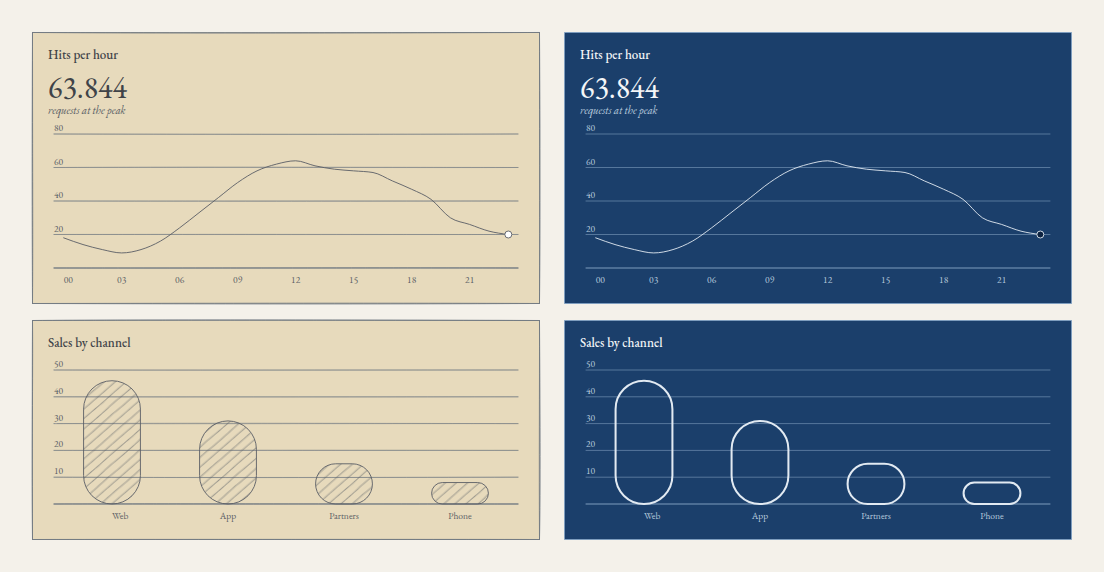
Look at the figure at the top: "63.844", with a dot for thousands. The language of the numbers is declared only once, in the application's provider, and the cyanotype section inherits it.
The two grounds
A ground is the drawing technique: the paper, the inks and how tone is built. silverpoint brings two.
| Ground | Substrates | Tone is built from |
|---|---|---|
silverpoint (default) | cream (default), green, blue, ochre | The density of the hatching; the line is inked by hand |
cyanotype | prussian | The weight of an exact white line; there is no hatching |
In silverpoint, a darker category does not get another colour: it gets denser hatching. That is why a chart reads the same in grey scale or in print. cyanotype imitates a cyanotype print: white lines on Prussian blue.
cyanotype has a single substrate. It always paints it, whatever substrate says, so with that ground there is no need to set it.
The provider accepts five fields, the same ones the chart reads from it:
| Field | What it sets |
|---|---|
ground | The ground |
substrate | The substrate within the ground |
mode | ink, inked by hand, or precision, with exact strokes |
locale | The language and region of the numbers |
palette | The colours; palettes have their own article, 12 |
The panel
The hits data is the one from article 03: traffic.ts, with one { hour, hits } row per hour. The sales by channel go in src/sales.ts:
export type ChannelSales = {
  channel: string;
  sales: number;
};

export const sales: ChannelSales[] = [
  { channel: 'Web', sales: 46 },
  { channel: 'App', sales: 31 },
  { channel: 'Partners', sales: 15 },
  { channel: 'Phone', sales: 8 },
];
The panel, in src/Panel.tsx, says nothing about style. It only draws the two charts:
import { BarChart } from '@silverpoint/react/bar-chart';
import { LineChart } from '@silverpoint/react/line-chart';
import { sales } from './sales';
import { traffic } from './traffic';

export function Panel() {
  return (
    <section style={{ display: 'grid', gap: 16 }}>
      <LineChart
        data={traffic}
        xKey="hour"
        valueKey="hits"
        title="Hits per hour"
        value={63844}
        unit="requests at the peak"
      />
      <BarChart data={sales} xKey="channel" valueKey="sales" title="Sales by channel" />
    </section>
  );
}
In Vue and Angular the panel is a component with the same two charts (Panel.vue and panel.ts), written with the syntax of articles 04 and 05.
One provider for the whole application
React
SilverpointProvider wraps the application in src/main.tsx:
import { StrictMode } from 'react';
import { createRoot } from 'react-dom/client';
import { SilverpointProvider } from '@silverpoint/react';
import '@silverpoint/fonts/fonts.css';
import '@silverpoint/grounds/styles.css';
import './index.css';
import App from './App.tsx';

createRoot(document.getElementById('root')!).render(
  <StrictMode>
    <SilverpointProvider ground="silverpoint" substrate="ochre" locale="es-ES">
      <App />
    </SilverpointProvider>
  </StrictMode>,
);
Vue
In Vue, the application's provider is a plugin. It is installed in src/main.ts:
import { createApp } from 'vue';
import { provideSilverpoint } from '@silverpoint/vue';
import '@silverpoint/fonts/fonts.css';
import '@silverpoint/grounds/styles.css';
import './style.css';
import App from './App.vue';

createApp(App)
  .use(provideSilverpoint({ ground: 'silverpoint', substrate: 'ochre', locale: 'es-ES' }))
  .mount('#app');
Angular
In Angular it is one more application provider, in src/app/app.config.ts:
import { ApplicationConfig, provideBrowserGlobalErrorListeners } from '@angular/core';
import { provideRouter } from '@angular/router';
import { provideSilverpoint } from '@silverpoint/angular';
import { routes } from './app.routes';

export const appConfig: ApplicationConfig = {
  providers: [
    provideBrowserGlobalErrorListeners(),
    provideRouter(routes),
    provideSilverpoint({ ground: 'silverpoint', substrate: 'ochre', locale: 'es-ES' }),
  ],
};
Reflex
In Reflex, silverpoint_provider is a component that wraps the page. This is the whole ops_panel/ops_panel.py, with the panel, the page's provider and, inside, the cyanotype section we will discuss shortly:
import reflex as rx
from reflex_silverpoint_react import bar_chart, line_chart, silverpoint_provider

from .sales import SALES
from .traffic import TRAFFIC


def panel() -> rx.Component:
    return rx.el.section(
        line_chart(
            data=TRAFFIC,
            x_key="hour",
            value_key="hits",
            title="Hits per hour",
            value=63844,
            unit="requests at the peak",
        ),
        bar_chart(data=SALES, x_key="channel", value_key="sales", title="Sales by channel"),
        style={"display": "grid", "gap": "16px"},
    )


def index() -> rx.Component:
    return silverpoint_provider(
        rx.el.main(
            panel(),
            silverpoint_provider(panel(), ground="cyanotype"),
            style={
                "display": "grid",
                "grid_template_columns": "1fr 1fr",
                "gap": "24px",
                "max_width": "1040px",
                "padding": "32px",
            },
        ),
        ground="silverpoint",
        substrate="ochre",
        locale="es-ES",
    )


app = rx.App()
app.add_page(index)
TRAFFIC and SALES are the same rows, as lists of dictionaries, in traffic.py and sales.py.
Wrapping each page works, but with several pages it gets repeated. Reflex lets you wrap the whole application with app.extra_app_wraps, a dictionary of wrappers that Reflex places around every page. This very blog does it that way: a single silverpoint provider styles every chart on the site. With it, the page no longer needs its own provider:
def index() -> rx.Component:
    return rx.el.main(
        panel(),
        silverpoint_provider(panel(), ground="cyanotype"),
        style={
            "display": "grid",
            "grid_template_columns": "1fr 1fr",
            "gap": "24px",
            "max_width": "1040px",
            "padding": "32px",
        },
    )


app = rx.App()
app.extra_app_wraps[(10, "SilverpointProvider")] = lambda _stateful: silverpoint_provider(
    ground="silverpoint",
    substrate="ochre",
    locale="es-ES",
)
app.add_page(index)
The key is a tuple with the wrapper's order and a name. The value is a function that receives whether the application uses state and returns the component.
A section with another ground
A provider inside another styles a section of the page. The fields it declares win; the ones it does not declare are inherited from the outer one. That is what the right half of the panel does: it only changes ground, and inherits locale.
In React, src/App.tsx:
import { SilverpointProvider } from '@silverpoint/react';
import { Panel } from './Panel';

export default function App() {
  return (
    <main style={{ display: 'grid', gridTemplateColumns: '1fr 1fr', gap: 24, maxWidth: 1040 }}>
      <Panel />
      <SilverpointProvider ground="cyanotype">
        <Panel />
      </SilverpointProvider>
    </main>
  );
}
In Vue, the plugin is for the application and the SilverpointProvider component, for a section. It adds no element to the page, so it does not change the layout. src/App.vue:
<script setup lang="ts">
import { SilverpointProvider } from '@silverpoint/vue';
import Panel from './Panel.vue';
</script>

<template>
  <main style="display: grid; grid-template-columns: 1fr 1fr; gap: 24px; max-width: 1040px">
    <Panel />
    <SilverpointProvider ground="cyanotype">
      <Panel />
    </SilverpointProvider>
  </main>
</template>
In Angular, a section is a component with its own provideSilverpoint in providers. src/app/cyanotype-panel.ts:
import { Component } from '@angular/core';
import { provideSilverpoint } from '@silverpoint/angular';
import { Panel } from './panel';

@Component({
  selector: 'app-cyanotype-panel',
  imports: [Panel],
  providers: [provideSilverpoint({ ground: 'cyanotype' })],
  template: `<app-panel />`,
})
export class CyanotypePanel {}
And src/app/app.ts puts the two sections side by side:
import { Component } from '@angular/core';
import { CyanotypePanel } from './cyanotype-panel';
import { Panel } from './panel';

@Component({
  selector: 'app-root',
  imports: [Panel, CyanotypePanel],
  template: `
    <main style="display: grid; grid-template-columns: 1fr 1fr; gap: 24px; max-width: 1040px">
      <app-panel />
      <app-cyanotype-panel />
    </main>
  `,
})
export class App {}
In Reflex you already saw it in the index function: silverpoint_provider(panel(), ground="cyanotype") inside the page's provider.
All four draw the image at the start. In the cyanotype section, the ochre substrate that comes from the outer provider has no effect: cyanotype always paints its Prussian blue.
Who wins
Each field is resolved in this order, and the first one that declares it wins:
- The chart's own prop.
- The dashboard (
Dashboard) that holds it, which we will see in article 13. - The nearest provider and, if it does not declare it, the outer ones.
- The library's default value.
An example in React:
import { SilverpointProvider } from '@silverpoint/react';
import { LineChart } from '@silverpoint/react/line-chart';

export default function App() {
  return (
    <main style={{ display: 'grid', gridTemplateColumns: '1fr 1fr', gap: 24, maxWidth: 1040 }}>
      <SilverpointProvider substrate="green" mode="precision">
        <LineChart title="Inherited" />
        <LineChart title="Own props" substrate="blue" mode="ink" />
      </SilverpointProvider>
    </main>
  );
}
The first chart inherits the green substrate and the precision mode. The second declares its own and is drawn on blue, inked by hand.
There is one exception that no prop can skip. If the system asks for more contrast (prefers-contrast: more) or forced colours (forced-colors: active), every chart switches to precision. We will see it in article 10.
Common problems
- I changed
substrateand the cyanotype stays the same. That is expected:cyanotypeonly has theprussiansubstrate and always paints it. - A chart does not receive the provider's style. It is outside it. In React, check that
SilverpointProviderwraps the component that draws the chart; in Vue, that the plugin is installed beforemount. - I want to change the style while the application runs. In React, Vue and Reflex it is enough to change the provider's props. In Angular,
provideSilverpointreceives a fixed object when the injector is created, so the change goes through the charts' inputs. Article 12 solves it in all four.
What comes next
With the provider, the application's style lives in one place. Article 10 goes into the precision mode and accessibility: what changes when the inking is turned off, how a chart is navigated with the keyboard and what a screen reader reads.
The grounds documentation has the two grounds and their substrates.