The earlier articles of the series about silverpoint taught each piece on its own. This one puts them together in an Angular application: Operations, the operations panel of the web service, with three pages.
It is the same application as articles 23 (React with Next.js), 24 (Vue) and 26 (Reflex). Article 27 compares the four. Here it is built with what Angular brings: the CLI, the router, standalone components and signals, with no state library.
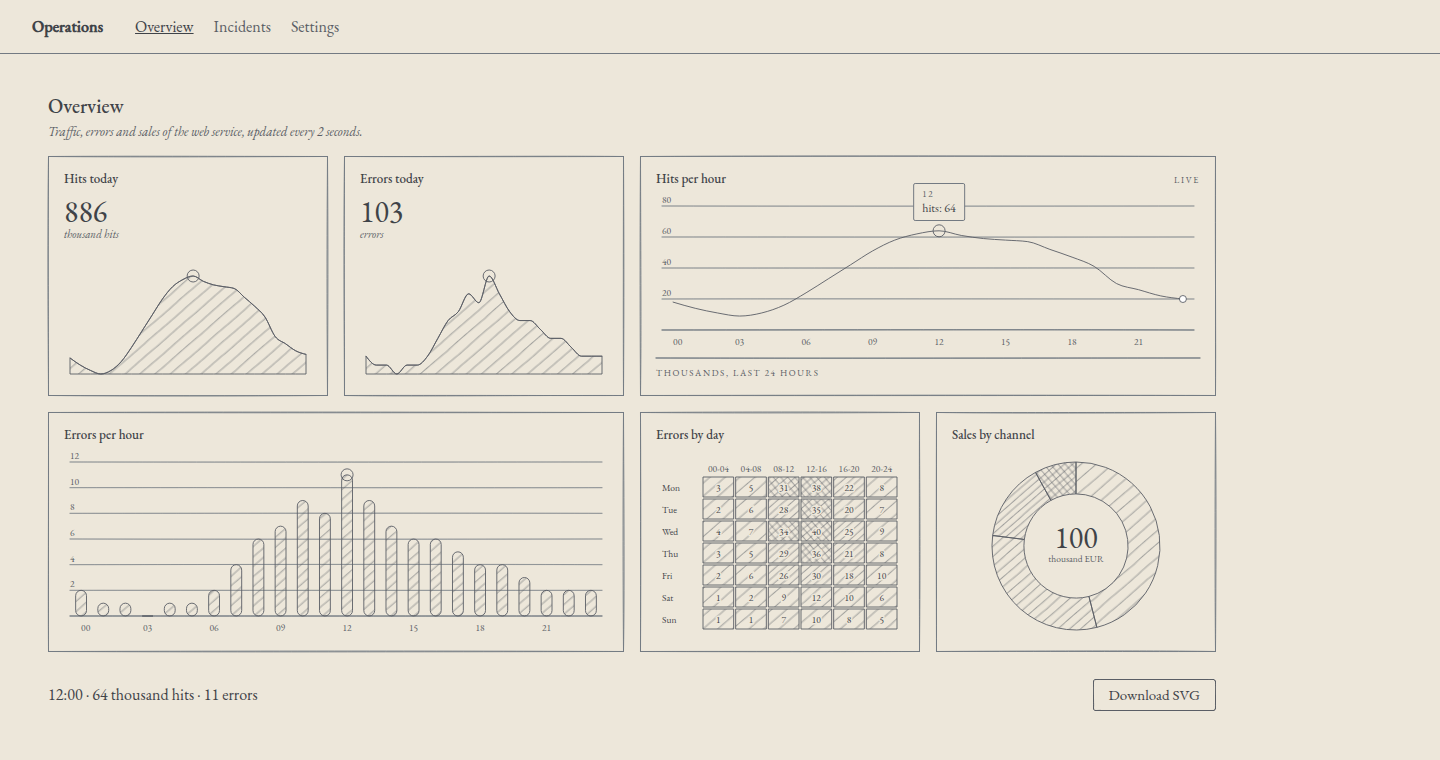
What you will build
| Route | Page | What it uses |
|---|---|---|
/ | Overview | A dashboard with indicators, live hits, errors linked by hour, a heatmap and a donut; the readout of the active hour; the SVG download |
/incidents | Incidents | The sortable, paginated incidents table, the modal to acknowledge one and the toast |
/settings | Settings | The alert-rule form and the theme: palette and ground |
Each page brings together earlier articles:
| Piece | Article |
|---|---|
| The Angular project | 05 |
| The provider and the grounds | 09 |
| The active item | 11 |
| Palettes and theme switching | 12 |
| The dashboard and the link by hour | 13 |
| The form | 16 |
| Table, modal and toast | 17 |
| The SVG export | 18 |
| The live data | 20 |
What you need
The Angular project from article 05, created with the Angular 22 CLI and with @silverpoint/angular, @silverpoint/grounds and @silverpoint/fonts 0.10.1. The router and reactive forms come with the project.
Add the engine as a dependency of your own:
npm install @silverpoint/coreIt was already installed, because the adapter brings it. But the application imports the palettes, uiSortRows and a few types from it, and what you import should be in your package.json.
The structure
ops-panel
├── angular.json
├── package.json
├── package-lock.json
├── public
│   └── favicon.ico
├── README.md
├── src
│   ├── app
│   │   ├── app.config.ts
│   │   ├── app.routes.ts
│   │   ├── app.ts
│   │   ├── data
│   │   │   ├── incidents.ts
│   │   │   └── ops.ts
│   │   ├── export-svg.ts
│   │   ├── incident-log.ts
│   │   ├── live-feed.ts
│   │   ├── pages
│   │   │   ├── alert-rule-form.ts
│   │   │   ├── incidents.ts
│   │   │   ├── overview.ts
│   │   │   └── settings-page.ts
│   │   └── settings.ts
│   ├── index.html
│   ├── main.ts
│   └── styles.css
├── tsconfig.app.json
├── tsconfig.json
└── tsconfig.spec.json
main.ts and index.html are the CLI's; in index.html only the title changes. The data in src/app/data/ is the series' data: ops.ts, from article 13, and incidents.ts, from 17, unchanged. The rest is explained below.
1. The routes
src/app/app.routes.ts:
import { Routes } from '@angular/router';

export const routes: Routes = [
  {
    path: '',
    title: 'Overview · Operations',
    loadComponent: () => import('./pages/overview').then((m) => m.Overview),
  },
  {
    path: 'incidents',
    title: 'Incidents · Operations',
    loadComponent: () => import('./pages/incidents').then((m) => m.Incidents),
  },
  {
    path: 'settings',
    title: 'Settings · Operations',
    loadComponent: () => import('./pages/settings-page').then((m) => m.SettingsPage),
  },
  { path: '**', redirectTo: '' },
];
Each page is loaded with loadComponent, so the CLI puts it in its own file and the browser downloads it the first time you visit it. title changes the tab's title. Any other route goes back to Overview.
2. The settings: a service with signals
The theme and the alert rule are used on several pages. They live in an application-wide service, src/app/settings.ts:
import { Injectable, computed, effect, signal } from '@angular/core';
import type { GroundName, Palette } from '@silverpoint/core';
import { indigo, ironGall, sanguine, sepia, silverpoint, verdigris } from '@silverpoint/core/palettes';

export const PALETTES: { key: string; label: string; palette: Palette }[] = [
  { key: 'silverpoint', label: 'Silverpoint', palette: silverpoint },
  { key: 'sanguine', label: 'Sanguine', palette: sanguine },
  { key: 'sepia', label: 'Sepia', palette: sepia },
  { key: 'iron-gall', label: 'Iron gall', palette: ironGall },
  { key: 'verdigris', label: 'Verdigris', palette: verdigris },
  { key: 'indigo', label: 'Indigo', palette: indigo },
];

export type AlertRule = {
  metric: string;
  threshold: number;
  channel: string;
  active: boolean;
  notes: string;
};

type Stored = { paletteKey: string; cyanotype: boolean };

const KEY = 'operations-theme';
const DEFAULTS: Stored = { paletteKey: 'silverpoint', cyanotype: false };

// localStorage can be missing or blocked: the app then keeps the theme in memory.
function load(): Stored {
  try {
    return { ...DEFAULTS, ...JSON.parse(localStorage.getItem(KEY) ?? 'null') };
  } catch {
    return DEFAULTS;
  }
}

@Injectable({ providedIn: 'root' })
export class Settings {
  readonly paletteKey = signal(load().paletteKey);
  readonly cyanotype = signal(load().cyanotype);
  readonly rule = signal<AlertRule>({
    metric: 'errors',
    threshold: 10,
    channel: 'email',
    active: true,
    notes: '',
  });

  readonly ground = computed<GroundName>(() => (this.cyanotype() ? 'cyanotype' : 'silverpoint'));
  // Cyanotype prints with its own inks on Prussian blue: no palette on top.
  readonly palette = computed(() =>
    this.cyanotype() ? undefined : PALETTES.find((p) => p.key === this.paletteKey())?.palette,
  );

  constructor() {
    effect(() => {
      const stored: Stored = { paletteKey: this.paletteKey(), cyanotype: this.cyanotype() };
      try {
        localStorage.setItem(KEY, JSON.stringify(stored));
      } catch {
        // Not saved: the theme lasts until the page is reloaded.
      }
    });
  }
}
A service with providedIn: 'root' exists once and lasts as long as the page. No state library is needed: signals already notify whoever reads them.
The theme is saved in localStorage, inside try/catch. In a private window or with storage blocked, localStorage can throw; the theme then lasts until you reload. The alert rule is only kept in memory, for the session.
With the cyanotype ground no palette is applied: cyanotype prints with its own inks on Prussian blue, and a palette meant for light paper would not read.
3. The provider that follows the theme
Article 09 set the style of the whole application with provideSilverpoint. In Angular, that function takes a fixed object: there is no way to change its ground afterwards. That is why article 12 passed the theme to each chart.
Here there is another way. src/app/app.config.ts registers the same token that provideSilverpoint uses, SILVERPOINT_CONFIG, with an object whose fields read the settings:
import { ApplicationConfig, inject, provideBrowserGlobalErrorListeners } from '@angular/core';
import { provideRouter } from '@angular/router';
import type { ProviderConfig } from '@silverpoint/core';
import { SILVERPOINT_CONFIG } from '@silverpoint/angular/env';
import { routes } from './app.routes';
import { Settings } from './settings';

export const appConfig: ApplicationConfig = {
  providers: [
    provideBrowserGlobalErrorListeners(),
    provideRouter(routes),
    {
      // provideSilverpoint() takes a fixed object. This provider reads the
      // settings on every render, so every chart and component follows them.
      provide: SILVERPOINT_CONFIG,
      useFactory: (): ProviderConfig => {
        const settings = inject(Settings);
        return {
          get ground() {
            return settings.ground();
          },
          get palette() {
            return settings.palette();
          },
        };
      },
    },
  ],
};
It works because silverpoint's charts and components read the provider inside a computed. When ground is read, the getter reads settings.ground(), and Angular records that dependency. When you change the theme, every chart and every component redraws with the new one.
I checked it by removing every other path: without passing the theme to any chart, the six charts, the dashboard frame, the table, the buttons and the controls change palette and ground. It is a use of the token that the documentation does not describe, so check it if you update silverpoint.
SILVERPOINT_CONFIG is imported from @silverpoint/angular/env. It also exists in @silverpoint/angular, but that pulls about 42 kB more into the initial bundle, and the CLI warns that it goes over the 500 kB budget.
4. The application frame
src/app/app.ts is the root component: the navigation bar, the router-outlet and the page's colours.
import { Component, computed, inject } from '@angular/core';
import { RouterLink, RouterLinkActive, RouterOutlet } from '@angular/router';
import { paletteStyle } from '@silverpoint/core/palettes';
import { Settings } from './settings';

@Component({
  selector: 'app-root',
  imports: [RouterLink, RouterLinkActive, RouterOutlet],
  template: `
    <div class="shell" [class]="'sp-ground-' + settings.ground()" data-substrate="cream" [style]="inks()">
      <header>
        <strong>Operations</strong>
        <nav aria-label="Main">
          <a routerLink="/" routerLinkActive="current" [routerLinkActiveOptions]="{ exact: true }" ariaCurrentWhenActive="page">Overview</a>
          <a routerLink="/incidents" routerLinkActive="current" ariaCurrentWhenActive="page">Incidents</a>
          <a routerLink="/settings" routerLinkActive="current" ariaCurrentWhenActive="page">Settings</a>
        </nav>
      </header>
      <main>
        <router-outlet />
      </main>
    </div>
  `,
  styles: `
    .shell {
      min-height: 100vh;
      background: var(--sp-substrate);
      color: var(--sp-text);
      font-family: var(--sp-font-display);
    }
    header {
      display: flex;
      gap: 32px;
      align-items: baseline;
      padding: 16px 32px;
      border-bottom: 1px solid var(--sp-rule);
    }
    nav {
      display: flex;
      gap: 20px;
    }
    a {
      color: var(--sp-text-muted);
      text-decoration: none;
    }
    a.current {
      color: var(--sp-text);
      text-decoration: underline;
    }
    main {
      max-width: 1200px;
      padding: 24px 32px;
    }
  `,
})
export class App {
  protected readonly settings = inject(Settings);
  // The palette as --sp-* properties, so the page itself takes its colours.
  protected readonly inks = computed(() => paletteStyle(this.settings.palette()));
}
The charts already follow the theme, but the page background is not silverpoint's. To make it change too, the frame carries the ground's class, sp-ground-silverpoint or sp-ground-cyanotype, and data-substrate="cream". With them, silverpoint's stylesheet gives it the ground's --sp-* variables. paletteStyle adds the palette's, and the frame's CSS uses var(--sp-substrate) and var(--sp-text).
routerLinkActive marks the link of the current page, and ariaCurrentWhenActive adds aria-current="page" to it for screen readers. Overview needs exact: true; otherwise / would be active on every page.
5. The live data
Article 20 moved a 24-hour window every 2 seconds. Here hits and errors advance together, because the two charts share them. src/app/live-feed.ts:
import { Injectable, computed, signal } from '@angular/core';
import { takeUntilDestroyed } from '@angular/core/rxjs-interop';
import { interval } from 'rxjs';
import { hourly, type HourRow } from './data/ops';

// The next reading: the hour after the last one, taken from the day's
// profile with a small variation that changes from tick to tick.
export function nextReading(last: HourRow, tick: number): HourRow {
  const hour = (Number(last.hour) + 1) % 24;
  return {
    hour: String(hour).padStart(2, '0'),
    hits: hourly[hour].hits + ((tick * 7) % 9) - 4,
    errors: Math.max(0, hourly[hour].errors + ((tick * 5) % 3) - 1),
  };
}

// A rolling window: drop the oldest hour and append the new one.
export function advance(rows: readonly HourRow[], tick: number): HourRow[] {
  return [...rows.slice(1), nextReading(rows[rows.length - 1], tick)];
}

const sum = (rows: readonly HourRow[], key: 'hits' | 'errors') =>
  rows.reduce((total, row) => total + row[key], 0);

// One feed for the whole app: it keeps running while you visit other pages.
@Injectable({ providedIn: 'root' })
export class LiveFeed {
  readonly rows = signal(hourly);
  readonly hits = computed(() => sum(this.rows(), 'hits'));
  readonly errors = computed(() => sum(this.rows(), 'errors'));

  constructor() {
    interval(2000)
      .pipe(takeUntilDestroyed())
      .subscribe((tick) => this.rows.update((current) => advance(current, tick + 1)));
  }
}
The interval lives in an application-wide service, not in the page. If you go to Incidents and come back, the window is where it was. takeUntilDestroyed stops it if the application is destroyed.
hits and errors are the window's totals: the page's indicators show them and change with each reading.
6. The Overview page
src/app/pages/overview.ts:
import { Component, computed, inject, signal, viewChild } from '@angular/core';
import type { ActiveItem } from '@silverpoint/core';
import { SpBarChart } from '@silverpoint/angular/bar-chart';
import { SpDashboard, SpDashboardCell, type DashboardLayout } from '@silverpoint/angular/dashboard';
import { SpDonutChart } from '@silverpoint/angular/donut-chart';
import { SpHeatmapChart } from '@silverpoint/angular/heatmap-chart';
import { SpKpiCard } from '@silverpoint/angular/kpi-card';
import { SpLineChart } from '@silverpoint/angular/line-chart';
import { SpButton } from '@silverpoint/angular/ui/button';
import { blocks, errorsByDay, sales } from '../data/ops';
import { downloadSvg } from '../export-svg';
import { LiveFeed } from '../live-feed';

@Component({
  selector: 'app-overview',
  imports: [SpBarChart, SpButton, SpDashboard, SpDashboardCell, SpDonutChart, SpHeatmapChart, SpKpiCard, SpLineChart],
  template: `
    <sp-dashboard
      id="ops"
      title="Overview"
      description="Traffic, errors and sales of the web service, updated every 2 seconds."
      [layout]="layout"
      [link]="{ key: 'hour' }"
    >
      <sp-dashboard-cell cell="hits-today">
        <sp-kpi-card title="Hits today" [data]="feed.rows()" valueKey="hits" [value]="feed.hits()" unit="thousand hits" />
      </sp-dashboard-cell>
      <sp-dashboard-cell cell="errors-today">
        <sp-kpi-card title="Errors today" [data]="feed.rows()" valueKey="errors" [value]="feed.errors()" unit="errors" />
      </sp-dashboard-cell>
      <sp-dashboard-cell cell="traffic">
        <sp-line-chart
          #hits
          title="Hits per hour"
          badge="Live"
          [data]="feed.rows()"
          xKey="hour"
          valueKey="hits"
          footerLeft="Thousands, last 24 hours"
          (activeChange)="active.set($event)"
        />
      </sp-dashboard-cell>
      <sp-dashboard-cell cell="errors-hour">
        <sp-bar-chart title="Errors per hour" [data]="feed.rows()" xKey="hour" valueKey="errors" />
      </sp-dashboard-cell>
      <sp-dashboard-cell cell="errors-day">
        <sp-heatmap-chart
          title="Errors by day"
          [data]="errorsByDay"
          labelKey="day"
          valuesKey="values"
          [columnLabels]="blocks"
          [scaleMax]="40"
        />
      </sp-dashboard-cell>
      <sp-dashboard-cell cell="channels">
        <sp-donut-chart title="Sales by channel" [data]="sales" nameKey="channel" valueKey="sales" centerLabel="thousand EUR" />
      </sp-dashboard-cell>
    </sp-dashboard>
    <div class="actions">
      <p aria-live="polite">{{ readout() }}</p>
      <button type="button" spButton (click)="download()">Download SVG</button>
    </div>
  `,
  styles: `
    .actions {
      display: flex;
      gap: 16px;
      align-items: center;
      justify-content: space-between;
      padding: 0 16px;
    }
  `,
})
export class Overview {
  protected readonly feed = inject(LiveFeed);
  protected readonly errorsByDay = errorsByDay;
  protected readonly blocks = blocks;
  protected readonly sales = sales;
  protected readonly layout: DashboardLayout = {
    columns: { sm: 1, md: 2, lg: 4 },
    rowHeight: 240,
    gap: 16,
    cells: [
      { id: 'hits-today' },
      { id: 'errors-today' },
      { id: 'traffic', colSpan: { md: 2, lg: 2 } },
      { id: 'errors-hour', colSpan: { md: 2, lg: 2 } },
      { id: 'errors-day' },
      { id: 'channels' },
    ],
  };

  protected readonly active = signal<ActiveItem | null>(null);
  protected readonly readout = computed(() => {
    const item = this.active();
    if (!item) return 'Point at the hits chart to read an hour.';
    const { hour, hits, errors } = item.datum;
    return `${hour}:00 · ${hits} thousand hits · ${errors} errors`;
  });

  private readonly hits = viewChild.required<SpLineChart>('hits');

  protected download() {
    downloadSvg(this.hits().toSVGString(), 'hits-per-hour.svg');
  }
}
What to know about each part:
- The dashboard is the one from article 13, with the same grid.
[link]="{ key: 'hour' }"links the charts by hour: when you move over an hour of the hits, the same hour is marked in the errors and in the indicators. - The dashboard's theme. Since silverpoint 0.10.0, the dashboard frame follows the provider, as its charts do: its background and borders change with the theme without putting
[ground]or[palette]onsp-dashboard(silverpoint#17). In 0.9 they kept the silverpoint palette. - The readout uses the hits chart's
(activeChange), as in article 11.item.datumis the whole row. Destructuring,const { hour, hits, errors } = item.datum, is valid withnoPropertyAccessFromIndexSignature; withitem.datum.hour, compilation would fail. - The download.
viewChild.requiredfinds the chart marked with#hitseven inside a dashboard cell, andtoSVGString()returns its SVG.
The charts have no id: inside a dashboard, each cell gives them a stable one, such as ops--traffic, and the hand-drawn stroke does not change between readings.
7. The SVG export
src/app/export-svg.ts is the download function from article 18:
import { standaloneSVG } from '@silverpoint/grounds';
import groundCss from '@silverpoint/grounds/styles-text';

export function downloadSvg(svg: string, filename: string) {
  // The SVG with the ground's stylesheet inside, so it looks the same outside the app.
  const file = new Blob([standaloneSVG(svg, groundCss)], { type: 'image/svg+xml' });
  const url = URL.createObjectURL(file);
  const link = document.createElement('a');
  link.href = url;
  link.download = filename;
  link.click();
  URL.revokeObjectURL(url);
}
standaloneSVG puts the ground's stylesheet inside the SVG, between <![CDATA[ and ]]>, so it looks the same outside the application (silverpoint#14). The stylesheet arrives as text from @silverpoint/grounds/styles-text, a plain JavaScript module: no TypeScript declaration is needed and angular.json stays untouched, and it works the same with ng serve and with ng build (silverpoint#19).
Up to 0.9.2 you had to import styles.css with loader: 'text', and with ng serve that left the page blank unless pre-bundling was turned off with "prebundle": false.
8. The Incidents page
The table, the modal and the toast are the ones from article 17. Only where the incidents live changes. src/app/incident-log.ts:
import { Injectable, computed, signal } from '@angular/core';
import { INCIDENTS } from './data/incidents';

// The incidents live here, not in the page, so an acknowledgement
// survives a visit to another page.
@Injectable({ providedIn: 'root' })
export class IncidentLog {
  readonly rows = signal(INCIDENTS);
  readonly openIds = computed(() => this.rows().filter((row) => row.status === 'open').map((row) => row.id));

  acknowledge(id: string) {
    this.rows.update((rows) => rows.map((row) => (row.id === id ? { ...row, status: 'acknowledged' } : row)));
  }
}
If you acknowledge an incident and change page, it is still acknowledged when you come back. The template of src/app/pages/incidents.ts is article 17's, with log.rows() and log.openIds() instead of the local signals, and an h1. The class:
export class Incidents {
  protected readonly log = inject(IncidentLog);
  protected readonly columns = COLUMNS;
  protected readonly pageSize = PAGE_SIZE;
  protected readonly sortKey = signal('opened');
  protected readonly sortOrder = signal<'asc' | 'desc'>('desc');
  protected readonly page = signal(1);
  protected readonly open = signal(false);
  protected readonly picked = signal<string | null>(null);
  protected readonly acknowledged = signal('');
  protected readonly toastOpen = signal(false);

  protected readonly visible = computed(() =>
    uiSortRows(this.log.rows(), this.sortKey(), this.sortOrder()).slice(
      (this.page() - 1) * PAGE_SIZE,
      this.page() * PAGE_SIZE,
    ),
  );

  protected sort(key: string) {
    this.sortOrder.set(key === this.sortKey() && this.sortOrder() === 'asc' ? 'desc' : 'asc');
    this.sortKey.set(key);
    this.page.set(1);
  }

  protected acknowledge() {
    const picked = this.picked();
    if (!picked) return;
    this.log.acknowledge(picked);
    this.acknowledged.set(picked);
    this.picked.set(null);
    this.open.set(false);
    this.toastOpen.set(true);
  }
}
The button that opens the modal uses var(--sp-rule) and var(--sp-text) in its styles, so it also changes with the theme.
9. The Settings page
src/app/pages/settings-page.ts:
import { Component, inject } from '@angular/core';
import { SpSelect } from '@silverpoint/angular/ui/select';
import { SpSwitch } from '@silverpoint/angular/ui/switch';
import { PALETTES, Settings } from '../settings';
import { AlertRuleForm } from './alert-rule-form';

@Component({
  selector: 'app-settings-page',
  imports: [AlertRuleForm, SpSelect, SpSwitch],
  template: `
    <h1>Settings</h1>
    <div class="columns">
      <section aria-labelledby="theme-title">
        <h2 id="theme-title">Theme</h2>
        <sp-select
          label="Palette"
          [items]="palettes"
          [value]="settings.paletteKey()"
          (valueChange)="settings.paletteKey.set($event ?? 'silverpoint')"
          [disabled]="settings.cyanotype()"
        />
        <sp-switch
          label="Cyanotype ground"
          [value]="settings.cyanotype()"
          (valueChange)="settings.cyanotype.set(!!$event)"
        />
        <p>The theme applies to every page and is kept on this device.</p>
      </section>
      <section aria-labelledby="alert-title">
        <h2 id="alert-title">Alert rule</h2>
        <app-alert-rule-form />
      </section>
    </div>
  `,
  styles: `
    .columns {
      display: grid;
      grid-template-columns: repeat(auto-fit, minmax(320px, 1fr));
      gap: 48px;
    }
    section {
      display: grid;
      gap: 16px;
      align-content: start;
      justify-items: start;
    }
    h2 {
      margin: 0;
    }
  `,
})
export class SettingsPage {
  protected readonly settings = inject(Settings);
  protected readonly palettes = PALETTES.map(({ key, label }) => ({ key, label }));
}
sp-select and sp-switch receive their value with [value] and report with (valueChange). I do not use [(value)] because their models accept null or undefined, and the settings' signals do not: $event ?? 'silverpoint' and !!$event do the conversion. With cyanotype, the palette select is disabled.
The form is the one from article 16, with the same template. What changes is the class in src/app/pages/alert-rule-form.ts, which now starts from the saved rule and saves it in the settings:
export class AlertRuleForm {
  private readonly settings = inject(Settings);
  protected readonly metrics = METRICS;
  protected readonly channels = CHANNELS;
  // The form starts from the saved rule, so it survives a visit to another page.
  private readonly rule = this.settings.rule();
  protected readonly form = new FormGroup({
    metric: new FormControl(this.rule.metric, { nonNullable: true }),
    threshold: new FormControl(this.rule.threshold, { nonNullable: true }),
    channel: new FormControl(this.rule.channel, { nonNullable: true }),
    active: new FormControl(this.rule.active, { nonNullable: true }),
    notes: new FormControl(this.rule.notes, { nonNullable: true }),
  });
  protected readonly saved = computed(() => {
    const { metric, threshold, channel, active, notes } = this.settings.rule();
    return `Rule: ${metric} ≥ ${threshold}, by ${channel}, ${active ? 'active' : 'paused'}. Notes: ${notes || '—'}`;
  });

  protected save() {
    this.settings.rule.set(this.form.getRawValue());
  }
}
10. The global styles
src/styles.css:
@import '@silverpoint/fonts/fonts.css';
@import '@silverpoint/grounds/styles.css';
@import '@silverpoint/grounds/ui.css';

body {
  margin: 0;
}
The fonts, the charts' stylesheet and the components' one. The rest of the styles go in each component.
Run, build and deploy
In development:
npx ng serveThe application is at http://localhost:4200. For production:
npx ng buildThe result is a folder of static files, dist/ops-panel/browser. On my machine, the clean build took about 4 seconds and produced this:
| File | Size | Compressed (gzip) |
|---|---|---|
main (Angular, router, frame, settings) | 345.6 kB | 109.2 kB |
| Overview page | 69.3 kB | 21.3 kB |
| Two shared silverpoint chunks | 81.5 kB | 23.3 kB |
| Incidents page | 12.6 kB | 4.2 kB |
| Settings page | 10.2 kB | 2.8 kB |
| CSS | 152.7 kB | 14.7 kB |
The first visit to / downloads about 157 kB of compressed JavaScript and CSS, plus the three fonts. The Incidents and Settings pages arrive when you visit them.
To deploy, upload dist/ops-panel/browser to any static host. There is one condition: Angular's router navigates in the browser, but if someone reloads /incidents, the server receives that path and has no such file. The host must answer index.html for paths that do not exist. Vercel, Netlify, Cloudflare Pages and nginx allow it with a rewrite rule. For the tests I used a static Node server with that rule.
The checks
I tested the application in Chrome with Playwright, 38 checks, with ng serve and with the production build. All of them passed in both:
| Page | What was checked |
|---|---|
| Overview | The six charts reach data-status="ready"; the window advances every 2 seconds and keeps 24 rows; the indicator changes with it; the readout shows the active hour and clears on leaving; moving over the hits marks the errors; the downloaded SVG carries the stylesheet |
| Navigation | The links change page without reloading; the current link carries aria-current; each page has its title |
| Incidents | Five rows, newest first; sort by minutes both ways; page 3 has the last two; the modal lists the five open ones; the toast names the incident; it is still acknowledged on coming back |
| Settings | The form saves the rule; SMS is disabled |
| Theme | Sanguine changes the page background, the components, the six charts and the dashboard frame; cyanotype changes the page, the charts, the table and the buttons; the theme survives a reload |
With silverpoint 0.10.1 I ran the main checks again, in development and in production, and they passed again.
Also, no errors in the console. The first chart was ready 235 ms after the page started loading, and all six at 279 ms (the median of three loads of the production build, on my machine).
Angular 22 creates projects without zone.js: the screen updates on the next frame, not inside the click. A test that reads the page right after a click sees the previous state. My first run failed five checks because of that; a short wait after each action solved it.
Common problems
- With
ng serve, the page stays blank and the console talks about "export named 'default'".styles.csswas imported withloader: 'text'. Import the stylesheet from@silverpoint/grounds/styles-text, which exists since 0.10.0 (silverpoint#19). - The theme changes the page, but not the charts.
provideSilverpointwas used with a fixed object. RegisterSILVERPOINT_CONFIGwith getters, as inapp.config.ts. - The charts change, but the dashboard frame does not. You have a version before 0.10.0 (silverpoint#17). Update the silverpoint packages.
- The CLI warns that the initial bundle is over 500 kB.
SILVERPOINT_CONFIGwas imported from@silverpoint/angular. Import it from@silverpoint/angular/env. - When you rest the pointer on a chart, the browser's own tooltip also appears. Up to 0.9.2,
title="Hits per hour"also stayed as atitleattribute ofsp-line-chart; 0.10.0 no longer leaves it on the element (silverpoint#18). In Chrome the tooltip still shows, because it comes from the<title>element of the SVG, which is the chart's accessible name. Writing it as[title]="'Hits per hour'"does not remove it. - Reloading
/settingsin production, the server answers 404. The rule that returnsindex.htmlis missing.
What comes next
Operations now works in Angular. Article 26 builds the same application in Reflex, in Python, and gives it real data: the measured latency of public services.