Continuing with the series of Flask tutorials, this time I will cover the database topic, using sqlite3.
This article is based on the English article The Flask Mega tutorial, Part IV: Database.
The previous articles are:
tutorial-flask/
├── app
│   ├── forms.py
│   ├── __init__.py
│   ├── models.py
│   ├── templates
│   │   ├── base.html
│   │   ├── index.html
│   │   └── login.html
│   └── views.py
├── config.py
├── db_create.py
├── db_downgrade.py
├── db_migrate.py
├── db_upgrade.py
├── docker-compose.yml
├── Dockerfile
├── README.md
├── run.py
└── tmp
The new or modified files are the following:
config.py.db_create.py: Script to create the database.db_migrate.py: Script to migrate the database.db_upgrade.py: Script to upgrade the database.db_downgrade.py: Script to revert the database upgrade.__init__.pymodels.py: Module where the database tables are defined.
File config.py:
#Se importa os


import os


#Se define el directorio base del proyecto


basedir = os.path.abspath(os.path.dirname(__file__))


#Se habilita CSRF


CSRF_ENABLED = True


#Se define la clave secreta


SECRET_KEY = 'pruea'


PROVEEDORES_OPENID = [


    {'name': 'Google', 'url': 'https://www.google.com/accounts/o8/id'},


    {'name': 'Yahoo', 'url': 'https://me.yahoo.com'}]


#Se define el uri de la base de datos sqlite app.db


SQLALCHEMY_DATABASE_URI = 'sqlite:///' + os.path.join(basedir, 'app.db')


#Se define el repositorio para migracion de la base de datos app.db


SQLALCHEMY_MIGRATE_REPO = os.path.join(basedir, 'db_repository')
File __init__.py:
#Se importa Flask

from flask import Flask

#Se importa SQLALchemy

#from flask.ext.sqlalchemy import SQLAlchemy

from flask_sqlalchemy import SQLAlchemy

#Se crea la instancia de flask

app = Flask(__name__)

#Se define la configuracion

app.config.from_object('config')

#SE instancia la base de datos

db = SQLAlchemy(app)

#Se importa views y models de app

from app import views, models
File models.py:
#de app se importa db
from app import db

#Se crea la tabla User que hereda de db.Model
class User(db.Model):
    #Se crea la columna id como clave primaria e integer
    id = db.Column(db.Integer, primary_key=True)
    #Se crea la columna nickname como string de tamagn 64, como unico.
    usuario = db.Column(db.String(64), index=True, unique=True)
    #Columna correo, de 120 de tamagno del string y unico.
    correo = db.Column(db.String(120), index=True, unique=True)
    #Posts. que tiene relacion con la clase Post (tabla post),
    posts = db.relationship('Post', backref='author', lazy='dynamic')

    def __repr__(self):
        return '<User %r>' % (self.usuario)

#Tabla Post que hereda de model
class Post(db.Model):
    #Se crea el id del post como entero y clave primaria
    id = db.Column(db.Integer, primary_key=True)
    #Se crea la columna body como string de 140 caracteres
    cuerpo = db.Column(db.String(140))
    #Se define la marca de tiempo.
    timestamp = db.Column(db.DateTime)
    #Se define el id del usuario, es una clave foranea de la tabla usuario
    #Columna id.
    user_id = db.Column(db.Integer, db.ForeignKey('user.id'))

    def __repr__(self):
        return '<Post %r>' % (self.cuerpo)
File db_create.py:
#!/usr/bin/env python


#de migrate.versioning se importa api


from migrate.versioning import api


#De config se importa el uri


from config import SQLALCHEMY_DATABASE_URI


#De config se importa el repo de migrate


from config import SQLALCHEMY_MIGRATE_REPO


#De app se importa db


from app import db


#Se importa os.path


import os.path


#Se crea la base de datos.


db.create_all()


#Si el directorio del migrate no existe se crea y se usa,


#Si no se usa.


if not os.path.exists(SQLALCHEMY_MIGRATE_REPO):


    api.create(SQLALCHEMY_MIGRATE_REPO, 'database repository')


    api.version_control(SQLALCHEMY_DATABASE_URI, SQLALCHEMY_MIGRATE_REPO)


else:


    api.version_control(SQLALCHEMY_DATABASE_URI, SQLALCHEMY_MIGRATE_REPO,


                        api.version(SQLALCHEMY_MIGRATE_REPO))
File db_migrate.py:
#!/usr/bin/env python

#se importa api.

from migrate.versioning import api

#Se importa el uri y el migrate.

from config import SQLALCHEMY_DATABASE_URI

from config import SQLALCHEMY_MIGRATE_REPO

#se define la version de la db para las migraciones.

v = api.db_version(SQLALCHEMY_DATABASE_URI, SQLALCHEMY_MIGRATE_REPO)

#Se baja una version.

api.downgrade(SQLALCHEMY_DATABASE_URI, SQLALCHEMY_MIGRATE_REPO, v - 1)

#Se vuelva a definir el uri y migrate de la vesion.

v = api.db_version(SQLALCHEMY_DATABASE_URI, SQLALCHEMY_MIGRATE_REPO)

#Se muestra en pantalla la version actual.

print('Current database version: ' + str(v))
File db_upgrate.py:
#!/usr/bin/env python
#Se importa api.
from migrate.versioning import api
#De config se importa URI y el repo.
from config import SQLALCHEMY_DATABASE_URI
from config import SQLALCHEMY_MIGRATE_REPO
#Se actualiza el api.
api.upgrade(SQLALCHEMY_DATABASE_URI, SQLALCHEMY_MIGRATE_REPO)
#Se define la version del api.
v = api.db_version(SQLALCHEMY_DATABASE_URI, SQLALCHEMY_MIGRATE_REPO)
#Se muestra la nueva version.
print('Current database version: ' + str(v))
File db_downgrade.py:
#!/usr/bin/env python

#se importa api.

from migrate.versioning import api

#Se importa el uri y el migrate.

from config import SQLALCHEMY_DATABASE_URI

from config import SQLALCHEMY_MIGRATE_REPO


#se define la version de la db para las migraciones.

v = api.db_version(SQLALCHEMY_DATABASE_URI, SQLALCHEMY_MIGRATE_REPO)

#Se baja una version.

api.downgrade(SQLALCHEMY_DATABASE_URI, SQLALCHEMY_MIGRATE_REPO, v - 1)

#Se vuelva a definir el uri y migrate de la vesion.

v = api.db_version(SQLALCHEMY_DATABASE_URI, SQLALCHEMY_MIGRATE_REPO)

#Se muestra en pantalla la version actual.

print('Current database version: ' + str(v))
Build the docker image with docker-compose:
docker-compose buildNow it is time to run the container:
docker-compose up
Creating tutorialflask_web_1
Attaching to tutorialflask_web_1
web_1  |  * Running on http://0.0.0.0:5000/ (Press CTRL+C to quit)
web_1  |  * Restarting with stat
web_1  |  * Debugger is active!
web_1  |  * Debugger pin code: 201-487-104
Now, to create the database, use docker from another console in the same project directory:
First a docker ps:
docker ps
CONTAINER ID        IMAGE               COMMAND                  CREATED              STATUS              PORTS                    NAMES
52bf03d39d06        tutorialflask_web   "/bin/sh -c 'python r"   About a minute ago   Up About a minute   0.0.0.0:5000->5000/tcp   tutorialflask_web_1
Now we have the container ID; next, run docker exec:
docker exec -ti 52bf03d39d06 ./db_create.pyNow run an ls -l and you get the following:
drwxr-xr-x 4 ernesto ernesto 4096 sep 12 20:07 app
-rw-r--r-- 1 root    root    7168 sep 12 22:31 app.db
-rw-r--r-- 1 ernesto ernesto  620 sep 12 22:14 config.py
-rwxr-xr-x 1 ernesto ernesto  773 sep 12 20:29 db_create.py
-rwxr-xr-x 1 ernesto ernesto  619 sep 12 20:31 db_downgrade.py
-rwxr-xr-x 1 ernesto ernesto 1530 sep 12 20:37 db_migrate.py
drwxr-sr-x 4 root    root    4096 sep 12 22:31 db_repository
-rwxr-xr-x 1 ernesto ernesto  456 sep 12 20:52 db_upgrade.py
-rw-r--r-- 1 ernesto ernesto   67 sep  4 17:27 docker-compose.yml
-rw-r--r-- 1 ernesto ernesto  480 sep  4 17:27 Dockerfile
drwxr-xr-x 2 root    root    4096 sep 12 22:29 __pycache__
-rw-r--r-- 1 ernesto ernesto    0 sep  4 17:27 README.md
-rw-r--r-- 1 ernesto ernesto   79 sep  4 17:27 run.py
drwxr-xr-x 2 ernesto ernesto 4096 sep 19  2014 tmp
The file app.db and the directory __py__cache__ were created.
Now the first migration will be run:
docker exec -ti 52bf03d39d06 ./db_migrate.py
New migration saved as /code/db_repository/versions/001_migration.py
Current database version: 1
The first migration was saved and the version number is 1. Listing the files
and directories gives the following:
drwxr-xr-x 4 ernesto ernesto 4096 sep 12 20:07 app
-rw-r--r-- 1 root    root    7168 sep 12 22:33 app.db
-rw-r--r-- 1 ernesto ernesto  620 sep 12 22:14 config.py
-rwxr-xr-x 1 ernesto ernesto  773 sep 12 20:29 db_create.py
-rwxr-xr-x 1 ernesto ernesto  619 sep 12 20:31 db_downgrade.py
-rwxr-xr-x 1 ernesto ernesto 1530 sep 12 20:37 db_migrate.py
drwxr-sr-x 4 root    root    4096 sep 12 22:31 db_repository
-rwxr-xr-x 1 ernesto ernesto  456 sep 12 20:52 db_upgrade.py
-rw-r--r-- 1 ernesto ernesto   67 sep  4 17:27 docker-compose.yml
-rw-r--r-- 1 ernesto ernesto  480 sep  4 17:27 Dockerfile
drwxr-xr-x 2 root    root    4096 sep 12 22:29 __pycache__
-rw-r--r-- 1 ernesto ernesto    0 sep  4 17:27 README.md
-rw-r--r-- 1 ernesto ernesto   79 sep  4 17:27 run.py
drwxr-xr-x 2 ernesto ernesto 4096 sep 19  2014 tmp
Now we have the db_repository directory.
Now we will work with the database interactively; run docker exec:
docker exec -ti 52bf03d39d06 python


Python 3.5.2 (default, Aug 22 2016, 21:04:27)
[GCC 4.9.2] on linux
Type "help", "copyright", "credits" or "license" for more information.
>>>
From the application, import db and models:
>>> from app import db, modelsCreate a user:
>>> u = models.User(usuario='john', correo='john@email.com')
>>> db.session.add(u)
>>> db.session.commit()
Create another user:
>>> u = models.User(usuario='jane', correo='jane@email.com')
>>> db.session.add(u)
>>> db.session.commit()
Query the users:
>>> users = models.User.query.all()
>>> users
[<User 'john'>, <User 'jane'>]


>>> for user in users:
...     print (user)
...
<User 'john'>
<User 'jane'>
Get the information of the user with id 1:
>>> u = models.User.query.get(1)
>>> u
<User 'john'>
Now we will add some posts:
>>> import datetime
>>> u = models.User.query.get(1)
>>> p = models.Post(cuerpo='mi primer post!', timestamp=datetime.datetime.utcnow(), author=u)
>>> db.session.add(p)
>>> db.session.commit()
Exit the command interpreter.
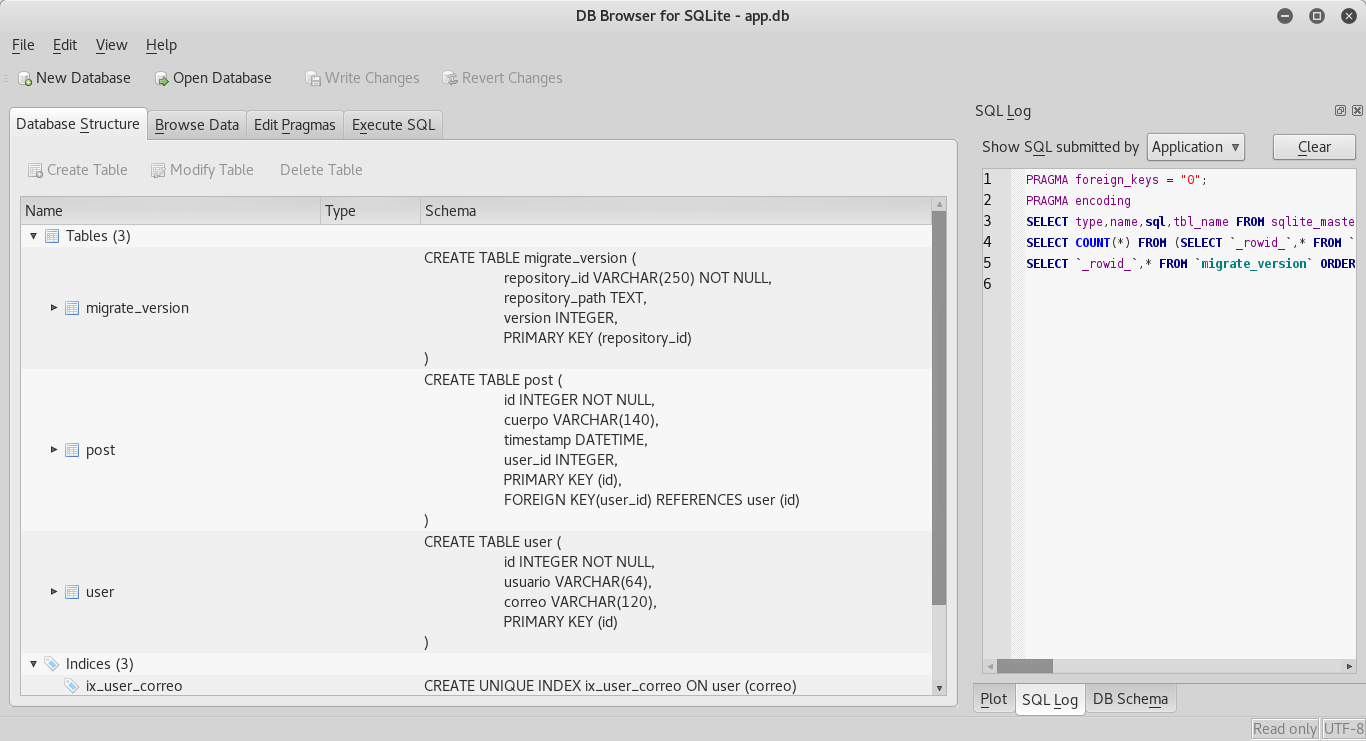
Now sqlitebrowser will be used to inspect the app.db database:
The figure shows the main screen of the application, where you can see the SQL statements for the
creation of the tables:
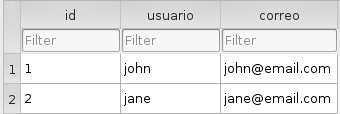
Now the data is shown, the user table and the post table:

To stop the container, run:
docker-compose down
The source code of this article is in gitlab in the articulo4 branch.
Make a donation! If you liked this article you can donate with Bitcoin (BTC) using the digital wallet of your choice to the following address: 17MtNybhdkA9GV3UNS6BTwPcuhjXoPrSzV
Or by scanning the QR code from your wallet:
