I have already written some articles about flask:
The idea is to produce a sequence of articles based on the Flask by Example articles and the Flask mega tutorial by Miguel Grinberg articles. Both tutorials, in English, use virtualenv with pip in their first article; in this series Docker will be used.
I will host the code of the series of flask tutorials in Gitlab.
Create the tutorial-flask directory:
mkdir tutorial-flask
cd tutorial-flask
Now configure the user used in git:
git config --global user.name "Ernesto Crespo"
git config --global user.email "ecrespo@gmail.com"
Initialize the repo and define the remote repo:
git init
git remote add origin git@gitlab.com:ecrespo/tutorial-flask.git
Create the README.md file, add the file to git and commit:
touch README.md
git add README.md
git commit -m"Se creo el archivo readme"
Define the git upstream and push to the gitlab repository:
git push --set-upstream origin masterThe directory and file structure is the following:
tutorial-flask
├── app
│   ├── __init__.py
│   └── views.py
├── docker-compose.yml
├── Dockerfile
├── README.md
└── run.py
Create the .gitignore, Dockerfile and docker-compose.yml files:
touch .gitignoreThe Dockerfile uses python as the base system, defines the /code directory, installs the required libraries, adds the files to the /code directory and runs run.py:
FROM python
WORKDIR /code

RUN pip install --upgrade pip
RUN pip install  flask
RUN pip install  flask-login
RUN pip install  flask-openid
RUN pip install  flask-mail
RUN pip install  flask-sqlalchemy
RUN pip install  sqlalchemy-migrate
RUN pip install  flask-whooshalchemy
RUN pip install  flask-wtf
RUN pip install  flask-babel
RUN pip install  guess_language
RUN pip install  flipflop
RUN pip install  coverage
RUN pip install  redis
EXPOSE 5000

ADD . /code
CMD python run.py
The docker-compose.yml file contains the following:
#Se define el servicio web, la construcción de la imagen se hace con el archivo Dockerfile, se define el puerto a exportar (5000) y el volumen /code.
web:
  build: .
  ports:
   - "5000:5000"
  volumes:
   - .:/code
The run.py file contains the following:
#!/usr/bin/env python
from app import app

app.run(host="0.0.0.0",debug=True)

El archivo app/__init__.py contiene lo siguiente:

from flask import Flask

app = Flask(__name__)
from app import views
The app/views.py file contains the following:
#!/usr/bin/env python
from app import app

@app.route('/<nombre>')
def hola_nombre(nombre):
    return "Hola {}!".format(nombre)

@app.route('/')
def hola():
    return "Hola mundo!"
Now docker-compose will be used:
docker-compose build

Building web
Step 1 : FROM python
 ---> 7fd24fb1b492
Step 2 : WORKDIR /code
 ---> Using cache
 ---> bdc41d9c0a55
Step 3 : RUN pip install --upgrade pip
 ---> Using cache
 ---> a2f64276e289
Step 4 : RUN pip install  flask
 ---> Using cache
 ---> 56d3d1077646
Step 5 : RUN pip install  flask-login
 ---> Using cache
 ---> ebe8bc959ad8
Step 6 : RUN pip install  flask-openid
 ---> Using cache
 ---> fe54237ce068
Step 7 : RUN pip install  flask-mail
 ---> Using cache
 ---> f1594ad12f2b
Step 8 : RUN pip install  flask-sqlalchemy
 ---> Using cache
 ---> 6d04889555c2
Step 9 : RUN pip install  sqlalchemy-migrate
 ---> Using cache
 ---> d25cd2a54289
Step 10 : RUN pip install  flask-whooshalchemy
 ---> Using cache
 ---> 4479491e59aa
Step 11 : RUN pip install  flask-wtf
 ---> Using cache
 ---> 170b10c7dea0
Step 12 : RUN pip install  flask-babel
 ---> Using cache
 ---> fe581f26a1e5
Step 13 : RUN pip install  guess_language
 ---> Using cache
 ---> 6d2d290ed6d3
Step 14 : RUN pip install  flipflop
 ---> Using cache
 ---> 35e2dff248ce
Step 15 : RUN pip install  coverage
 ---> Using cache
 ---> 7012043af8e9
Step 16 : RUN pip install  redis
 ---> Using cache
 ---> ce2854de687f
Step 17 : EXPOSE 5000
 ---> Using cache
 ---> f947cd2c0d69
Step 18 : ADD . /code
 ---> db09ee94c8e7
Removing intermediate container 2f21e7abd55d
Step 19 : CMD python run.py
 ---> Running in 1f58a7b38656
 ---> 4c8390d54c13
Removing intermediate container 1f58a7b38656
Successfully built 4c8390d54c13
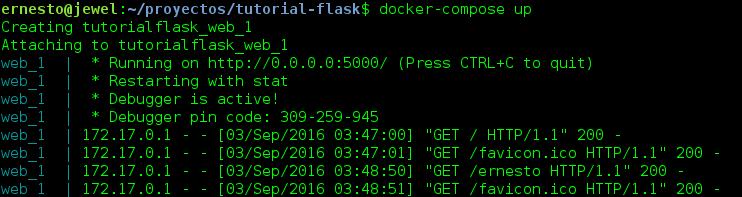
Now start the service with docker-compose:
docker-compose upThe image of the docker-compose execution is shown below:
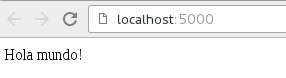
Now the browser will be opened at http://localhost:5000 ; an image of the page loading is shown below:
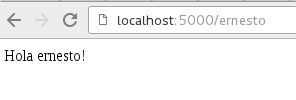
Finally, open the browser at http://localhost:5000/ernesto; the image of the page loading is shown below:
The code for this article can be downloaded from gitlab: download.zip (broken link). Flask Tutorial branch articulo 1.
To stop the service, run docker-compose:
docker-compose downMake a donation! If you liked the article you can make a donation with Bitcoin (BTC) using the digital wallet of your choice to the following address: 17MtNybhdkA9GV3UNS6BTwPcuhjXoPrSzV
Or by scanning the QR code from your wallet:
