Continuing with the Flask tutorial article series, based on the English-language articles Flask by Example and Flask mega tutorial part III: web forms.
In this case a form will be shown with flask.
The project's directory and file structure is the following:
tutorial-flask
├── app
│   ├── forms.py
│   ├── __init__.py
│   ├── templates
│   │   ├── base.html
│   │   ├── index.html
│   │   └── login.html
│   └── views.py
├── config.py
├── docker-compose.yml
├── Dockerfile
├── README.md
├── run.py
└── tmp
The files that changed are the following:
views.py: Form handling is added to the view.config.py: Security handling and the OpenID providers are added.forms.py: Handles the creation of the form.base.html: The login link is added.login.html: The page that handles the user's login through a form.
File config.py:
#Se habilita el uso de CSRF


CSRF_ENABLED = True


#Se define una clave secreta


SECRET_KEY = 'prueba'


#Se define los proveedores de openid:


PROVEEDORES_OPENID = [


    {'name': 'Google', 'url': 'https://www.google.com/accounts/o8/id'},


    {'name': 'Yahoo', 'url': 'https://me.yahoo.com'}]
File forms.py:
#Se importa Form

from flask.ext.wtf import Form

#De form se importa StringField y BooleanField

from wtforms import StringField, BooleanField

#De validadores se importa DataRequired

from wtforms.validators import DataRequired


#Se Crea la clase LoginForm que hereda de Form

class LoginForm(Form):

 #Se define el ID como StringField

    openid = StringField('openid', validators=[DataRequired()])

    #Se define un campo de check para definir si se recuerda el id o no,

    #por defecto no.

    recuerdame = BooleanField('recuerdame', default=False)
File views.py:
#Se importa render_template, flash y redirect

from flask import render_template, flash, redirect

#Se importa la aplicacion app

from app import app

#De forms.py se importa LoginForm

from .forms import LoginForm


@app.route('/')

@app.route('/index')

def index():

  user = {'usuario': 'Ernesto'}

  posts = [

      {

          'autor': {'usuario': 'John'},

          'asunto': 'Un gran dia en Edimburgo!'

      },

      {

          'autor': {'usuario': 'Jane'},

          'asunto': 'Civil War, una gran pelicula!'

      }

  ]

  return render_template('index.html',

                         title='Inicio',

                         user=user,

                         posts=posts)


#Se define login con url /login con metodos GET y POST

@app.route('/login', methods=['GET', 'POST'])

def login():

  #Se crea una instancia de LoginForm

  form = LoginForm()

  #Se consulta si validate existe

  if form.validate_on_submit():

    flash('Solicitud de login por OpenID="%s", recuerdame=%s' %

          (form.openid.data, str(form.recuerdame.data)))

    return redirect('/index')

  return render_template('login.html',

                         title='Inicio sesion',

                         form=form,

                         providers=app.config['PROVEEDORES_OPENID'])
File base.html:
<html>

  <head>

    {% if title %}

    <title>{{ title }} - Microblog</title>

    {% else %}

    <title>Microblog</title>

    {% endif %}

  </head>

  <body>

    <div>

Microblog: <a href="https://www.blogger.com/index">Inicio</a> <a href="https://www.blogger.com/login">Login</a></div>

<hr />

    {% with messages = get_flashed_messages() %}

    {% if messages %}

    <ul>

    {% for message in messages %}

<li>{{ message }} </li>

{% endfor %}

    </ul>

{% endif %}

    {% endwith %}

    {% block content %}{% endblock %}

  </body>

</html>
File index.html:
<!-- extend base layout -->
{% extends "base.html" %}

{% block content %}
    <h1>Hola, {{ user.usuario }}!</h1>
    {% for post in posts %}
    <p>
      {{ post.autor.usuario }} dice: <b>{{ post.asunto }}</b>
    </p>
    {% endfor %}
{% endblock %}

Archivo login.html:

<!-- extend base layout -->

{% extends "base.html" %}


{% block content %}

    <script type="text/javascript">

    function set_openid(openid, pr)

    {

        u = openid.search('<username>');

        if (u != -1) {

            // openid requires username

            user = prompt('Coloque su' + pr + ' usuario:');

            openid = openid.substr(0, u) + user;

        }

        form = document.forms['login'];

        form.elements['openid'].value = openid;

    }

    </script>

    <h1>Sign In</h1>

    <form action="" method="post" name="login">

        {{ form.hidden_tag() }}

        <p>

            Favor escriba su OpenID, o seleccione uno de los proveedores:<br>

            {{ form.openid(size=80) }}

            {% for error in form.openid.errors %}

                <span style="color: red;">[{{ error }}]</span>

            {% endfor %}<br>

            |{% for pr in providers %}

                <a href="javascript:set_openid('{{ pr.url }}', '{{ pr.name }}');">{{ pr.name }}</a> |

            {% endfor %}

        </p>

        <p>{{ form.recuerdame }} Recuerdame</p>

        <p><input type="submit" value="Login"></p>

    </form>

{% endblock %}
Build the docker image:
docker-compose buildRun the container:
docker-compose upThe following image shows the container running:

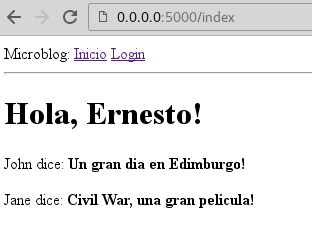
Next, open the browser at the following URL: http://127.0.0.1:5000 , and the image of the home page is shown below:
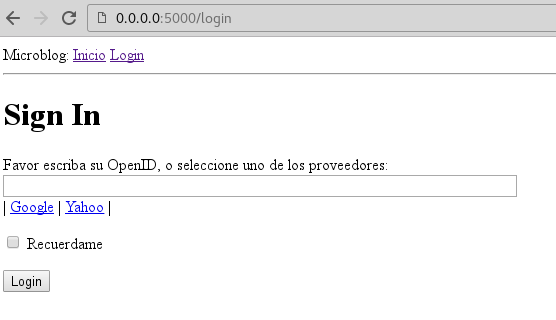
Clicking the login link shows the form:
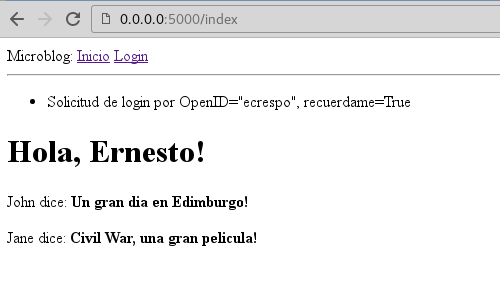
Entering the user, or taking the google or yahoo one, and clicking login returns the user and whether remember me was checked or not:
The code of this tutorial is in a repository on gitlab on the articulo3 branch.
Make a donation! If you liked the article you can make a donation with Bitcoin (BTC) using the digital wallet of your choice to the following address: 17MtNybhdkA9GV3UNS6BTwPcuhjXoPrSzV
Or by scanning the QR code from your wallet:
