Continuing with the articles about Android widgets, now an improvement will be added to the single selection one. 2 buttons will be included, one to select and another to quit.
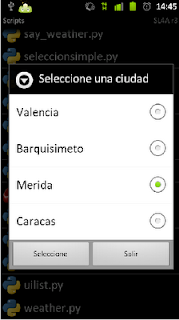
The example shows a list of cities; you select one and then press the select button, and at the end the selected city is displayed.
The code is shown below:
#!/usr/bin/env python

#Se importa el módulo android y time
import android, time

#Se crea una instancia de la clase android
droid = android.Android()

#Se define el título de la ventana
titulo = "Seleccione una ciudad"

#Se define una lista con las ciudades a seleccionar
ciudades = ['Valencia','Barquisimeto','Merida','Caracas']

#Se crea la ventana con el título
droid.dialogCreateAlert(titulo)

#Se agrega las ciudades a la lista de selección
droid.dialogSetSingleChoiceItems(ciudades)

#Se agrega el botón seleccionar
droid.dialogSetPositiveButtonText('Seleccionar')

#Se agrega el botón salir
droid.dialogSetNegativeButtonText('Salir')

#Se muestra la ventana de dialogo
droid.dialogShow()

#Se captura la respuesta de los botones
respuesta  = droid.dialogGetResponse().result

#Se captura la ciudad seleccionada, se captura el número en la lista.
#Items es una lista de eventos, el valor 1 guarda el resultado de una lista y como se selecciono
#un solo elemento se solicita el valor cero de esa lista para tener el item seleccionado.
items = droid.dialogGetSelectedItems()

#Se el botón que se le da clip es seleccionar se busca que ciudad se selecciono.
if  respuesta['which'] == "positive":
     #Se muestra un mensaje de la ciudad seleccionada,
    droid.makeToast("La ciudad seleccionada es: %s " %ciudades[int(items[1][0])])
    time.sleep(2)
else:
    #Si se seleciono el botón salir se muestra un mensaje al respecto.
    droid.makeToast("Saliendo del programa")
    time.sleep(2)
The figure shows the cities to choose from with the select and quit buttons.
===
Make a donation! If you liked the article you can make a donation with Bitcoin (BTC) using the digital wallet of your choice to the following address: 17MtNybhdkA9GV3UNS6BTwPcuhjXoPrSzV
Or by scanning the QR code from your wallet:
