In this article I will explain how to use the single selection widget.
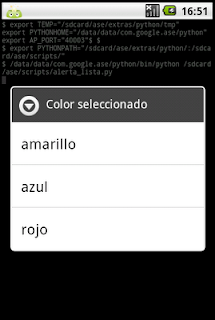
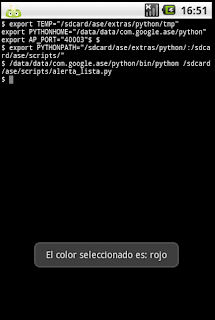
The idea is to have a tuple with several colors, open a widget with those colors and select one; then a message with the selected color will appear.
The Python code of the application is shown below:
#Importar módulo android y time.
import android,time

#Se instancia el objeto Android
droid = android.Android()

#Se crea el titulo del mensaje de alerta y se crea el widget.
titulo = 'Color seleccionado'
droid.dialogCreateAlert(titulo)

#Se crea la tupla con la lista de colores.
colores = ('amarillo', 'azul', 'rojo')

#Se agrega la tupla al widget de selección simple.
droid.dialogSetItems(colores)

#Se muestra el widget.
droid.dialogShow()

#Se captura el resultado de seleccionar un color
respuesta  = droid.dialogGetResponse().result
#El resultado se guarda en un diccionario y se muestra en un mensaje.
droid.makeToast('El color seleccionado es: %s' %colores[respuesta['item']])
The following figure shows the color list widget.
After clicking a color, a message with the selected color is shown, as the following figure displays.
Finally, the figure of the program's QR code is shown.
===
Make a donation! If you liked the article you can make a donation with Bitcoin (BTC) using the digital wallet of your choice to the following address: 17MtNybhdkA9GV3UNS6BTwPcuhjXoPrSzV
Or by scanning the QR code from your wallet:
