Previous articles have covered mongodb and Django.
This time the topic is creating a blog with Django using mongodb. This article is based on an English article from the IBM Developers Work site.
There will be a form to create posts, update them and delete them. The material design template for Django explained in the previous article will be used.
To develop the application in Django with mongodb you have to install Django, mongodb and mongoengine; the installation the Debian way is shown below:
apt-get install python-mongoengine mongodb-server mongodb-clients mongodb python3-pymongo python3-pymongo-ext python-django python3-djangoThe first thing to do is create the blog project.
django-admin startproject blogThis creates directories and files as shown below:
blog
├── blog
│   ├── __init__.py
│   ├── settings.py
│   ├── urls.py
│   └── wsgi.py
└── manage.py
Now create the posts application:
django-admin startapp postsNow you have the following directory and file structure:
blog
├── blog
│   ├── __init__.py
│   ├── __init__.pyc
│   ├── settings.py
│   ├── settings.pyc
│   ├── urls.py
│   └── wsgi.py
├── manage.py
└── posts
    ├── admin.py
    ├── __init__.py
    ├── migrations
    │   └── __init__.py
    ├── models.py
    ├── tests.py
    └── views.py
Modify the blog/blog/settings.py file so that it reflects the use of mongodb and the application.
You need to add the name of the database for mongodb in the first lines of settings.py:
DBNAME = 'blongo'Add posts and the material-design support explained in the previous article to the applications.
INSTALLED_APPS = (
    'material',
    'material.admin',
    'django.contrib.admin',
    'django.contrib.auth',
    'django.contrib.contenttypes',
    'django.contrib.sessions',
    'django.contrib.messages',
    'django.contrib.staticfiles',
    'posts',
)
settings.py is also modified so that it processes the directory where the templates will be:
TEMPLATES = [
    {
        'BACKEND': 'django.template.backends.django.DjangoTemplates',
        'DIRS': [os.path.join(BASE_DIR, 'templates' )],
        'APP_DIRS': True,
        'OPTIONS': {
            'context_processors': [
                'django.template.context_processors.debug',
                'django.template.context_processors.request',
                'django.contrib.auth.context_processors.auth',
                'django.contrib.messages.context_processors.messages',
            ],
        },
    },
]
Create the templates and media directories:
mkdir -p {templates,static}And inside media create the css, images and js directories:
mkdir -p static/{css,images,js}Now the directory structure looks like this:
blog
├── blog
│   ├── __init__.py
│   ├── __init__.pyc
│   ├── settings.py
│   ├── settings.pyc
│   ├── urls.py
│   └── wsgi.py
├── manage.py
├── posts
│   ├── admin.py
│   ├── __init__.py
│   ├── migrations
│   │   └── __init__.py
│   ├── models.py
│   ├── tests.py
│   └── views.py
├── static
│   ├── css
│   ├── images
│   └── js
└── templates
In the posts directory, modify the models.py file with the following content:
#Se importa models
from django.db import models

#Se importa mongoengine quien es el que facilita la conexión a mongodb
from mongoengine import *

#Se trae el nombre de la base de datos de mongodb de settings.py
from blog.settings import DBNAME

#Se conecta a la base de datos
connect(DBNAME)


#Se crea la tabla Posts (documento), con title, content y la fecha de publicación y/o actualización
class Post(Document):
    title = StringField(max_length=120, required=True)
    content = StringField(max_length=500, required=True)
    last_update = DateTimeField(required=True)
Modify the blog/posts/views.py file with the following content (this is where the form is published, the list of posts is shown, each post is updated and each post can be deleted):
from django.shortcuts import render, render_to_response
from django.template import RequestContext

from models import Post

import datetime

#Se define index donde recibe como argumento request
def index(request):
    #SI el metodo es un post, se toma los datos del formulario y se guarda en
    #mongodb
    if request.method == 'POST':
       # nuevo post
       title = request.POST['title']
       content = request.POST['content']

       post = Post(title=title)
       post.last_update = datetime.datetime.now()
       post.content = content
       post.save()
   #Si el metodo es get entonces se está cargando la página inicialmente, así que se publican
   #los posts
    # se obtiene todos los posts de la base de datos
    posts = Post.objects
    return render_to_response('index.html', {'Posts': posts},context_instance=RequestContext(request))


#Actualizar un post
def update(request):
    #Captura el id del post
    id = eval("request." + request.method + "['id']")
    post = Post.objects(id=id)[0]
    #Si el metodo es post, se está actualizando la información del formulario
    if request.method == 'POST':

        # se actualiza los valores y se salva en mongodb
        post.title = request.POST['title']
        post.last_update = datetime.datetime.now()
        post.content = request.POST['content']
        post.save()
        template = 'index.html'
        params = {'Posts': Post.objects}
    #Si el metodo es GET se muestra la página incial update.html
    elif request.method == 'GET':
        template = 'update.html'
        params = {'post':post}

    return render_to_response(template, params, context_instance=RequestContext(request))

#Para borrar un posts
def delete(request):
    #Se toma el id del post
    id = eval("request." + request.method + "['id']")
    #Se pregunta si es POST, se le pasa el id del posts y se borra, se va a la página index.html
    if request.method == 'POST':
        post = Post.objects(id=id)[0]
        post.delete()
        template = 'index.html'
        params = {'Posts': Post.objects}
    #Si es un metodo get entonces se muestra la página delete.html
    elif request.method == 'GET':
        template = 'delete.html'
        params = { 'id': id }

    return render_to_response(template, params, context_instance=RequestContext(request))
Now the images of the base.html, index.html, update.html and delete.html files will be shown.
In the base.html file the following two lines are added, which allow the material design style and javascript to be used:
{% include 'material/includes/material_css.html' %}
{% include 'material/includes/material_js.html' %}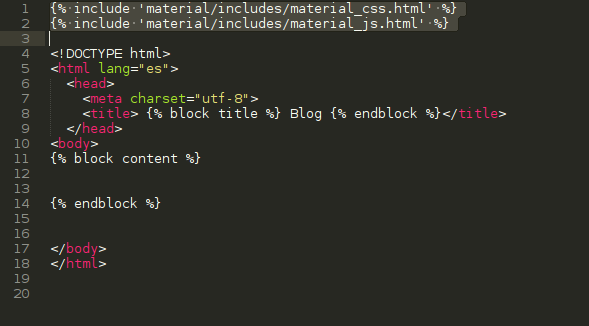
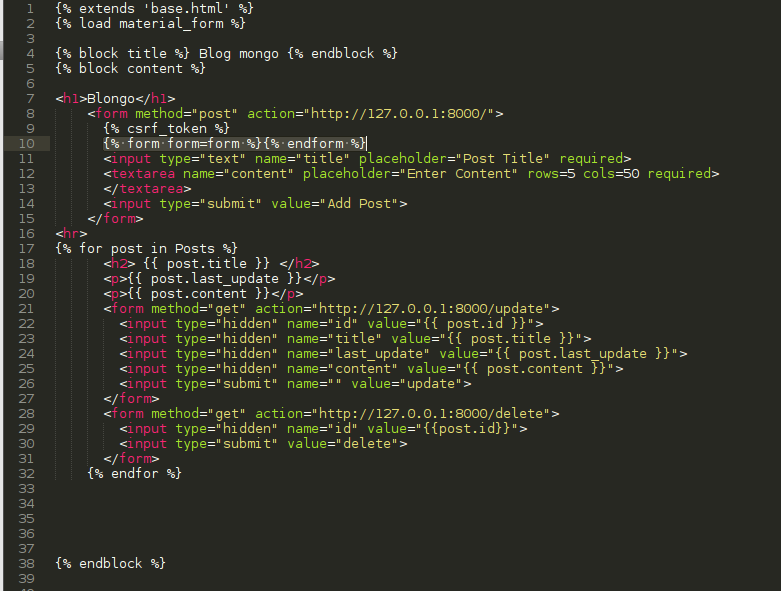
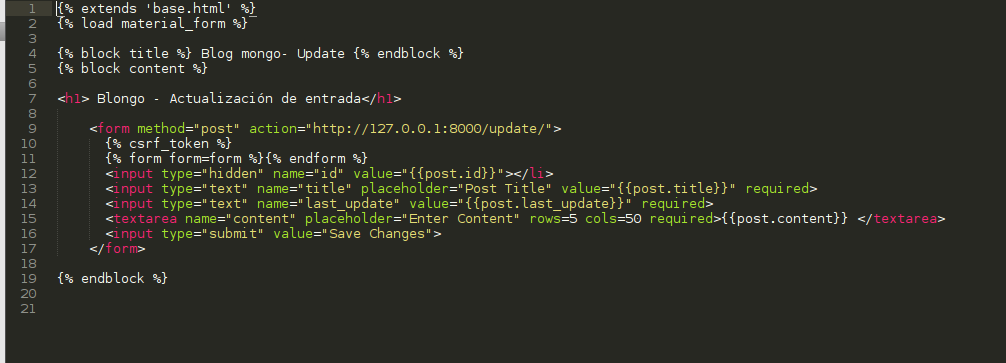
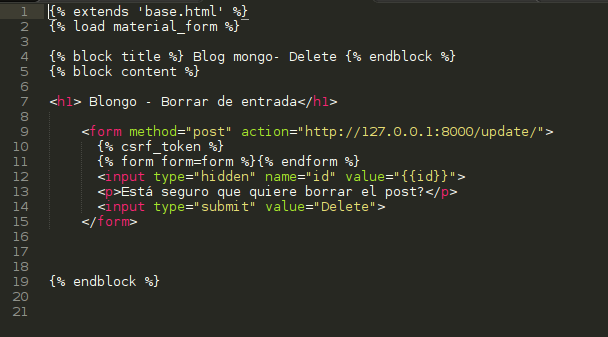
The index.html, update.html and delete.html files will have 2 lines: in one they inherit the content of the base.html file and in the other material_form (material design) is loaded:
{% extends 'base.html' %}
{% load material_form %}
If there is a form, the following line must be placed after the csrf token:
{% form form=form %}{% endform %}With that, the forms are handled with the material design style.
The image of the index.html file is shown below:
The image of the update.html file is shown below:
The image of the delete.html file is shown below:
For this to work, the blog/blog/urls.py file still needs to be modified with the urls for index, update and delete:
from django.conf.urls import include, url
from django.contrib import admin

urlpatterns = [
    url(r'^admin/', include(admin.site.urls)),
    url(r'^$', 'posts.views.index'),
    url(r'^update/', 'posts.views.update'),
    url(r'^delete/', 'posts.views.delete'),
]
Create the administrative database with the migrate command:
./manage.py migrate
Operations to perform:
  Synchronize unmigrated apps: staticfiles, posts, material, messages, material_admin
  Apply all migrations: admin, contenttypes, auth, sessions
Synchronizing apps without migrations:
  Creating tables...
    Running deferred SQL...
  Installing custom SQL...
Running migrations:
  Rendering model states... DONE
  Applying contenttypes.0001_initial... OK
  Applying auth.0001_initial... OK
  Applying admin.0001_initial... OK
  Applying contenttypes.0002_remove_content_type_name... OK
  Applying auth.0002_alter_permission_name_max_length... OK
  Applying auth.0003_alter_user_email_max_length... OK
  Applying auth.0004_alter_user_username_opts... OK
  Applying auth.0005_alter_user_last_login_null... OK
  Applying auth.0006_require_contenttypes_0002... OK
  Applying sessions.0001_initial... OK
Create the administrative account:
./manage.py createsuperuser
Username (leave blank to use 'ecrespo'): ernesto
Email address: ecrespo@xxxx.xxx
Password:
Password (again):
Superuser created successfully.
Run the django server:
./manage.py runserver
Performing system checks...

System check identified no issues (0 silenced).
May 14, 2015 - 20:52:27
Django version 1.8, using settings 'blog.settings'
Starting development server at http://127.0.0.1:8000/
Quit the server with CONTROL-C.
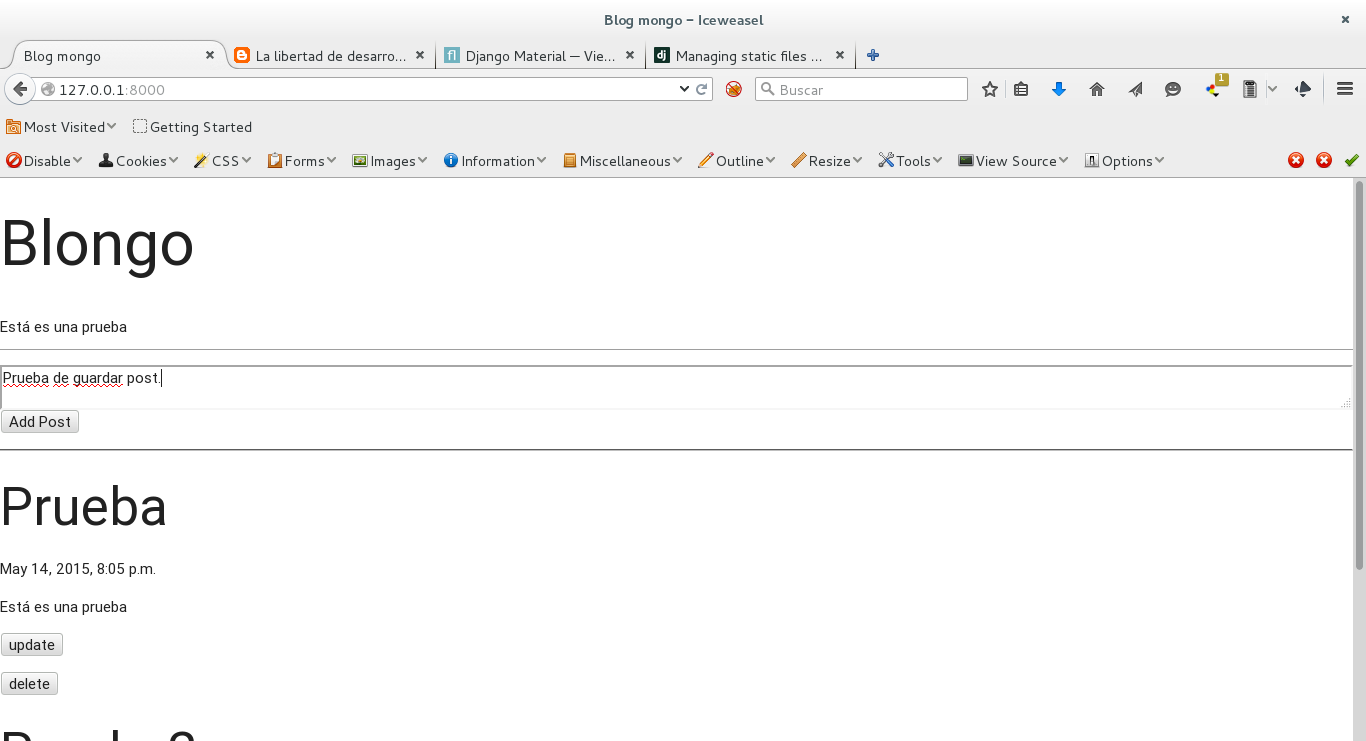
An image of the application while the form is being filled in is shown below:
Finally, the post that was just published is shown:
For more information you can check the following links:
- http://api.mongodb.org/python/1.6/tools.html
- http://www.peterbe.com/plog/using-mongodb-in-your-django-app/django-mongodb-html5-slides/html5.html#slide1
- http://staltz.com/djangoconfi-mongoengine/#/
- https://django-mongodb-engine.readthedocs.org/en/latest/tutorial.html
- https://github.com/vpulim/mango
- https://www.safaribooksonline.com/library/view/mongodb-and-python/9781449312817/ch04s03.html
Make a donation! If you liked the article you can make a donation with Bitcoin (BTC) using the digital wallet of your choice at the following address: 17MtNybhdkA9GV3UNS6BTwPcuhjXoPrSzV
Or by scanning the QR code from your wallet:
