The charts in the series on silverpoint draw numbers. An operations panel also has a history: when each release went out and when something broke. For that, silverpoint ships SpTimeline, a skin over TimelineJS, Knight Lab's timeline library.
TimelineJS provides the slides, the navigation and the date scale. silverpoint provides the ground's frames, tones and type. The result looks like the rest of the panel.
What you will build
The web service's history in 2026: three releases, two incidents and an era, the cluster migration. Below it, a line of text says which slide is active.
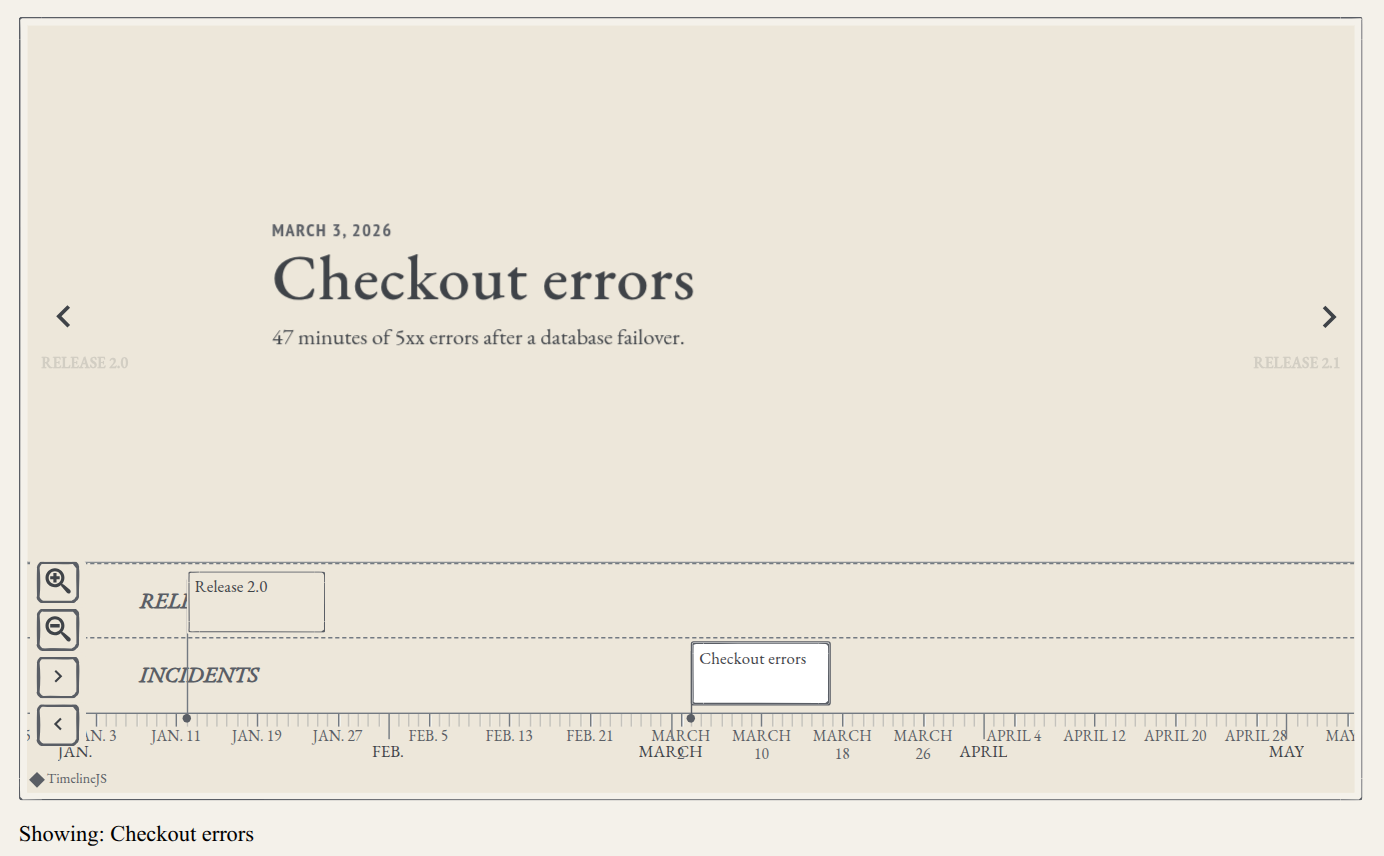
Releases and incidents sit on separate rows: TimelineJS groups the events by their group field.
What you need
Your framework's project from articles 03 to 06. The timeline does not use the hits data: it has its own JSON.
1. Install TimelineJS
TimelineJS is an optional peer of the adapters: it is not installed with @silverpoint/react, @silverpoint/vue or @silverpoint/angular. Install it yourself before you import the timeline subpath, or the build cannot resolve it:
npm install @knight-lab/timelinejs@^3.9.13Reflex does not need this: sp_timeline declares the dependency and Reflex installs it when it compiles.
2. The stylesheets, in order
The timeline needs five stylesheets, in this order: the fonts, the ground, the UI components, TimelineJS's and silverpoint's skin. The skin goes after TimelineJS's because it overrides it.
In React, in src/main.tsx:
import { StrictMode } from 'react';
import { createRoot } from 'react-dom/client';
import '@silverpoint/fonts/fonts.css';
import '@silverpoint/grounds/styles.css';
import '@silverpoint/grounds/ui.css';
import '@knight-lab/timelinejs/dist/css/timeline.css';
import '@silverpoint/grounds/timeline.css';
import './index.css';
import App from './App.tsx';

createRoot(document.getElementById('root')!).render(
  <StrictMode>
    <App />
  </StrictMode>,
);
In Vue, in src/main.ts, with the same imports:
import { createApp } from 'vue';
import '@silverpoint/fonts/fonts.css';
import '@silverpoint/grounds/styles.css';
import '@silverpoint/grounds/ui.css';
import '@knight-lab/timelinejs/dist/css/timeline.css';
import '@silverpoint/grounds/timeline.css';
import './style.css';
import App from './App.vue';

createApp(App).mount('#app');
In Angular, in src/styles.css:
@import '@silverpoint/fonts/fonts.css';
@import '@silverpoint/grounds/styles.css';
@import '@silverpoint/grounds/ui.css';
@import '@knight-lab/timelinejs/dist/css/timeline.css';
@import '@silverpoint/grounds/timeline.css';

body {
  margin: 0;
  padding: 32px;
  background: #f4f1ea;
}

/* The skin sets its display font on the slide arrows too: give them back TimelineJS's icon font. */
.sp-timeline .tl-timeline div.tl-slidenav-icon {
  font-family: 'tl-icons' !important;
}
Do not skip @silverpoint/grounds/ui.css. Without it, the timeline loses the card that frames it: the skin draws it with the UI components' classes.
The rule at the end, which goes in src/index.css and src/style.css in React and Vue, fixes a bug of the skin that is still in version 0.10.1. The skin also sets its type on the slide arrows, which are glyphs of TimelineJS's icon font, tl-icons. Without the rule, the arrows show as empty boxes. In React it reads:
body {
  margin: 0;
  padding: 32px;
  background: #f4f1ea;
}

/* The skin sets its display font on the slide arrows too: give them back TimelineJS's icon font. */
.sp-timeline .tl-timeline div.tl-slidenav-icon {
  font-family: 'tl-icons' !important;
}
3. The data: TimelineJS's JSON
data is TimelineJS's JSON, unchanged: a title slide, the events and, optionally, eras and scale. The TimelineJS documentation describes every field.
Create src/history.ts in React and Vue, or src/app/history.ts in Angular:
export const history = {
  title: {
    unique_id: 'overview',
    text: {
      headline: 'Service history',
      text: 'Releases and incidents of the web service in 2026.',
    },
  },
  events: [
    {
      unique_id: 'release-2-0',
      group: 'Releases',
      start_date: { year: 2026, month: 1, day: 12 },
      text: { headline: 'Release 2.0', text: 'The new checkout goes live.' },
    },
    {
      unique_id: 'incident-checkout',
      group: 'Incidents',
      start_date: { year: 2026, month: 3, day: 3 },
      text: {
        headline: 'Checkout errors',
        text: '47 minutes of 5xx errors after a database failover.',
      },
    },
    {
      unique_id: 'release-2-1',
      group: 'Releases',
      start_date: { year: 2026, month: 5, day: 20 },
      text: { headline: 'Release 2.1', text: 'Search rewritten on a new index.' },
    },
    {
      unique_id: 'incident-search',
      group: 'Incidents',
      start_date: { year: 2026, month: 8, day: 7 },
      text: {
        headline: 'Slow search',
        text: 'The p95 of search reached 2 seconds for three hours.',
      },
    },
    {
      unique_id: 'release-2-2',
      group: 'Releases',
      start_date: { year: 2026, month: 10, day: 2 },
      text: { headline: 'Release 2.2', text: 'A CDN in front of the API.' },
    },
  ],
  eras: [
    {
      start_date: { year: 2026, month: 6, day: 1 },
      end_date: { year: 2026, month: 7, day: 15 },
      text: { headline: 'Cluster migration' },
    },
  ],
};
Three things about this JSON:
| Field | What for |
|---|---|
unique_id | Each slide's identifier. The change event returns it, so give each slide a stable one |
group | The event's row in the navigation bar |
eras | A span of dates with no slide of its own, such as the cluster migration |
The component builds TimelineJS on a copy of data: your object is never changed.
4. In React
import { useState } from 'react';
import { SpTimeline } from '@silverpoint/react/timeline';
import { history } from './history';

const options = { timenav_position: 'bottom', initial_zoom: 2 };

const headlines = new Map(
  [history.title, ...history.events].map((slide) => [slide.unique_id, slide.text.headline]),
);

export default function App() {
  const [current, setCurrent] = useState('Service history');

  return (
    <main style={{ maxWidth: 960 }}>
      <SpTimeline
        data={history}
        options={options}
        height="560px"
        label="Service history"
        onChange={(id) => setCurrent(headlines.get(id ?? '') ?? 'Service history')}
        fallback={<p>The timeline could not load.</p>}
      />
      <p>Showing: {current}</p>
    </main>
  );
}
options passes TimelineJS its options as they are, except font and theme, which the ground sets. Here the navigation bar goes at the bottom and the initial zoom is 2.
height is a CSS length, '600px' by default. A value that is not a length is dropped with the warning SP017. label is the region's accessible name; without it, the headline of the title slide is used.
onChange receives the unique_id of the active slide. With the headlines map, the text below shows its headline.
Stable data and options
options sits outside the component on purpose. The component rebuilds TimelineJS when data, options or inkedFrames change, and it compares references. If you write options={{ timenav_position: 'bottom' }} inside the JSX, every render creates a new object: you press the arrow, onChange updates the state, React renders again, the timeline is rebuilt and goes back to the first slide.
I saw it while testing this article: the arrow seemed to do nothing. Declare data and options outside the component, or keep them in a useMemo.
5. In Vue
<script setup lang="ts">
import { ref } from 'vue';
import { SpTimeline } from '@silverpoint/vue/timeline';
import { history } from './history';

const options = { timenav_position: 'bottom', initial_zoom: 2 };

const headlines = new Map(
  [history.title, ...history.events].map((slide) => [slide.unique_id, slide.text.headline]),
);

const current = ref('Service history');

function onChange(id: string | undefined) {
  current.value = headlines.get(id ?? '') ?? 'Service history';
}
</script>

<template>
  <main style="max-width: 960px">
    <SpTimeline
      :data="history"
      :options="options"
      height="560px"
      label="Service history"
      @change="onChange"
    >
      <template #fallback>
        <p>The timeline could not load.</p>
      </template>
    </SpTimeline>
    <p>Showing: {{ current }}</p>
  </main>
</template>
The events are emits: @change, @loaded, @nav-next… The fallback goes in the fallback slot.
6. In Angular
import { Component, signal } from '@angular/core';
import { SpTimeline, SpTimelineFallback } from '@silverpoint/angular/timeline';
import { history } from './history';

const options = { timenav_position: 'bottom', initial_zoom: 2 };

const headlines = new Map(
  [history.title, ...history.events].map((slide) => [slide.unique_id, slide.text.headline]),
);

@Component({
  selector: 'app-root',
  imports: [SpTimeline, SpTimelineFallback],
  template: `
    <main style="max-width: 960px">
      <sp-timeline
        [data]="history"
        [options]="options"
        height="560px"
        label="Service history"
        (change)="onChange($event)"
      >
        <ng-template spFallback>
          <p>The timeline could not load.</p>
        </ng-template>
      </sp-timeline>
      <p>Showing: {{ current() }}</p>
    </main>
  `,
})
export class App {
  protected readonly history = history;
  protected readonly options = options;
  protected readonly current = signal('Service history');

  protected onChange(id: string | undefined) {
    this.current.set(headlines.get(id ?? '') ?? 'Service history');
  }
}
The events are outputs: (change), (loaded), (navNext)… The fallback is an <ng-template spFallback>, and the SpTimelineFallback directive goes in imports next to the component.
7. In Reflex
In ops_panel/history.py, the same JSON as a dictionary, HISTORY, and the headlines map:
HEADLINES = {
    slide["unique_id"]: slide["text"]["headline"]
    for slide in [HISTORY["title"], *HISTORY["events"]]
}
And the page, in ops_panel/ops_panel.py:
import reflex as rx
from reflex_silverpoint_react import sp_timeline

from .history import HEADLINES, HISTORY

OPTIONS = {"timenav_position": "bottom", "initial_zoom": 2}


class TimelineState(rx.State):
    current: str = "Service history"

    @rx.event
    def on_slide(self, unique_id: str):
        self.current = HEADLINES.get(unique_id, "Service history")


def index() -> rx.Component:
    return rx.box(
        sp_timeline(
            HISTORY,
            OPTIONS,
            height="560px",
            label="Service history",
            on_change=TimelineState.on_slide,
            fallback=rx.text("The timeline could not load."),
        ),
        rx.text("Showing: ", TimelineState.current),
        max_width="960px",
        padding="32px",
    )


app = rx.App()
app.add_page(index)
In Reflex, data and options are the first two arguments. on_change calls the backend with the unique_id, and the state keeps the headline. fallback takes any component.
The events
| Event | When | React | Vue | Angular | Reflex |
|---|---|---|---|---|---|
| Change | Another slide becomes active; carries its unique_id | onChange | @change | (change) | on_change |
| Loaded | TimelineJS finished building | onLoaded | @loaded | (loaded) | on_loaded |
| Next | The right arrow is pressed | onNavNext | @nav-next | (navNext) | on_nav_next |
| Previous | The left arrow is pressed | onNavPrevious | @nav-previous | (navPrevious) | on_nav_previous |
| Zoom | The scale zooms in or out | onZoomIn, onZoomOut | @zoom-in, @zoom-out | (zoomIn), (zoomOut) | on_zoom_in, on_zoom_out |
| Start | Back to the first slide | onBackToStart | @back-to-start | (backToStart) | on_back_to_start |
The fallback and SP025
TimelineJS loads in the browser only, through a dynamic import. If that load fails, the component shows the fallback and warns in the console with SP025: TimelineJS could not be loaded.
I tested it in Angular by blocking TimelineJS's chunk: "The timeline could not load." appeared, with the warning SP025. Always give it a fallback. Otherwise the region stays empty.
The Vite note
In development, Vite discovers TimelineJS's dynamic import when the page mounts the timeline, not at startup. It then re-optimizes the dependencies mid-session, changes each one's ?v= and the in-flight import fails with "error loading dynamically imported module". The timeline stays blank.
The fix is to ask Vite to bundle it at startup. In React and Vue, in vite.config.ts:
import react from '@vitejs/plugin-react'
import { defineConfig } from 'vite'

// https://vite.dev/config/
export default defineConfig({
  plugins: [react()],
  optimizeDeps: { include: ['@knight-lab/timelinejs'] },
})
It only affects the development server: the production build does not use the optimizer. In Reflex, .web/vite.config.js is generated on every compile; this blog solves it with a plugin in rxconfig.py, VitePrebundlePlugin, which adds the same line.
A real example: this blog's certifications
The resume page of this site has a timeline with my certifications, made with sp_timeline. This is how web/components/resume_sections.py uses it:
sp_timeline(
    certifications_data,
    certifications_options,
    height="100%",
    label=t(lang, "Certifications", "Certificaciones"),
    fallback=sp_empty(
        description=t(
            lang,
            "The certifications timeline could not load.",
            "No se pudo cargar la línea de tiempo de certificaciones.",
        )
    ),
    on_change=CertificationsState.on_slide_change,
    id="certifications-timeline",
)
What is behind it:
certifications_datacomes fromassets/timeline.json, loaded when the module is imported. Every slide gets a deterministicunique_id, soon_changeknows which certificate is active.- The certificate images are served from a local copy, not from Google Drive, which answers images hotlinked from another site with 429.
web/web.pyhas this article's sametl-iconsrule, and another that puts EB Garamond, the site's font, on TimelineJS's text.rxconfig.pyhas theVitePrebundlePluginfrom the previous note.
The size
TimelineJS is not light. In this article's React build, the TimelineJS chunk weighs 229 kB, 68 kB compressed, and it loads separately, only when the timeline mounts. Its CSS and the icon font go in the main CSS.
In Angular, the production build warns about two things. The initial bundle goes slightly over the project's 500 kB budget, and the wicg-inert module, which TimelineJS uses, is not ESM. Both are warnings, not errors.
Common problems
- The build cannot find
@knight-lab/timelinejs. It is not installed: it is an optional peer. - The timeline goes back to the first slide.
dataoroptionsare created on every render. Move them out of the component. - The arrows show as empty boxes. The
tl-iconsrule is missing. - The timeline has no frame.
@silverpoint/grounds/ui.cssis missing. - In development, the timeline stays blank with "error loading dynamically imported module". Add TimelineJS to
optimizeDeps.include. - The fallback shows and the console shows
SP025. TimelineJS could not be loaded: check the installation and the network.
What comes next
The timeline tells what happened. Article 22 presents it: slides written in Markdown with Marp's syntax, with live silverpoint charts inside, for the weekly operations review.