In the previous article I explained how to improve the computer's DNS queries with dnsmasq.
You can also add machines with their IP as if it were a DNS server with Bind9 running.
We have a virtual machine named grievous with IP 192.168.10.53.
To install dnsmasq, run apt-get.
apt-get install dnsmasqConfigure dnsmasq as a cache and local DNS.
Define the path of the resolv.conf file used to query the external DNS server.
resolv-file=/etc/resolv-orig.confDefine that answers to local requests come from the /etc/hosts file.
local=/localnet/And that is all that needs to be changed in the /etc/dnsmasq.conf file to resolve local machine names through /etc/hosts.
Add the machines to the /etc/hosts file.
In this case we have the grievous machine:
192.168.10.53 grievous grievousIf you need to add more machines to the DNS server, simply edit the /etc/hosts file and add the machines there.
Create the /etc/resolv-orig.conf file, which holds the IPs of the external DNS servers. In this case I am using the DNS servers of Google, OpenDNS and my workplace network.
nameserver 8.8.8.8
nameserver 8.8.4.4
nameserver 208.67.222.222
nameserver 208.67.220.220
nameserver 192.168.32.254
The DNS server is now configured; the only thing left is for the machine to make its queries through the /etc/resolv.conf file, which must point to the local DNS server (127.0.0.1).
nameserver 127.0.0.1Now name resolution can be tested on the machine.
Test that the DNS server returns answers when querying the name of the grievous machine:
host grievous
grievous has address 192.168.10.53


dig grievous

; <<>> DiG 9.7.3 <<>> grievous
;; global options: +cmd
;; Got answer:
;; ->>HEADER<<- opcode: QUERY, status: NOERROR, id: 19819
;; flags: qr aa rd ra; QUERY: 1, ANSWER: 1, AUTHORITY: 0, ADDITIONAL: 0


;; QUESTION SECTION:
;grievous.			IN	A


;; ANSWER SECTION:
grievous.		0	IN	A	192.168.10.53


;; Query time: 6 msec
;; SERVER: 127.0.0.1#53(127.0.0.1)
;; WHEN: Sat Aug 20 10:06:45 2011
;; MSG SIZE  rcvd: 42
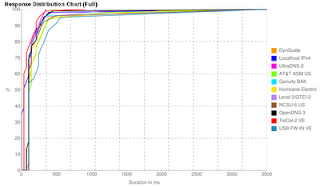
Now the performance of the DNS servers can be checked with NameBench. To install it, run apt-get.
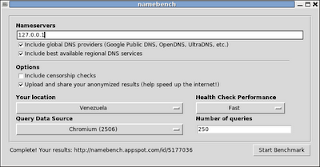
apt-get install namebenchThe following figure shows namebench running, where the name server to use is defined.
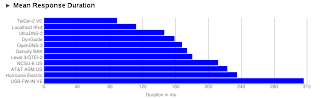
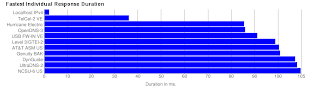
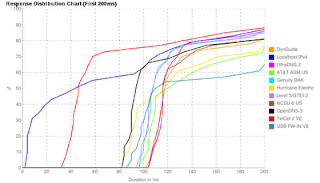
Below are the figures with the Namebench results.
===
Make a donation! If you liked the article you can make a donation with Bitcoin (BTC) using the digital wallet of your choice to the following address: 17MtNybhdkA9GV3UNS6BTwPcuhjXoPrSzV
Or by scanning the QR code from your wallet:
