In today's article I will test that using dnsmasq as a dnscache improves the internet connection, especially when browsing from a mobile phone or on a somewhat slow internet connection. I will also mention several DNS query diagnostic tools such as dnstracer, dnswalk, dig and host, and show a couple of python scripts for DNS queries.
Checking the DNS servers our machine uses: The DNS servers in use on the machine are the CANTV ones; you can see this by running cat on /etc/resolv.conf
# Dynamic resolv.conf(5) file for glibc resolver(3) generated by resolvconf(8)
#     DO NOT EDIT THIS FILE BY HAND -- YOUR CHANGES WILL BE OVERWRITTEN
nameserver 200.44.32.12
nameserver 200.11.248.12
This information comes from the DHCP servers of the network the machine is connected to.
Now run the dig command, which, among other things, reports the query time. The query was made with www.velug.org.ve:
dig www.velug.org.ve

; <<>> DiG 9.7.2-P3 <<>> www.velug.org.ve
;; global options: +cmd
;; Got answer:
;; ->>HEADER<<- opcode: QUERY, status: NOERROR, id: 14680
;; flags: qr rd ra; QUERY: 1, ANSWER: 2, AUTHORITY: 0, ADDITIONAL: 0

;; QUESTION SECTION:
;www.velug.org.ve.  IN A

;; ANSWER SECTION:
www.velug.org.ve. 3600 IN CNAME libertad.velug.org.ve.
libertad.velug.org.ve. 3600 IN A 150.188.8.196

;; Query time: 320 msec
;; SERVER: 200.44.32.12#53(200.44.32.12)
;; WHEN: Thu Feb  3 20:59:08 2011
;; MSG SIZE  rcvd: 73
The result is 320 milliseconds.
Now the dnstracer tool is used to verify how name resolution proceeds from the CANTV DNS, hopping through the different name servers. dnstracer -c -s 200.11.248.12 www.velug.org.ve The -c option disables the local cache, -s specifies the name server, and then the site to query is passed. The result is the following:
dnstracer -c -s 200.11.248.12  www.velug.org.ve
Tracing to www.velug.org.ve[a] via 200.11.248.12, maximum of 3 retries
200.11.248.12 (200.11.248.12) Got answer [received type is cname]
The query succeeded, and you can see that the velug site is inside the CANTV or nic.ve environment.
The next test is with the dnswalk tool, which returns a result for the DNS query.
dnswalk velug.org.ve.

Checking velug.org.ve.
Getting zone transfer of velug.org.ve. from turpial.velug.org.ve...failed
FAIL: Zone transfer of velug.org.ve. from turpial.velug.org.ve failed: Response code from server: REFUSED
Getting zone transfer of velug.org.ve. from libertad.velug.org.ve...failed
FAIL: Zone transfer of velug.org.ve. from libertad.velug.org.ve failed: connection failed
BAD: All zone transfer attempts of velug.org.ve. failed!
2 failures, 0 warnings, 1 errors.
The result is that it does not accept transferring the velug.org.ve zone.
Now on to installing dnsmasq as a dnscache. To install it, run aptitude.
aptitude install dnsmasq
Now when you check the resolv.conf file, the nameserver is 127.0.0.1. When you check the /etc/resolvconf/resolv.conf.d/ directory, the original file appears, containing the CANTV name servers:
cat original

domain cantv.net
search cantv.net
nameserver 200.44.32.12
nameserver 200.11.248.12
Now run dig again against the site www.velug.org.ve
dig www.velug.org.ve


; <<>> DiG 9.7.2-P3 <<>> www.velug.org.ve
;; global options: +cmd
;; Got answer:
;; ->>HEADER<<- opcode: QUERY, status: NOERROR, id: 40987
;; flags: qr rd ra; QUERY: 1, ANSWER: 2, AUTHORITY: 0, ADDITIONAL: 0

;; QUESTION SECTION:
;www.velug.org.ve.  IN A

;; ANSWER SECTION:
www.velug.org.ve. 1250 IN CNAME libertad.velug.org.ve.
libertad.velug.org.ve. 76 IN A 150.188.8.196

;; Query time: 92 msec
;; SERVER: 127.0.0.1#53(127.0.0.1)
;; WHEN: Thu Feb  3 21:06:08 2011
;; MSG SIZE  rcvd: 73
Now the query time is 92 milliseconds.
Run dnstracer again with the dnsmasq server as the server, with the following result:
dnstracer -c -s 127.0.0.1 www.velug.org.ve

Tracing to www.velug.org.ve[a] via 127.0.0.1, maximum of 3 retries
127.0.0.1 (127.0.0.1) Got answer [received type is cname]
 |\___ libertad.velug.org.ve [velug.org.ve] (No IP address)
  \___ turpial.velug.org.ve [velug.org.ve] (150.188.92.2) Got authoritative answer [received type is cname]
You can see that it queries the local name server and then returns the result of the query.
The next change is to use Google's public DNS and the opendns.com ones. Those DNS servers are added to the original file mentioned above.
Now the file contains Google's DNS first, then opendns, and finally cantv.
nameserver 8.8.8.8
nameserver 8.8.4.4
nameserver 208.67.222.222
nameserver 208.67.220.220

domain cantv.net
search cantv.net
nameserver 200.44.32.12
nameserver 200.11.248.12
Run a dig query again, but first restart the dnsmasq service so the velug site is not already in the cache.
dig www.velug.org.ve

; <<>> DiG 9.7.2-P3 <<>> www.velug.org.ve
;; global options: +cmd
;; Got answer:
;; ->>HEADER<<- opcode: QUERY, status: NOERROR, id: 26497
;; flags: qr rd ra; QUERY: 1, ANSWER: 2, AUTHORITY: 0, ADDITIONAL: 0

;; QUESTION SECTION:
;www.velug.org.ve.  IN A

;; ANSWER SECTION:
www.velug.org.ve. 3600 IN CNAME libertad.velug.org.ve.
libertad.velug.org.ve. 2907 IN A 150.188.8.196

;; Query time: 158 msec
;; SERVER: 127.0.0.1#53(127.0.0.1)
;; WHEN: Thu Feb  3 21:14:27 2011
;; MSG SIZE  rcvd: 73
It went up a little, but when the query is repeated it drops to 0 milliseconds.
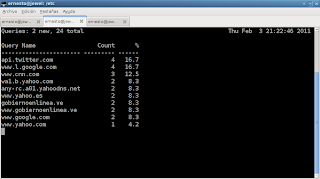
The next tool shows the traffic generated by DNS queries; it is called dnstop.
dnstop -l 4 wlan0
The command defines table levels with the -l option, and then the interface on which it will listen for DNS traffic is passed. The following figure shows the screen the application displays with the s option, which shows the source of the query.
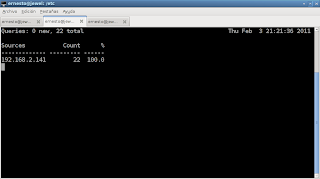
It shows the IP of the local server.
The following figure shows the CANTV DNS servers with the number of queries made to each server. This information is seen by pressing the d key.
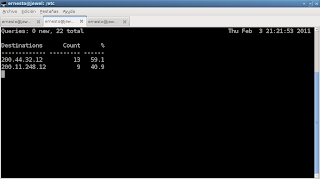
Then you can see the tables by depth level that you gave the command; pressing 2 shows the following:
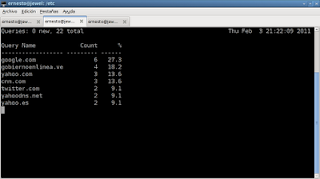
Here the queried domains appear with the number of times they were used.
Then pressing 3 shows more information about those sites:
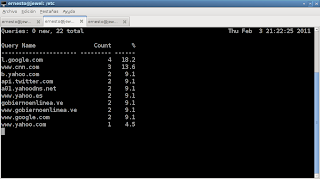
The following shows the level 4 table.
To finish, I will show the use of the python-dns module; a python script will be created to query the IPs of several sites on the internet.
#!/usr/bin/env python

"""
Nombre: consulta-dns.py
Descripcion: Programa que permite realizar consultas de IPs a sitios en internet
Autor: Ernesto Crespo
Correo: ecrespo@gmail.com
Version:0.1
Licencia: GPLv3.
"""
#Se importa el modulo dns para resolver nombres
import dns.resolver

#Se crea la lista de sitios a consultar
sitios  = ["python.org","debian.org","debian.org.ve","velug.org.ve"]


#Se crea la funcion consulta que se le pasa la lista de sitios.
#Se crea la funcion consulta que se le pasa la lista de sitios.
def consulta(lista=sitios):
    #Se crea un diccionario donde se almacena los resultados
    resultado = {}
    #Se crea un ciclo de los sitios de internet para averiguar las IPs de cada uno
    for equipo in lista:
        #Se crea una lista para las IPs
        ips = []
        #Se consulta la IP del equipo.
        ip = dns.resolver.query(equipo,"A")
        #Si tiene varias IPs se almacena en la lista de IPs
        for i in ip:
            ips.append(str(i))
        #Se guarda las IPs del equipo en el diccionario
        resultado[equipo] = ips
    #Se retorna el diccionario con el resultado
    return resultado

if __name__ == "__main__":
    #Se llama a la funcion consulta
    respuesta = consulta()
    #Se toma la lista de equipos de la funcion keys del diccionario donde se recorre en un ciclo.
    for lista in respuesta.keys():
        #Se presenta en pantalla cada sitio con sus IPs
        print lista, respuesta[lista]
The output of the program is the following:
debian.org ['206.12.19.7', '128.31.0.51']
python.org ['82.94.164.162']
velug.org.ve ['150.188.92.2']
debian.org.ve ['75.119.207.96']
===
Make a donation! If you liked the article you can make a donation in Bitcoin (BTC) using the digital wallet of your choice to the following address: 17MtNybhdkA9GV3UNS6BTwPcuhjXoPrSzV
Or by scanning the QR code from your wallet:
