The previous article (Extracting data from web pages with scrapy gave an introduction to using scrapy based on the tutorial on the project page.
This article continues the series of articles on extracting data from web pages (webscraping.
In the previous article, information was extracted from the page dmoz.org (broken link); this time the same page will be used, but this time based on the English article Web scraping with scrapy and MongoDB.
In that article the data extraction is done on stackoverflow, but because of connection problems the extraction will be shown with the site dmoz.org (broken link).
Besides extracting the data, what is extracted will be added to the Mongo database; to set up the MongoDB server you can follow the following article, and to use it from python this other one.
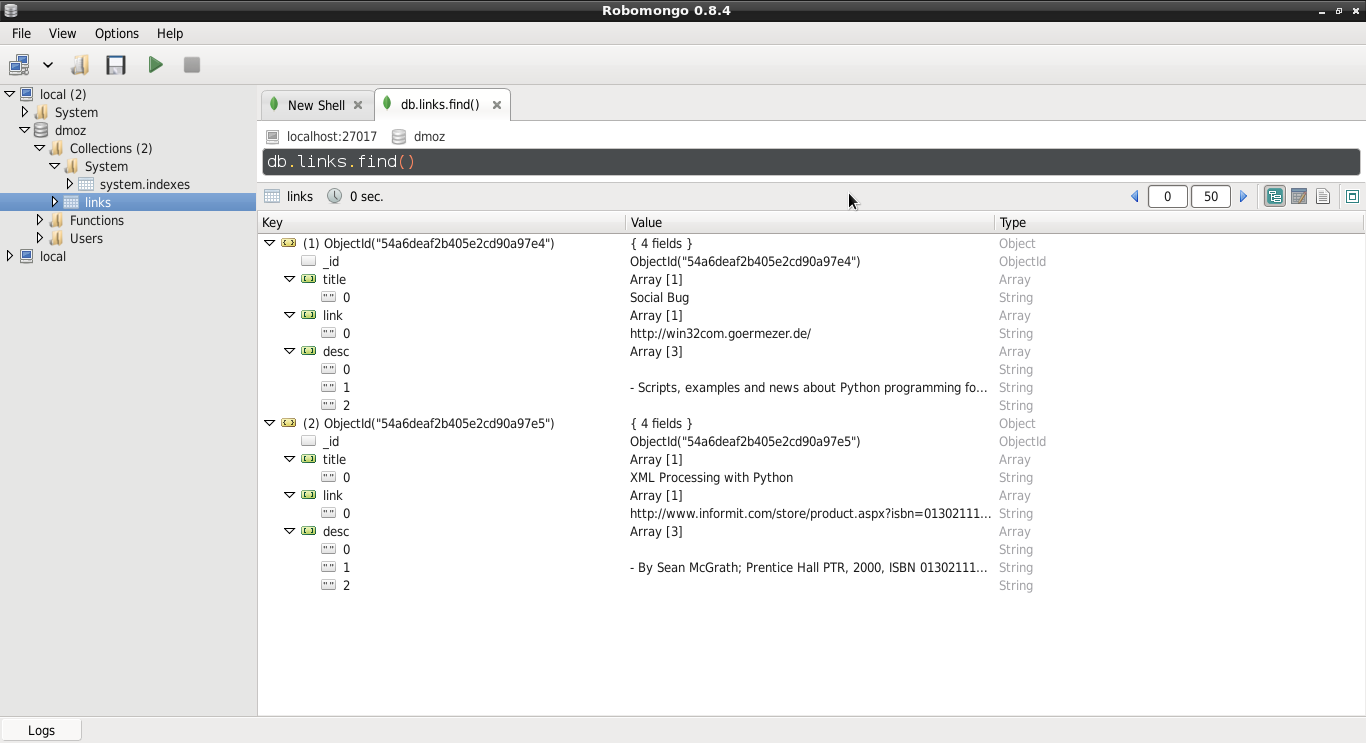
To view the data inserted into MongoDB you can install the robomongo application.
The procedure is the same as in the previous article; create the project:
$scrapy startproject dmozModify the dmoz/dmoz/items.py file:
from scrapy import Item,Field

class DmozItem(Item):
    title = Field()
    link = Field()
    desc = Field()
Now create the spider dmoz/dmoz/spider/dmoz_spider.py:
# -*- coding: utf-8 -*-
#Se importa Spider y Selector
from scrapy import Spider
from scrapy.selector import Selector

#Se importa la clase DmozItem
from dmoz.items import DmozItem


#Se crea la clase DmozSpider que hereda de Spider .
class DmozSpider(Spider):
    #Se define el nombre del proyecto
    name = 'dmoz'
    #El proyecto al cual está permitido
    allowed_domains = ['dmoz.org']
    #Se define las urls a extraer datos
    start_urls = ["http://www.dmoz.org/Computers/Programming/Languages/Python/Books/",
        "http://www.dmoz.org/Computers/Programming/Languages/Python/Resources/"
    ]


    def parse(self, response):
        #Se instancia el selector de ul-> li del artículo anterior
        questions = Selector(response).xpath('//ul/li')
        #Se crea una lista de items
        items = []

        #Se recorre los li
        for question in questions:
            #Se instancia DmozItem en item
            item = DmozItem()
            #Se extra title, link y descripción de cada enlace de la página
            title = question.xpath('a/text()').extract()
            link = question.xpath('a/@href').extract()
            desc = question.xpath('text()').extract()
            #Se asocia estos elementos a la lista
            item['title'] = title
            item['link'] = link
            item['desc'] = desc
            items.append(item)
        #Se retorna el item
        return item
Test the spider and then save the output to a json file.
scrapy crawl dmoz

2015-01-02 14:33:37-0430 [scrapy] INFO: Scrapy 0.24.2 started (bot: dmoz)
2015-01-02 14:33:37-0430 [scrapy] INFO: Optional features available: ssl, http11, boto, django
2015-01-02 14:33:37-0430 [scrapy] INFO: Overridden settings: {'NEWSPIDER_MODULE': 'dmoz.spiders', 'SPIDER_MODULES': ['dmoz.spiders'], 'BOT_NAME': 'dmoz'}
2015-01-02 14:33:37-0430 [scrapy] INFO: Enabled extensions: LogStats, TelnetConsole, CloseSpider, WebService, CoreStats, SpiderState
2015-01-02 14:33:39-0430 [scrapy] INFO: Enabled downloader middlewares: HttpAuthMiddleware, DownloadTimeoutMiddleware, UserAgentMiddleware, RetryMiddleware, DefaultHeadersMiddleware, MetaRefreshMiddleware, HttpCompressionMiddleware, RedirectMiddleware, CookiesMiddleware, ChunkedTransferMiddleware, DownloaderStats
2015-01-02 14:33:39-0430 [scrapy] INFO: Enabled spider middlewares: HttpErrorMiddleware, OffsiteMiddleware, RefererMiddleware, UrlLengthMiddleware, DepthMiddleware
/usr/lib/python2.7/dist-packages/scrapy/contrib/pipeline/__init__.py:21: ScrapyDeprecationWarning: ITEM_PIPELINES defined as a list or a set is deprecated, switch to a dict
  category=ScrapyDeprecationWarning, stacklevel=1)
2015-01-02 14:33:39-0430 [scrapy] INFO: Enabled item pipelines: MongoDBPipeline
2015-01-02 14:33:39-0430 [dmoz] INFO: Spider opened
2015-01-02 14:33:39-0430 [dmoz] INFO: Crawled 0 pages (at 0 pages/min), scraped 0 items (at 0 items/min)
2015-01-02 14:33:39-0430 [scrapy] DEBUG: Telnet console listening on 127.0.0.1:6023
2015-01-02 14:33:39-0430 [scrapy] DEBUG: Web service listening on 127.0.0.1:6080
2015-01-02 14:33:45-0430 [dmoz] DEBUG: Crawled (200) <GET http://www.dmoz.org/Computers/Programming/Languages/Python/Resources/> (referer: None)
2015-01-02 14:33:45-0430 [dmoz] DEBUG: Question added to MongoDB database!
2015-01-02 14:33:45-0430 [dmoz] DEBUG: Scraped from <200 http://www.dmoz.org/Computers/Programming/Languages/Python/Resources/>
 {'desc': [u'\r\n\t\r\n                                ',
           u' \r\n\t\t\t\r\n                                - Scripts, examples and news about Python programming for the Windows platform.\r\n                                \r\n                                ',
           u'\r\n                                '],
  'link': [u'http://win32com.goermezer.de/'],
  'title': [u'Social Bug']}
2015-01-02 14:33:46-0430 [dmoz] DEBUG: Crawled (200) <GET http://www.dmoz.org/Computers/Programming/Languages/Python/Books/> (referer: None)
2015-01-02 14:33:46-0430 [dmoz] DEBUG: Question added to MongoDB database!
2015-01-02 14:33:46-0430 [dmoz] DEBUG: Scraped from <200 http://www.dmoz.org/Computers/Programming/Languages/Python/Books/>
 {'desc': [u'\r\n\t\r\n                                ',
           u' \r\n\t\t\t\r\n                                - By Sean McGrath; Prentice Hall PTR, 2000, ISBN 0130211192, has CD-ROM. Methods to build XML applications fast, Python tutorial, DOM and SAX, new Pyxie open source XML processing library. [Prentice Hall PTR]\r\n                                \r\n                                ',
           u'\r\n                                '],
  'link': [u'http://www.informit.com/store/product.aspx?isbn=0130211192'],
  'title': [u'XML Processing with Python']}
2015-01-02 14:33:46-0430 [dmoz] INFO: Closing spider (finished)
2015-01-02 14:33:46-0430 [dmoz] INFO: Dumping Scrapy stats:
 {'downloader/request_bytes': 516,
  'downloader/request_count': 2,
  'downloader/request_method_count/GET': 2,
  'downloader/response_bytes': 16342,
  'downloader/response_count': 2,
  'downloader/response_status_count/200': 2,
  'finish_reason': 'finished',
  'finish_time': datetime.datetime(2015, 1, 2, 19, 3, 46, 119507),
  'item_scraped_count': 2,
  'log_count/DEBUG': 8,
  'log_count/INFO': 7,
  'response_received_count': 2,
  'scheduler/dequeued': 2,
  'scheduler/dequeued/memory': 2,
  'scheduler/enqueued': 2,
  'scheduler/enqueued/memory': 2,
  'start_time': datetime.datetime(2015, 1, 2, 19, 3, 39, 404138)}
2015-01-02 14:33:46-0430 [dmoz] INFO: Spider closed (finished)
Save the information to the json file:
scrapy crawl dmoz -o dmoz.json -t jsonThe dmoz.json file contains the following:
[{"desc": ["\r\n\t\r\n                                ", " \r\n\t\t\t\r\n                                - Scripts, examples and news about Python programming for the Windows platform.\r\n                                \r\n                                ", "\r\n                                "], "link": ["http://win32com.goermezer.de/"], "title": ["Social Bug"]},
{"desc": ["\r\n\t\r\n                                ", " \r\n\t\t\t\r\n                                - By Sean McGrath; Prentice Hall PTR, 2000, ISBN 0130211192, has CD-ROM. Methods to build XML applications fast, Python tutorial, DOM and SAX, new Pyxie open source XML processing library. [Prentice Hall PTR]\r\n                                \r\n                                ", "\r\n                                "], "link": ["http://www.informit.com/store/product.aspx?isbn=0130211192"], "
To configure access to MongoDB, edit the dmoz/dmoz/settings.py file and add the following:
ITEM_PIPELINES = ['dmoz.pipelines.MongoDBPipeline', ]

#información de conexión con el servidor mongodb, host, puerto, base de datos y colección.
MONGODB_SERVER = "localhost"
MONGODB_PORT = 27017
MONGODB_DB = "dmoz"
MONGODB_COLLECTION = "links"
Edit dmoz/dmoz/pipelines.py to build the data extraction process flow; the database connection is defined and then the data is inserted into mongodb:
#Se importa pymongo
import pymongo

#Se importa la configuración de settings
from scrapy.conf import settings

#Se importa DropItem y log
from scrapy.exceptions import DropItem
from scrapy import log


#Se crea la clase MongoDBPipeline
class MongoDBPipeline(object):

    def __init__(self):
        #Se conecta al servidor mongodb
        connection = pymongo.Connection(
            settings['MONGODB_SERVER'],
            settings['MONGODB_PORT']
        )
        #Se instancia los datos de conexión y la colección de los datos
        db = connection[settings['MONGODB_DB']]
        self.collection = db[settings['MONGODB_COLLECTION']]

    #Se procesa los items
    def process_item(self, item, spider):
        valid = True
        #Se recorre los datos si no hay datos se descarta, si los hay se inserta y se agrega un mensaje al log.
        for data in item:
            if not data:
                valid = False
                raise DropItem("Missing {0}!".format(data))
        if valid:
            self.collection.insert(dict(item))
            log.msg("Question added to MongoDB database!",
                    level=log.DEBUG, spider=spider)
        return item
Test the data extraction again:
scrapy crawl dmozFrom the shell, run the mongo client:
mongo
MongoDB shell version: 2.4.10
connecting to: test
>
Show the existing databases:
> show dbs
dmoz 0.203125GB
local 0.078125GB
Use the dmoz database:
> use dmoz
switched to db dmoz
Show the existing collections of the database:
> show collections
links
system.indexes
Show the contents of the links collection:
> db.links.find()
{ "_id" : ObjectId("54a6ef962b405e3dc6fd96b8"), "title" : [  "XML Processing with Python" ], "link" : [  "http://www.informit.com/store/product.aspx?isbn=0130211192" ], "desc" : [  "\r\n\t\r\n                                ",  " \r\n\t\t\t\r\n                                - By Sean McGrath; Prentice Hall PTR, 2000, ISBN 0130211192, has CD-ROM. Methods to build XML applications fast, Python tutorial, DOM and SAX, new Pyxie open source XML processing library. [Prentice Hall PTR]\r\n                                \r\n                                ",  "\r\n                                " ] }
{ "_id" : ObjectId("54a6ef962b405e3dc6fd96b9"), "title" : [  "Social Bug" ], "link" : [  "http://win32com.goermezer.de/" ], "desc" : [  "\r\n\t\r\n                                ",  " \r\n\t\t\t\r\n                                - Scripts, examples and news about Python programming for the Windows platform.\r\n                                \r\n                                ",  "\r\n                                " ] }
Finally, here is the screenshot of the robomongo application showing the same contents of the links collection:
Make a donation! If you liked the article you can make a donation with Bitcoin (BTC) using the digital wallet of your choice to the following address: 17MtNybhdkA9GV3UNS6BTwPcuhjXoPrSzV
Or by scanning the QR code from the wallet:
