In previous articles the topic of webscraping has been covered; now the scrapy framework will be used, which makes it possible to automate data extraction.
Scrapy is a framework for crawling and extracting structured data from web pages. The data can be used for data mining, data processing or historical records of information.
This article is based on the English tutorial on the project page.
To install scrapy there is a deb package the Debian way:
#apt-get install python-scrapyOr using pip:
#pip install scrapyThe idea is to extract data from the dmoz (broken link) page.
This tutorial follows this procedure:
- Create the project.
- Define the items to be extracted from the page.
- Write the spider to crawl a site and extract the items.
- Write the pipeline to store the extracted data.
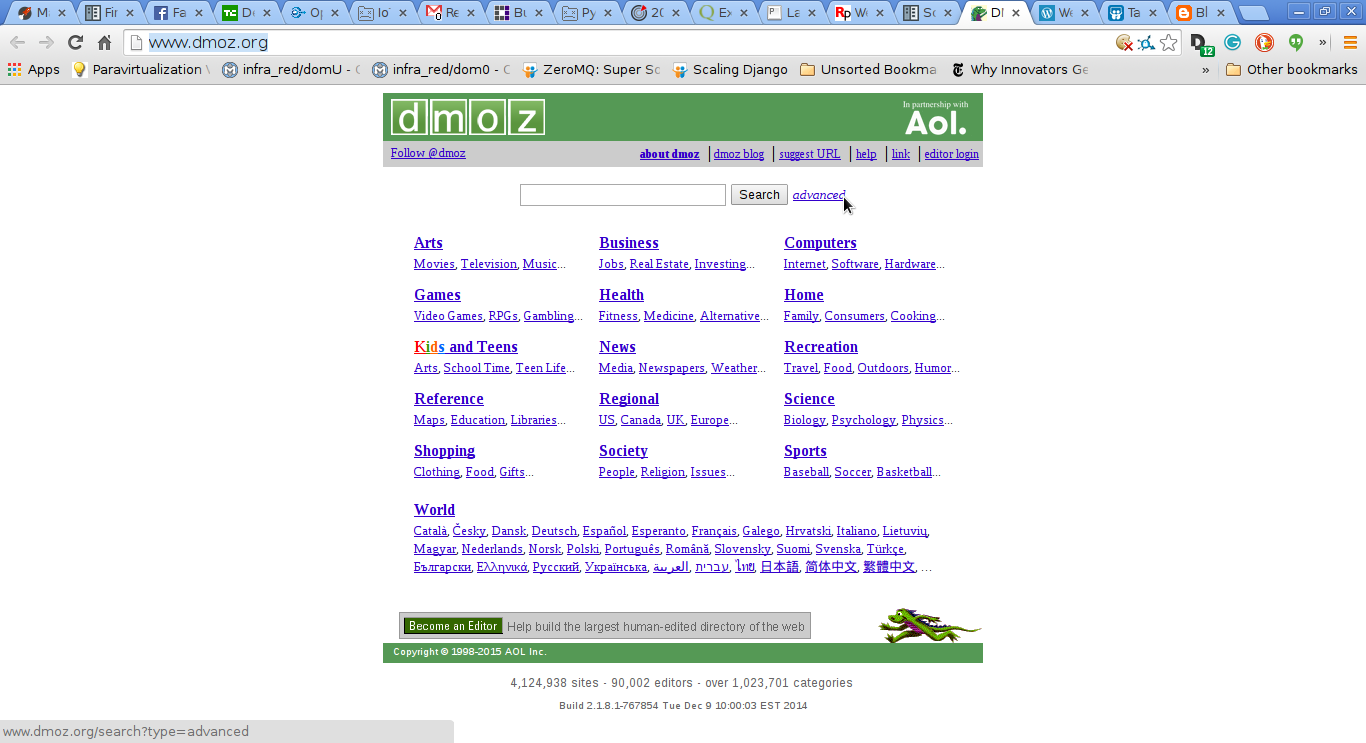
A screenshot of the site is shown below:
The first thing to do is create a project:
$scrapy startproject dmoz
New Scrapy project 'dmoz' created in:
    /home/ernesto/proyectos/scrapy/dmoz

You can start your first spider with:
    cd dmoz
    scrapy genspider example example.com
This creates a dmoz directory with the following content:
dmoz/
├── dmoz
│   ├── __init__.py
│   ├── items.py
│   ├── pipelines.py
│   ├── settings.py
│   └── spiders
│       └── __init__.py
└── scrapy.cfg
Description of the files:
scrapy.cfg: Project configurationdmoz/: python module of our project, where the project code will go.dmoz/items.py: File where the items to extract are defined.dmoz/settings.py: Project settings file.dmoz/pipelines.py: The project's pipelines are defined here.dmoz/spider/: Directory where the spider code that extracts data will be placed. Define the Item (dmoz/items.py):
This file should contain the following:
# -*- coding: utf-8 -*-

import scrapy
from scrapy import Item,Field


class DmozItem(Item):
    title = Field()
    link = Field()
    desc = Field()
The DmozItem class is defined, inheriting from Item; title, link and desc are Field instances, which are the items to extract from the web page.
Creating the spider. Spiders are classes written by the user to extract data from a web page or domain or group of domains.
Before creating the dmoz_spider.py file, selectors will be discussed.
There are several ways to extract data from web pages; scrapy uses XPath or CSS expressions called scrapy selectors. You can find the documentation at the following link.
Here is a list of XPath expressions and their meaning:
/html/head/title: Selects the title element of head./html/head/title/text(): Selects the text of the title element.//td: Selects all td elements.//div[@class="mine"]: Selects all div elements that have the attribute class="mine".
Selectors have 4 methods:
- xpath(): Returns a list of selectors, each of them representing the nodes selected by the xpath expression passed as an argument.
- css(): Returns a list of selectors, each representing the nodes selected by the css() expression passed as an argument.
- extract(): Returns a string (unicode) with the selected data.
- re(): Returns a list of strings extracted by applying a regular expression passed as an argument.
Trying selectors from the scrapy shell: This is a way to evaluate XPath selectors; what is passed to the scrapy shell is the url of the page you want to evaluate.
scrapy shell "http://www.dmoz.org/Computers/Programming/Languages/Python/Books/"
2015-01-01 21:07:43-0430 [scrapy] INFO: Scrapy 0.24.2 started (bot: scrapybot)
2015-01-01 21:07:43-0430 [scrapy] INFO: Optional features available: ssl, http11, boto, django
2015-01-01 21:07:43-0430 [scrapy] INFO: Overridden settings: {'LOGSTATS_INTERVAL': 0}
2015-01-01 21:07:43-0430 [scrapy] INFO: Enabled extensions: TelnetConsole, CloseSpider, WebService, CoreStats, SpiderState
2015-01-01 21:07:45-0430 [scrapy] INFO: Enabled downloader middlewares: HttpAuthMiddleware, DownloadTimeoutMiddleware, UserAgentMiddleware, RetryMiddleware, DefaultHeadersMiddleware, MetaRefreshMiddleware, HttpCompressionMiddleware, RedirectMiddleware, CookiesMiddleware, ChunkedTransferMiddleware, DownloaderStats
2015-01-01 21:07:45-0430 [scrapy] INFO: Enabled spider middlewares: HttpErrorMiddleware, OffsiteMiddleware, RefererMiddleware, UrlLengthMiddleware, DepthMiddleware
2015-01-01 21:07:45-0430 [scrapy] INFO: Enabled item pipelines:
2015-01-01 21:07:45-0430 [scrapy] DEBUG: Telnet console listening on 127.0.0.1:6024
2015-01-01 21:07:45-0430 [scrapy] DEBUG: Web service listening on 127.0.0.1:6081
2015-01-01 21:07:45-0430 [default] INFO: Spider opened
2015-01-01 21:07:45-0430 [default] DEBUG: Crawled (200) <GET http://www.dmoz.org/Computers/Programming/Languages/Python/Books/> (referer: None)
[s] Available Scrapy objects:
[s]   crawler    <scrapy.crawler.Crawler object at 0x7f5e0a286250>
[s]   item       {}
[s]   request    <GET http://www.dmoz.org/Computers/Programming/Languages/Python/Books/>
[s]   response   <200 http://www.dmoz.org/Computers/Programming/Languages/Python/Books/>
[s]   settings   <scrapy.settings.Settings object at 0x7f5e0aaa0f50>
[s]   spider     <Spider 'default' at 0x7f5e09c94690>
[s] Useful shortcuts:
[s]   shelp()           Shell help (print this help)
[s]   fetch(req_or_url) Fetch request (or URL) and update local objects
[s]   view(response)    View response in a browser

In [1]:
Now the evaluation can begin:
In [1]: response.xpath('//title')
Out[1]: [<Selector xpath='//title' data=u'<title>DMOZ - Computers: Programming: La'>]

In [2]: response.xpath('//title').extract()
Out[2]: [u'<title>DMOZ - Computers: Programming: Languages: Python: Books</title>']

In [3]: response.xpath('//title/text()')
Out[3]: [<Selector xpath='//title/text()' data=u'DMOZ - Computers: Programming: Languages'>]

In [4]: response.xpath('//title/text()').extract()
Out[4]: [u'DMOZ - Computers: Programming: Languages: Python: Books']

In [5]: response.xpath('//title/text()').re('(\w+):')
Out[5]: [u'Computers', u'Programming', u'Languages', u'Python']
Now let's try a real case: extracting information from the ul, li elements on the page, extracting their text.
In [10]: sel.xpath('//ul/li/a/text()').extract()
Out[10]:
[u'Top',
 u'Computers',
 u'Programming',
 u'Languages',
 u'Python',
 u'Computers: Programming: Languages: Python: Resources',
 u'Computers: Programming: Languages: Ruby: Books',
 u'Deutsch',
 u'\u0420\u0443\u0441\u0441\u043a\u0438\u0439',
 u'Core Python Programming',
 u'Data Structures and Algorithms with Object-Oriented Design Patterns in Python',
 u'Dive Into Python 3',
 u'Foundations of Python Network Programming',
 u'Free Python books',
 u'FreeTechBooks: Python Scripting Language',
 u'How to Think Like a Computer Scientist: Learning with Python',
 u'An Introduction to Python',
 u'Learn to Program Using Python',
 u'Making Use of Python',
 u'Practical Python',
 u'Pro Python System Administration',
 u'Programming in Python 3 (Second Edition)',
 u'Python 2.1 Bible',
 u'Python 3 Object Oriented Programming',
 u'Python Language Reference Manual',
 u'Python Programming Patterns',
 u'Python Programming with the Java Class Libraries: A Tutorial for Building Web and Enterprise Applications with Jython',
 u'Python: Visual QuickStart Guide',
 u'Sams Teach Yourself Python in 24 Hours',
 u'Text Processing in Python',
 u'XML Processing with Python']
And now the links are extracted:
In [11]: sel.xpath('//ul/li/a/@href').extract()
Out[11]:
[u'/',
 u'/Computers/',
 u'/Computers/Programming/',
 u'/Computers/Programming/Languages/',
 u'/Computers/Programming/Languages/Python/',
 u'/Computers/Programming/Languages/Python/Resources/',
 u'/Computers/Programming/Languages/Ruby/Books/',
 u'/World/Deutsch/Computer/Programmieren/Sprachen/Python/B%C3%BCcher',
 u'/World/Russian/%D0%9A%D0%BE%D0%BC%D0%BF%D1%8C%D1%8E%D1%82%D0%B5%D1%80%D1%8B/%D0%9F%D1%80%D0%BE%D0%B3%D1%80%D0%B0%D0%BC%D0%BC%D0%B8%D1%80%D0%BE%D0%B2%D0%B0%D0%BD%D0%B8%D0%B5/%D0%AF%D0%B7%D1%8B%D0%BA%D0%B8/Python/%D0%9A%D0%BD%D0%B8%D0%B3%D0%B8',
 u'http://www.pearsonhighered.com/educator/academic/product/0,,0130260363,00%2Ben-USS_01DBC.html',
 u'http://www.brpreiss.com/books/opus7/html/book.html',
 u'http://www.diveintopython.net/',
 u'http://rhodesmill.org/brandon/2011/foundations-of-python-network-programming/',
 u'http://www.techbooksforfree.com/perlpython.shtml',
 u'http://www.freetechbooks.com/python-f6.html',
 u'http://greenteapress.com/thinkpython/',
 u'http://www.network-theory.co.uk/python/intro/',
 u'http://www.freenetpages.co.uk/hp/alan.gauld/',
 u'http://www.wiley.com/WileyCDA/WileyTitle/productCd-0471219754.html',
 u'http://hetland.org/writing/practical-python/',
 u'http://sysadminpy.com/',
 u'http://www.qtrac.eu/py3book.html',
 u'http://www.wiley.com/WileyCDA/WileyTitle/productCd-0764548077.html',
 u'https://www.packtpub.com/python-3-object-oriented-programming/book',
 u'http://www.network-theory.co.uk/python/language/',
 u'http://www.pearsonhighered.com/educator/academic/product/0,,0130409561,00%2Ben-USS_01DBC.html',
 u'http://www.informit.com/store/product.aspx?isbn=0201616165&redir=1',
 u'http://www.pearsonhighered.com/educator/academic/product/0,,0201748843,00%2Ben-USS_01DBC.html',
 u'http://www.informit.com/store/product.aspx?isbn=0672317354',
 u'http://gnosis.cx/TPiP/',
 u'http://www.informit.com/store/product.aspx?isbn=0130211192']
Modify the dmoz_spider.py file:
# -*- coding: utf-8 -*-
import scrapy

#Se importa la clase DmozItem
from dmoz.items import DmozItem


#Se crea la clase DmozSpider que hereda de scapySpider .
class DmozSpider(scrapy.Spider):
    #Se define el nombre del proyecto
    name = 'dmoz'
    #El proyecto al cual está permitido
    allowed_domains = ['dmoz.org']
    #Se define las urls a extraer datos
    start_urls = ["http://www.dmoz.org/Computers/Programming/Languages/Python/Books/",
        "http://www.dmoz.org/Computers/Programming/Languages/Python/Resources/"
    ]
     #Se crea el método parse_item el cual define la extracción de los datos por medio de los
     #items usando los selectores que se evaluaron.
    def parse_item(self, response):
        for sel in response.xpath('//ul/li'):
            item = DmozItem()
            item['title'] = sel.xpath('a/text()').extract()
            item['link'] = sel.xpath('a/@href').extract()
            item['desc'] = sel.xpath('text()').extract()
            yield item
Now the data extraction is run:
scrapy crawl dmoz -o items.json
2015-01-01 21:35:54-0430 [scrapy] INFO: Scrapy 0.24.2 started (bot: dmoz)
2015-01-01 21:35:54-0430 [scrapy] INFO: Optional features available: ssl, http11, boto, django
2015-01-01 21:35:54-0430 [scrapy] INFO: Overridden settings: {'NEWSPIDER_MODULE': 'dmoz.spiders', 'FEED_FORMAT': 'json', 'SPIDER_MODULES': ['dmoz.spiders'], 'FEED_URI': 'items.json', 'BOT_NAME': 'dmoz'}
2015-01-01 21:35:54-0430 [scrapy] INFO: Enabled extensions: FeedExporter, LogStats, TelnetConsole, CloseSpider, WebService, CoreStats, SpiderState
2015-01-01 21:35:55-0430 [scrapy] INFO: Enabled downloader middlewares: HttpAuthMiddleware, DownloadTimeoutMiddleware, UserAgentMiddleware, RetryMiddleware, DefaultHeadersMiddleware, MetaRefreshMiddleware, HttpCompressionMiddleware, RedirectMiddleware, CookiesMiddleware, ChunkedTransferMiddleware, DownloaderStats
2015-01-01 21:35:55-0430 [scrapy] INFO: Enabled spider middlewares: HttpErrorMiddleware, OffsiteMiddleware, RefererMiddleware, UrlLengthMiddleware, DepthMiddleware
2015-01-01 21:35:55-0430 [scrapy] INFO: Enabled item pipelines:
2015-01-01 21:35:55-0430 [dmoz] INFO: Spider opened
2015-01-01 21:35:55-0430 [dmoz] INFO: Crawled 0 pages (at 0 pages/min), scraped 0 items (at 0 items/min)
2015-01-01 21:35:55-0430 [scrapy] DEBUG: Telnet console listening on 127.0.0.1:6024
2015-01-01 21:35:55-0430 [scrapy] DEBUG: Web service listening on 127.0.0.1:6081
2015-01-01 21:35:56-0430 [dmoz] DEBUG: Crawled (200) <GET http://www.dmoz.org/Computers/Programming/Languages/Python/Resources/> (referer: None)
2015-01-01 21:35:56-0430 [dmoz] DEBUG: Crawled (200) <GET http://www.dmoz.org/Computers/Programming/Languages/Python/Books/> (referer: None)
2015-01-01 21:35:56-0430 [dmoz] INFO: Closing spider (finished)
2015-01-01 21:35:56-0430 [dmoz] INFO: Dumping Scrapy stats:
 {'downloader/request_bytes': 516,
  'downloader/request_count': 2,
  'downloader/request_method_count/GET': 2,
  'downloader/response_bytes': 16342,
  'downloader/response_count': 2,
  'downloader/response_status_count/200': 2,
  'finish_reason': 'finished',
  'finish_time': datetime.datetime(2015, 1, 2, 2, 5, 56, 398479),
  'log_count/DEBUG': 4,
  'log_count/INFO': 7,
  'response_received_count': 2,
  'scheduler/dequeued': 2,
  'scheduler/dequeued/memory': 2,
  'scheduler/enqueued': 2,
  'scheduler/enqueued/memory': 2,
  'start_time': datetime.datetime(2015, 1, 2, 2, 5, 55, 814884)}
2015-01-01 21:35:56-0430 [dmoz] INFO: Spider closed (finished)
The items.json file contains something like the following:
[{"desc": ["\r\n\r\n                    "], "link": ["/"], "title": ["Top"]},
{"desc": [], "link": ["/Computers/"], "title": ["Computers"]},
{"desc": [], "link": ["/Computers/Programming/"], "title": ["Programming"]},
{"desc": [], "link": ["/Computers/Programming/Languages/"], "title": ["Languages"]},
{"desc": [], "link": ["/Computers/Programming/Languages/Python/"], "title": ["Python"]},
Make a donation! If you liked the article you can make a donation with Bitcoin (BTC) using the digital wallet of your choice to the following address: 17MtNybhdkA9GV3UNS6BTwPcuhjXoPrSzV
Or by scanning the QR code from the wallet:
