In this article I explain how to use the multiple selection widget with buttons. The code is initially the same as in the [previous article]; what changes is that it uses the dialogSetMultiChoiceItems method.
In this example, after selecting some cities, a dialog window opens showing the selected cities.
The code is shown below:
#!/usr/bin/env python
#Se importan los módulos android y time.
import android, time
#Se crea la instancia de la clase android
droid = android.Android()
#Se crea el título de la ventana
titulo = "Seleccione las ciudades de su preferencia"
#Se crea una lista de ciudades
ciudades = ['Valencia','Barquisimeto','Merida','Caracas','Maracaibo','Maracay','Margarita']
#Se crea la ventana de alerta con el título asociado
droid.dialogCreateAlert(titulo)
#Se crea el widget de selección multiple
droid.dialogSetMultiChoiceItems(ciudades)
#Se crea el botón seleccionar
droid.dialogSetPositiveButtonText('Seleccionar')
#Se crea el botón salir
droid.dialogSetNegativeButtonText('Salir')
#Se muestra la ventana
droid.dialogShow()
#Se captura la respuesta de los botones
respuesta  = droid.dialogGetResponse().result
#Se captura los items seleccioandos
items = droid.dialogGetSelectedItems()
#Si se da clip al botón seleccionar se
if  respuesta['which'] == "positive":
    #Se averigua si no se selecciono una ciudad y devuelve un mensaje
    if len(items[1]) == 0:
        droid.dialogCreateAlert("No se selecciono ciudad alguna")
    elif len(items[1]) > 0:
    #Si se selecciona una ciuad o más se agrega a una variable texto las ciudades separadas por coma
        lista = []
        texto = ""
        cantidad = len(items[1])
        c = 1
        for i in items[1]:
            lista.append(ciudades[int(i)])
            if c <> cantidad:
                #Si no es el último elemento se agrega al final la coma.
                texto = texto + ciudades[int(i)] + ","
            else:
                #Si es el último elemento se agrega sin colocar la coma al final.
                texto = texto + ciudades[int(i)]
            c = c+1
        #Se crea la ventana de dialogo con la info de las ciudades
        droid.dialogCreateAlert("Ciudades seleccionada: %s" %texto)
else:
     #Si se le dio clip al botón salir se muestra un mensaje y se sale de la aplicación
    droid.dialogCreateAlert("Saliendo de la aplicacion")
#Se crea el botón aceptar
droid.dialogSetPositiveButtonText('Aceptar')
#Se muestra la ventana
droid.dialogShow()
The next 2 images show the city selection window and then the result window.
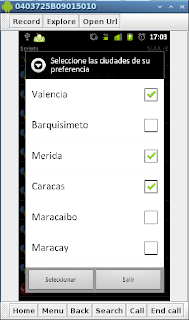
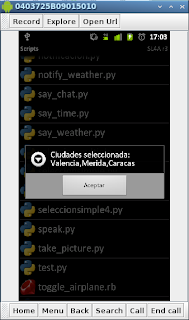
The QR code of the multiple selection example is shown in the following image:
The QR code of the single selection with buttons example.
===
Make a donation! If you liked the article you can make a donation with Bitcoin (BTC) using the digital wallet of your choice at the following address: 17MtNybhdkA9GV3UNS6BTwPcuhjXoPrSzV
Or by scanning the QR code from your wallet:
