Returning to the articles about Android.
This article covers how to capture the phone and contact information from the cell phone. A list of contacts and phone numbers is created, the information is displayed in a single-selection widget, then after selecting the contact the selection is captured, the contact's information is displayed and finally a call to that contact is made.
The new classes used in the program are:
- queryContent: Performs a search within a content. In this case it searches for the contacts.
- phoneCallNumber: Allows making a call by passing the phone number as a string.
The program code is shown below:
#Importar el modulo android
import android
#importar la funcion sleep del modulo time
from time import sleep
#Crea la instancia droid del objeto Android.
droid = android.Android()
#Se captura los contactos
contactos = droid.queryContent('content://com.android.contacts/data/phones',\

        ['display_name','data1'],None,None,None).result


#Se crean la lista nombres y telefonos
nombres = []
telefonos = []

#Se agrega la informacion de los contactos a las listas.
for i in range(len(contacts)):
    nombres.append(contacts[i][u'display_name'])
    telefonos.append(contacts[i][u'data1'])

#Se despliega la lista de contactos
droid.dialogCreateAlert("Contactos")
droid.dialogSetItems(nombres)
droid.dialogShow()
#Se captura el resultado de la seleccion simple
respuesta  = droid.dialogGetResponse().result
#Se muestra la informacion del contacto seleccionado
droid.makeToast('El contacto seleccionado es: %s, su numero es: %s'
                %(nombres[respuesta['item']],telefonos[respuesta['item']]))
sleep(5)
droid.makeToast("Realizando la llamada")
sleep(2)
#Se realiza la llamada al contacto seleccioando.
droid.phoneCallNumber("%s" %telefonos[respuesta['item']])
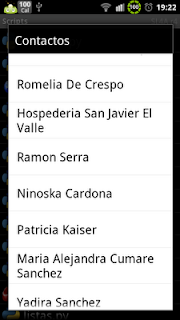
Below is the figure of the contact list:
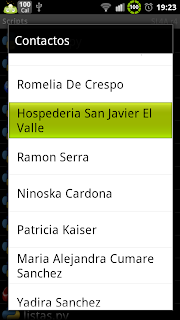
The following figure shows the selected contact:
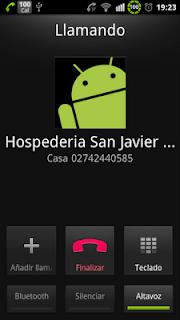
The last figure shows the call being made to the selected contact:
The program's QR code is shown in the following figure:
===
Make a donation! If you liked the article you can make a donation with Bitcoin (BTC) using the digital wallet of your choice to the following address: 17MtNybhdkA9GV3UNS6BTwPcuhjXoPrSzV
Or by scanning the QR code from your wallet:
