I was going to write first about how to create options in a menu, but I remembered that it is possible to play an mp3 song from python with the SL4A API.
The options the SL4A API has for playing music are the following:
- mediaIsPlaying: Checks whether the song is playing at that moment.
- mediaPlayInfo: Returns information about the song.
- mediaPlay: Plays the song.
- mediaPlayList:
- mediaPlayPause: Pauses the song.
- mediaPlaySeek: Plays the song from a given time.
- mediaPlaySetLooping: Defines whether the song is automatically played again.
- mediaPlayStart: Starts playing the file.
- mediaPlayClose: Closes the song file.
In this post only the mediaPlay and mediaPlayInfo functions will be used.
The idea is to list the mp3 files in the single-choice selection widget and then play the selected song.
Before playing the song, information about it is taken, mainly its duration; that time is then handled by a progress bar that advances while the song plays.
The program code is shown below:
#Importar el modulo android,path, la funcion sleep,listdir y exit.
import android
from time import sleep
from os import listdir
from os import path
from sys import exit


#La ruta donde se encuentran los mp3s
ruta = "/sdcard/mp3z/"


#Se crea la instancia de android
droid = android.Android()
#Se muestra un mensaje si se desea reproducir una cancion.si es si, se reproduce si no se sale del programa.
droid.dialogCreateAlert("Reproducir una cancion", "Desea reproducir una cancion?")
droid.dialogSetPositiveButtonText('Si')
droid.dialogSetNegativeButtonText('No')
droid.dialogShow()


#Se captura la respuesta.
respuesta = droid.dialogGetResponse()


if respuesta[1]['which'] == "positive":
    #Se busca los archivos y directorios de la ruta definida.
    archivos = listdir(ruta)
    #Se crea una lista vacia donde se agregaran los nombres de archivos mp3s
    listado = []
    #Se agregan los archivos mp3 a la lista
    for i in archivos:
        #Si es un archivo se agrega a listado, se pasa la ruta y el archivo.
        if path.isfile("%s%s" %(ruta,i)):
            listado.append(i)

    #Se muestra un mensaje con la lista de canciones que se pueden reproducir.
    droid.dialogCreateAlert("Reproducir una cancion")
    droid.dialogSetSingleChoiceItems(listado)
    droid.dialogSetPositiveButtonText('Seleccione')
    droid.dialogSetNegativeButtonText('Salir')
    droid.dialogShow()
    #Se captura la respuesta y el item seleccionado
    respuesta  = droid.dialogGetResponse().result
    item = droid.dialogGetSelectedItems()
    #Si la respuesta es positiva se reproduce la cancion
    if  respuesta['which'] == "positive":
        droid.makeToast("La cancion selecionada es: %s " %listado[int(item[1][0])])
        sleep(2)
        droid.makeToast("Reproduciendo la cancion")
        #Se agrega a cancion la cancion seleccionada segun la variable item.
        cancion = listado[int(item[1][0])]
        #Se reproduce la cancion pasando la ruta donde esta el archivo y el archivo.
        droid.mediaPlay("%s%s" %(ruta,cancion))
        #Se captura la duracion de la cancion representado en milisegundos
        tiempo = int(droid.mediaPlayInfo()[1]["duration"])
        #Se pasa la duracion de la cancion de milisegundos a segundos
        duracion = int(tiempo /1000)
        #Se crea una barra de progreso con el titulo reproduciendo, mensaje el nombre de la cancion y la duracion.
        droid.dialogCreateHorizontalProgress("Reproduciendo",cancion,duracion)
        #Se muestra el widget.
        droid.dialogShow()
        #Se incrementa el valor de la barra de progreso cada 1 seg.
        for i in range(0,duracion):
            sleep(1)
            droid.dialogSetCurrentProgress(i)
        #Al finalizar la cancion se muestra un mensaje de fin de la cancion y se sale de la aplicacion.
        droid.makeToast("Fin de la reproduccion de la cancion")
        droid.dialogDismiss()
    else:
        #Si no se selecciono una cancion se sale del programa
        droid.makeToast("No se selecciono una cancion-Se sale de la aplicacion")
        sleep(1)


else:
    #Se selecciono que no se desea reproducir una cancion
    droid.makeToast("Fin del programa")
    exit()
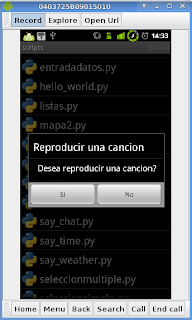
The following figure shows the window that asks whether you want to play a song:
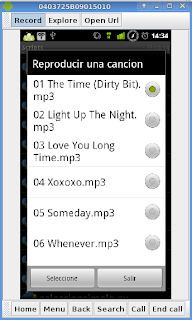
The following figure shows the list of songs that can be played; select one and then press the select button.
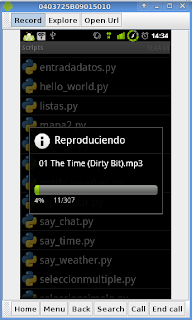
The last figure shows the song playback process:
The QR code of the program is shown below:
===
Make a donation! If you liked the article you can make a donation with Bitcoin (BTC) using the digital wallet of your choice to the following address: 17MtNybhdkA9GV3UNS6BTwPcuhjXoPrSzV
Or by scanning the QR code from your wallet:
