This article explains how to handle the phone's sensor information (orientation, accelerometer, magnetometer, accuracy and light).
The API has the following functions:
startSensingTimed(
    Entero SensorNum: 1=Todo, 2=Acelerometro, 3=Magnetometro, 4=Iluminación;
    Entero tiempo: Mínimo tiempo para realizar la lectura en milisegundos
    ): Inicia los eventos de lectura del sensor del celular.

stopSensing(): Detiene la lectura del sensor
 sensorsReadMagnetometer(): Devuelve una lista con la información del campo magnetico, una lista con los valores x, y, z.
 sensorsReadOrientation(): Devuelve una lista de valores sobre la orientación: azimut, pitch, roll.

 sensorsGetAccuracy():Retorna la precisión de la lectura.

sensorsGetLight(): Retorna la iluminación recibida en el equipo.

sensorsReadAccelerometer():Retorna una lista con los valores x,y,z del acelerometro.
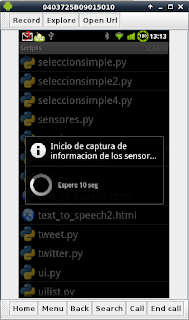
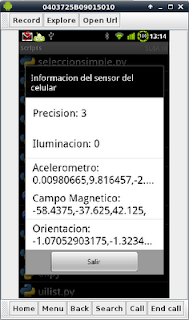
First, sensor reading is activated for 30 seconds and a message is generated saying the reading process has started. Then the list of captured values is shown and the user is asked to exit the application, which ends the capture of the phone's sensor information.
The code is shown below:
#Importar el módulo android
import android
#Importar sleep
from time import sleep
#Se crea la instancia del objeto android
droid=android.Android()
#Se activa el sensor con un tiempo de activación de 30seg.
droid.startSensingTimed(1,30000)
#Se crea el mensaje y la info a desplegar en el dialogo.
titulo = "Inicio de captura de informacion de los sensores"
mensaje = "Espere 10 seg"
#Se crea la barra spinner con un tiempo de 10 seg
droid.dialogCreateSpinnerProgress(titulo, mensaje)
droid.dialogShow()
sleep(10)
droid.dialogDismiss()

#Se captura la información de la precisión, iluminación, acelerometro, #magnetometro y orientación
precision = droid.sensorsGetAccuracy()
luz = droid.sensorsGetLight()
acelerometro = droid.sensorsReadAccelerometer()
magnetometro = droid.sensorsReadMagnetometer()
orientacion = droid.sensorsReadOrientation()
#Se desactiva el sensor del celular
droid.stopSensing()

#Se crea variables de texto con un formato para mostrar la información
textAcelerometro = ""
textMagnetometro = ""
textOrientacion = ""
for i in acelerometro[1]:
    textAcelerometro = textAcelerometro + "%s," %i
for i in orientacion[1]:
    textOrientacion = textOrientacion + "%s," %i
for i in magnetometro[1]:
    textMagnetometro = textMagnetometro + "%s," %i
infoPrecision = "Precision: %s " %precision[1]
infoIluminacion = "Iluminacion: %s" %luz[1]
infoAcelerometro = "Acelerometro: %s" %textAcelerometro
infoMagnetometro = "Campo Magnetico: %s" %textMagnetometro
infoOrientacion = "Orientacion: %s" %textOrientacion

#Se presenta la información en pantalla.
droid.dialogCreateAlert("Informacion del sensor del celular")
datos = [infoPrecision,infoIluminacion,infoAcelerometro,infoMagnetometro,infoOrientacion]
droid.dialogSetItems(datos)
droid.dialogSetNegativeButtonText('Salir')
droid.dialogShow()
respuesta  = droid.dialogGetResponse().result
if  respuesta['which'] == "negative":
    droid.makeToast("Saliendo del programa")
    time.sleep(2)
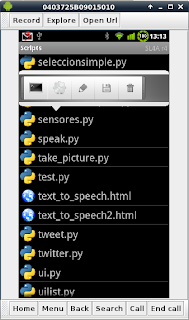
The figure shows the application running: a wait message is shown while the sensor is read, and then it displays the information obtained:
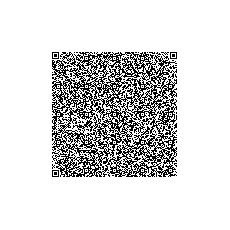
The application's QR code is shown in the following figure:
===
Make a donation! If you liked the article you can make a donation with Bitcoin (BTC) using the digital wallet of your choice to the following address: 17MtNybhdkA9GV3UNS6BTwPcuhjXoPrSzV
Or by scanning the QR code from your wallet:
