In a previous article I explained how to capture the phone's position information on Linux, and in this article, simpler than the previous version, it is done directly on android.
In that article the phone's position information is captured with the readLocation() function; in this version the getLastKnownLocation() function will be used. Note the differences between the two functions: with the latter I could get the correct position that googlemap shows, whereas the first function reported the position where the phone was a few days ago; more research into the SL4A or Android API is needed to find the reason for this behavior.
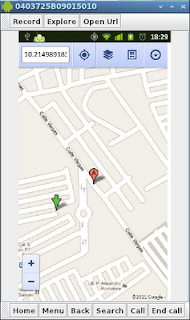
The other new thing in the program is that the position is displayed directly on the phone; this is done with the webviewShow() function, whose use was shown in the article about webview. In that article a web page is opened from the phone's SD memory; in this case the googlemaps page will be opened, passing it the longitude and latitude, and the browser will show the phone's location on the map.
In addition to the latitude and longitude information, you can capture information about:
- time
- altitude
- speed
- accuracy
The code is shown below:
#Importando el modulo android
import android
from time import sleep


#Se crea la instancia de la clase Android
droid = android.Android()
#Se inicia la localizacion
droid.startLocating()
#Se espera 15 segundos
sleep(15)
#Se presenta en la consola la informaci?n de la localizaci?n
#Se maneja la informacion de un diccionario.
resultado = droid.getLastKnownLocation()


latitud = resultado[1]["passive"]["latitude"]
longitud = resultado[1]["passive"]["longitude"]
altitud = resultado[1]["passive"]["altitude"]
#Se detiene la localizacion
droid.stopLocating()
#Se muestra googlemaps en el navegador en android
droid.webViewShow("http://maps.google.com/maps?q=%s,%s" %(latitud,longitud))
The following figure shows the script running.
The script's QR code is shown in the following figure:
===
Make a donation! If you liked the article you can make a donation with Bitcoin (BTC) using the digital wallet of your choice to the following address: 17MtNybhdkA9GV3UNS6BTwPcuhjXoPrSzV
Or by scanning the QR code from your wallet:
