The series of SL4A widgets explained on the blog is not enough to build applications like the ones you download from the Android market, but there is a way to expand the graphical interface possibilities for Android, and that is by using webview.
Webview lets you display html pages with javascript content.
The SL4A site has an introduction to webview.
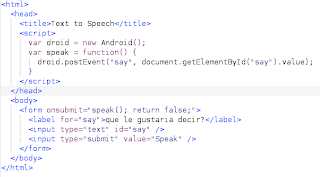
There is an html file called text_to_speech.html with javascript code; it is an html form where you enter a text to be played back.
Then there is the python code in a file called webview.py. The android instance is created, the text_to_speech2.html file is opened, and the script waits for the event, takes the result and plays it back with text to speech.
import android
droid = android.Android()
droid.webViewShow('file:///sdcard/sl4a/scripts/text_to_speech2.html')
while True:
  result = droid.waitForEvent('say').result
  droid.ttsSpeak(result['data'])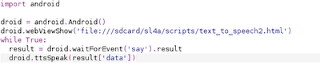
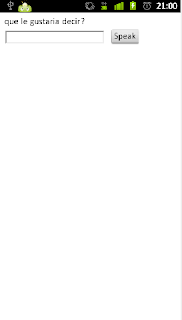
The following image shows the screen of the web page.
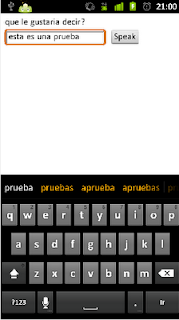
And the figure showing that a text was typed in the form; when the button is clicked, the phone plays back the text that was entered in the form.
===
Make a donation! If you liked this article you can donate with Bitcoin (BTC) using the digital wallet of your choice to the following address: 17MtNybhdkA9GV3UNS6BTwPcuhjXoPrSzV
Or by scanning the QR code from your wallet:
