What follows is a series of scripts to try out the different widgets (data input, display on screen, single selection, multiple selection, etc).
The first one to be tested is data input, and then the entered value will be shown on the phone's screen.
The code follows:
#Importar módulo Android
import android

#Crear la instancia del objeto android
droid = android.Android()

#Solicitar la entreda de datos en este caso el mensaje Escriba su nombre como título
#Y luego como campo de entrada el nombre
#Se guarda el dato en texto
texto = droid.getInput("Escriba su nombre","Nombre:")

#Se manda un saludo en pantalla con el nombre del usuario, la info se encuentra en
#texto el cual es una lista.
droid.makeToast('Hola %s' %texto[1])
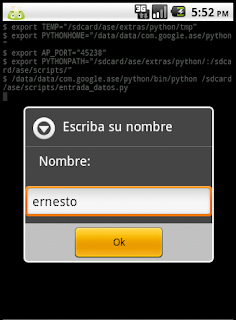
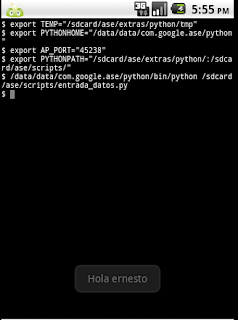
Below are the images of the script.
Data input:
Result:
You can download the code from the following QR code:
===
Make a donation! If you liked the article you can make a donation with Bitcoin (BTC) using the digital wallet of your choice at the following address: 17MtNybhdkA9GV3UNS6BTwPcuhjXoPrSzV
Or by scanning the QR code from your wallet:
