Beautiful Soup is a Python library that makes it easy to extract data from html and xml files.
This article is based on the article from Python For Beginners .
The official documentation can be read at the following link.
To install beautifulsoup you need to have the python-bs4 library installed, which is an html parser.
#apt-get install python-bs4Then beautiful soup 4 is installed:
#pip install beautifulsoup4To use beautifulsoup you can pass it an html file or a URL, but to fetch the html file you have to use urllib2; beautifulsoup does not do it on its own.
The API has several ways of filtering a search:
- Search by string, using the
find_allfunction:
soup.find_all("Prueba)This searches for every occurrence of the word Prueba in the file. 2. Regular expression: The following code shows all the html tags that start with the letter b.
import re

for tag in soup.find_all(re.compile("^b")):

    print(tag.name)
The following code shows all the html tags that contain the letter b:
import re

for tag in soup.find_all(re.compile("b")):

print(tag.name)- A list.
When a list is passed,
beautifulsoupwill find any element of the list. The following code shows how to find every a and every b that appears:
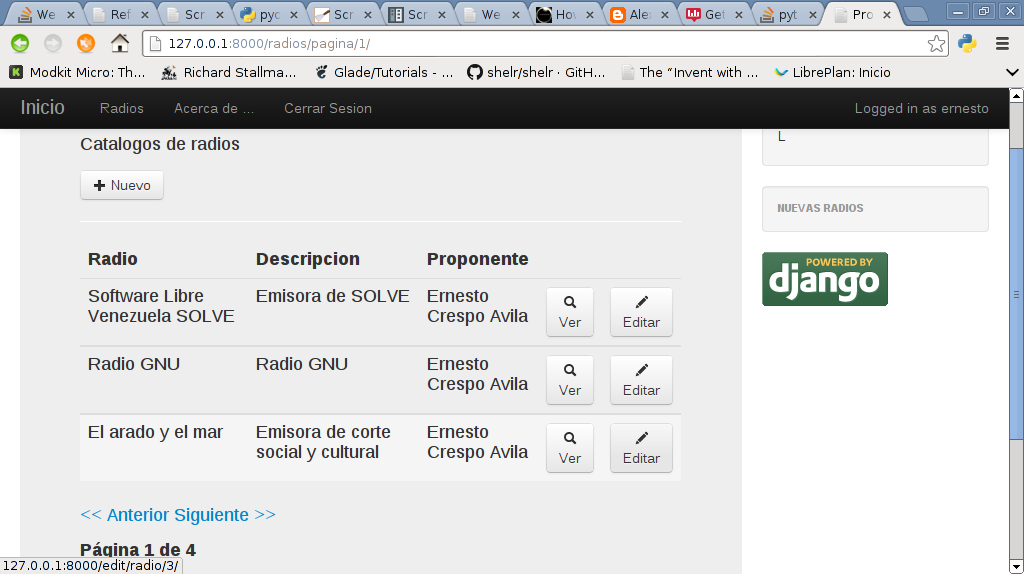
print soup.find_all(["a","b"])To demonstrate the use of beautifulsoup I will use a django application that keeps a registry of internet radios for the Linux radiotray application.
Here is a screenshot:
The example code is the following:
#!/usr/bin/env python


from bs4 import BeautifulSoup


import urllib2


#Se crea la instancia de BS pasando la URL con urllib2.


soup = BeautifulSoup(urllib2.urlopen("http://127.0.0.1:8000").read())


print "--------------------"


#Se muestra todo el contenido de la pagina


print soup.prettify()


print "---------------------"


#Se muestra el titulo de la pagina


print "Titulo" ,soup.title.string


print "----------------------"


#Se muestra el tag p de html que contiene la pagina


print soup.p


print "----------------------"


#Se muestra el tag a de html que contiene la pagina

print soup.a
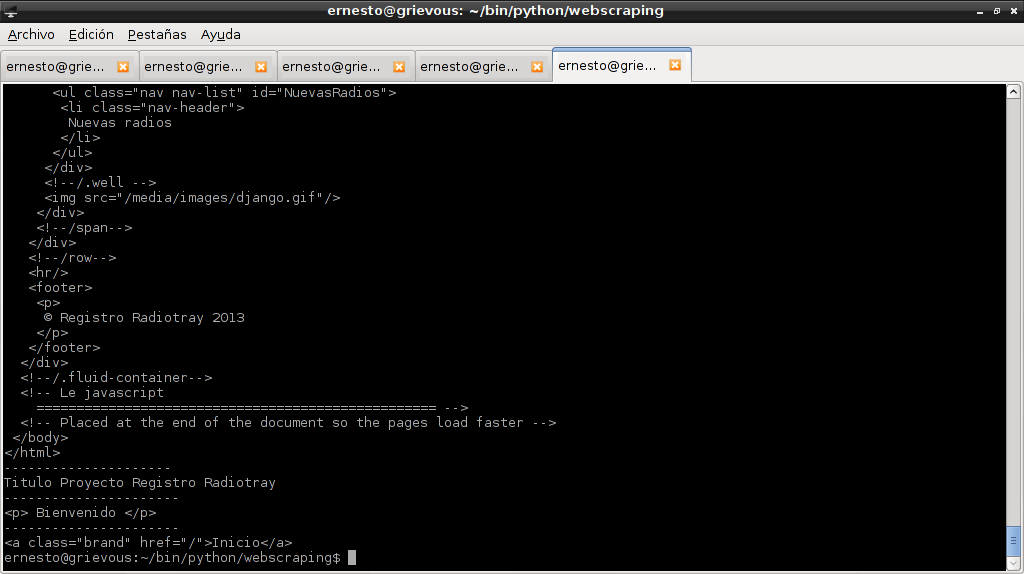
Below is an image with the result of the program:
To extract URLs from the page, search for the html tag a, then whatever contains the word href:
#!/usr/bin/env python


from bs4 import BeautifulSoup


import urllib2


#Se crea la instancia de BS pasando la URL con urllib2.


soup = BeautifulSoup(urllib2.urlopen("http://127.0.0.1:8000").read())


print "--------------------"


#Para extraer url de la pagina.


for link in soup.find_all('a'):

    print(link.get('href'))
The result is shown below:
--------------------
/
/radios/pagina/1/
/acerca/
/login/
To extract all the text from the page:
#!/usr/bin/env python

from bs4 import BeautifulSoup

import urllib2

#Se crea la instancia de BS pasando la URL con urllib2.

soup = BeautifulSoup(urllib2.urlopen("http://127.0.0.1:8000").read())

print "--------------------"

#Para extraer todo el texto de la pagina.

print(soup.get_text())
The result is shown below:
....
 Bienvenido
/span
Radio
              	L
/.well
Nuevas radios
/.well
/span
/row
© Registro Radiotray 2013
/.fluid-container
 Le javascript
    ==================================================
 Placed at the end of the document so the pages load faster
This is the basis for doing webscraping, which will be explained in the next article.
Make a donation! If you liked the article you can make a donation with Bitcoin (BTC) using the digital wallet of your choice to the following address: 17MtNybhdkA9GV3UNS6BTwPcuhjXoPrSzV
Or by scanning the QR code from your wallet:
