This tutorial covers the use of the calendar widget, how to capture the date on click and show it in the same window.
The figure shows the application design
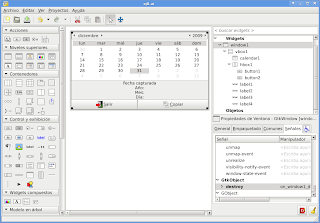
The code is shown below:
#!/usr/bin/env python
# -*- coding: utf-8 -*-


import gtk, time

class App:
 def __init__(self):
  #Manejo del archivo glade por medio de gtkbuilder
  self.glade_file = "ej8.ui"
  self.glade = gtk.Builder()
  self.glade.add_from_file(self.glade_file)
  # cargar los widgets de la interfaz
  self.window = self.glade.get_object('window1')
  self.button1 = self.glade.get_object('button1')
  self.button2 = self.glade.get_object('button2')
  self.calendario = self.glade.get_object('calendar1')
  self.label1 = self.glade.get_object('label1')
  self.label2 = self.glade.get_object('label2')
  self.label3 = self.glade.get_object('label3')
  self.label4 = self.glade.get_object('label4')
  #Asociar los eventos de los 2 botones y de la ventana
  self.window.connect("destroy",self.on_window1_destroy)
  self.button1.connect ("clicked",self.on_button1_clicked)
  self.button2.connect ("clicked",self.on_button2_clicked)
  #Tupla que maneja los meses del año
  self.meses = ('Enero','Febrero','Marzo','Abril','Mayo','Junio','Julio','Agosto','Septiembre','Octubre','Noviembre','Diciembre')
  #Se muestra todos los widgets
  self.window.show_all()

 def on_window1_destroy(self,*args):
  #Cerrar aplicación
  gtk.main_quit()

 def on_button1_clicked(self,*args):
  #Cerrar Aplicación
  gtk.main_quit()

 def on_button2_clicked(self,*args):
  #Capturar los datos del calendario y presentarlos en las etiquetas
  agno, mes, dia = self.calendario.get_date()
  texto_agno = "Año:  %s" %agno
  texto_mes = "Mes: %s" %self.meses[mes]
  texto_dia = "Dia: %s" %dia
  self.label2.set_text(texto_agno)
  self.label3.set_text(texto_mes)
  self.label4.set_text(texto_dia)

 def main(self):
  gtk.main()


if __name__ == "__main__":
 app = App()
 app.main()
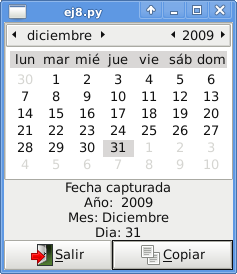
The following figure shows the application running:
===
Make a donation! If you liked the article you can make a donation with Bitcoin (BTC) using the digital wallet of your choice to the following address: 17MtNybhdkA9GV3UNS6BTwPcuhjXoPrSzV
Or by scanning the QR code from your wallet:
