Going back to programming with python, glade and gtk; now I will explain how to make a simple browser using webkit in python.
This post is based on the article from Marcelo's Blog; the difference is that he programmed the graphical interface without glade.
The following figure shows the application's graphical interface.
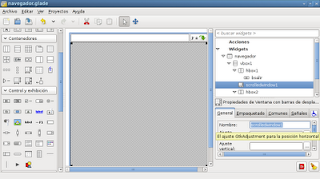
The application simply has a text entry for the URL, where you can press enter to load the page or click the "go" button; the page is loaded in the frame with scroll bars in the center of the interface, and there is a button to quit the browser. By default a page is loaded when the application starts.
The application code is shown below:
#!/usr/bin/env python
# -*- coding: utf-8 -*-
#Importar los módulos gtl y webkit


import gtk
import webkit


#La clase App hereda threading.Thread
class App:
    def __init__(self):
     #Método constructor, asociando los widgets
        #Asociar el archivo glade al objeto Builder.
        self.glade_file = "navegador.glade"
        self.glade = gtk.Builder()
        self.glade.add_from_file(self.glade_file)
        #Asociando la ventana del navegador
        self.ventana = self.glade.get_object('navegador')
        #Asociando el boton salir
        self.bsalir = self.glade.get_object('bsalir')
        #Asociando el boton navegar
        self.navegar = self.glade.get_object('navegar')
        #Asociando la entrada de texto del url a navegar
        self.enlace = self.glade.get_object('url')
        #Asociando la ventana con las barras deslizantes
        self.scrolledwindow1 = self.glade.get_object('scrolledwindow1')
        #Conectores
        #Conectar de destruir la ventana principal
        self.ventana.connect("destroy",self.on_navegador_destroy)
        #Conectar del boton salir
        self.bsalir.connect('clicked', self.on_bsalir_clicked)
        #Conector del boton navegar
        self.navegar.connect('clicked',self.on_navegar_clicked)
        #Conector de dar enter a la entrada de texto
        self.enlace.connect('activate',self.on_url_activate)
        #Asociando página por defecto.
        #Instanciando la clase webview
        self.webview = webkit.WebView()
        #Agregando webview a la ventana con barras deslizantes
        self.scrolledwindow1.add(self.webview)
        #Abriendo una página por defecto
        self.__navegacion("http://www.debian.org")

        #Se muestra la ventana principal del programa
        self.ventana.show_all()

    #Si se da enter a la entrada de texto se captura el url y se navega
    def on_url_activate(self,*args):
        url = "http://" + self.enlace.get_text()
        self.__navegacion(url)


    #Se abre el url con webview
    def __navegacion(self,url):
        self.webview.open(url)


    def on_navegador_destroy(self,*args):
        #Se cierra la aplicación
        gtk.main_quit()

    def on_bsalir_clicked(self,*args):
     #Se cierra la aplicación al darle clip al boton salir.
        gtk.main_quit()

    def on_navegar_clicked(self,*args):
        #Se navega el url al darle clip al boton
        url = "http://" + self.enlace.get_text()
        self.__navegacion(url)

    def main(self):
     #Inicia la aplicación
        gtk.main()


if __name__ == '__main__':
    app = App()
    app.main()
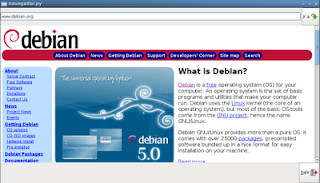
The following figure shows the browser running.
===
Make a donation! If you liked the article you can make a donation with Bitcoin (BTC) using the digital wallet of your choice to the following address: 17MtNybhdkA9GV3UNS6BTwPcuhjXoPrSzV
Or by scanning the QR code from your wallet:
