This article explains how to use radio buttons and handle images. The program is a barcode generator.
Python has a module for creating svg images with barcodes. This module is called pyBarcode; to install it you need python2.6, while the computer has python2.5 by default. I installed version 2.6 and compiled pyBarcode with it. For that reason I created a script that generates the barcode using python 2.6, while the graphical program uses python2.5.
In the graphical program you can pass a 12-digit number to generate a barcode, or generate the code randomly.
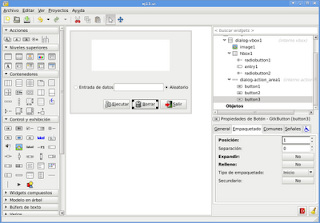
The graphical design of the application is shown in the following figure:
The code of the script that generates the barcode is the following:
#!/opt/python/bin/python2.6
# -*- coding: utf-8 -*-
#Importar barcode y sys
import barcode,sys


#Funcion generar codigo se le pasa el numero para generar el codigo
def generar_codigo(dato):
    #Se usara EAN13
    EAN = barcode.get_barcode('ean13')
    ean = EAN(u'%s' %dato)
    #Se salva el archivo en formato svg
    fullname = ean.save('ean13_barcode')
    fullname


if __name__ == "__main__":
    #se importa el modulo commands
    import commands
    #Se borra el archivo anterior
    commands.getstatusoutput("rm ean13_barcode.svg")
    #Se toma el argumento para generar el codigo
    dato =sys.argv[1]
    #Se ejecuta la funcion
    generar_codigo(dato)
The code of the graphical application is the following:
#!/usr/bin/env python
# -*- coding: utf-8 -*-
#Importar modulo gtk,commands y random
import gtk, commands, random

class App:
    def __init__(self):
       #Manejo del archivo glade por medio de gtkbuilder
       self.glade_file = "ej13.ui"
       self.glade = gtk.Builder()
       self.glade.add_from_file(self.glade_file)
       # cargar los widgets de la interfaz
       self.window = self.glade.get_object('dialog1')
       self.button1 = self.glade.get_object('button1')
       self.button2 = self.glade.get_object('button2')
       self.button3 = self.glade.get_object('button3')
       self.radiobutton1 = self.glade.get_object('radiobutton1')
       self.radiobutton2 = self.glade.get_object('radiobutton2')
       self.entrada = self.glade.get_object('entry1')
       self.imagen = self.glade.get_object('image1')
       #Valores iniciales de la aplicacion Titulo y tama?o de la ventana
       self.window.set_title("Ejemplo de generacion de codigo de barra")
       self.window.set_default_size(600, 400)


       #Asociar los eventos de los 2 botones y de la ventana
       self.window.connect("close",self.__on_dialog1_close)
       self.window.connect("destroy",self.__on_dialog1_destroy)
       self.button1.connect ("clicked",self.__on_button1_clicked)
       self.button2.connect ("clicked",self.__on_button2_clicked)
       self.button3.connect ("clicked",self.__on_button3_clicked)
       self.radiobutton1.connect("toggled",self.__on_radiobutton1_toggled)
       self.radiobutton2.connect("toggled",self.__on_radiobutton2_toggled)
       #Se muestra todos los widgets
       self.window.show_all()


    def __on_radiobutton1_toggled(self,*args):
        #Si este boton se selecciona se muestra la entrada de datos
        self.entrada.show()


    def __on_radiobutton2_toggled(self,*args):
        #Si este boton se selecciona se oculta la entrada de datos
        self.entrada.hide()

    def __on_dialog1_close(self,*args):
        #Se cierra la aplicacion
        gtk.main_quit()

    def __on_dialog1_destroy(self,*args):
        #Se cierra la aplicacion
        gtk.main_quit()

    def __on_button1_clicked(self,*args):
        #Creacion del codigo de barra
        if self.radiobutton1.get_active() == True:
            #Si el boton de radio esta activo se captura la entrada de texto
            self.texto = self.entrada.get_text()
            valor = int(self.texto)
        elif self.radiobutton2.get_active() == True:
            #Se el boton de radio esta activo se oculta la entrada de texto y se genera el numero
            #de forma aleatoria
            self.entrada.hide()
            valor = int(random.random()*1000000000000)
        #Se ejecuta el generador de codigo de barra
        commands.getstatusoutput("./generador.py %s" %valor)
        #Se carga la nueva imagen del codigo de barra generado
        self.imagen.set_from_file('./ean13_barcode.svg')

    def __on_button2_clicked(self,*args):
        #El boton salir, se cierra la aplicacion
        gtk.main_quit()

    def __on_button3_clicked(self,*args):
        #El boton se restaurar la aplicacion, se coloca una imagen en blanco
        self.imagen.set_from_file('./1.png')


    def main(self):
        #Se inicia la aplicacion
        gtk.main()


if __name__ == "__main__":
    #Se crea una instancia del objeto y se ejecuta el metodo main
    app = App()
    app.main()
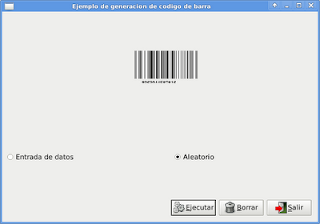
The following figure shows the application running:
===
Make a donation! If you liked the article you can make a donation with Bitcoin (BTC) using the digital wallet of your choice to the following address: 17MtNybhdkA9GV3UNS6BTwPcuhjXoPrSzV
Or by scanning the QR code from your wallet:
