I have some material saved that I prepared for a python course with gtk and glade; for some time I have tried to teach that course but there were always setbacks, so I would rather publish what I have on the blog.
I will start by building a simple interface that shows information in a label.
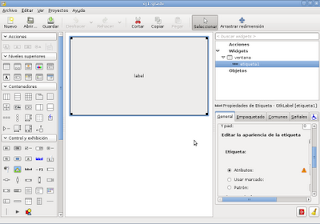
The figure shows the window that was created and the label widget with the message. The interface is saved with the .glade extension, which contains an XML file.
The program code is the following:
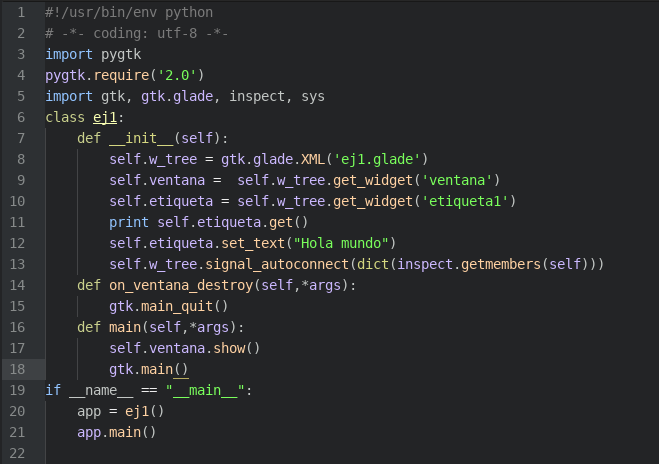
The first line defines the command interpreter to use, in this case python. The second line defines that UTF-8 will be used as the text format. Lines 3, 4 and 5 import modules and set the gtk version requirement. Line 6 defines the class ej1. Lines 7 to 13 define the init method, which runs when the object is created. Line 8 loads the glade XML file. Lines 9 and 10 get the window and etiqueta1 widgets, using the names they have in the glade file. Line 11 prints what etiqueta1 contains, taking the value with get(). Line 12 changes the contents of etiqueta1 with set_text("hola mundo"). Line 13. This line is the one that connects the widgets with the signals and the methods of the class ej1. Line 14 defines the method on_ventana_destroy. This method is used when the window is clicked to close it. Line 15. Calls gtk's quit function. Line 16. Defines the main method. Line 17. Shows the window. Line 18. Calls main to display the window on screen. Line 19. If the script is run, the following lines are executed: Line 20. The object is created. Line 21. The object's main method is run.
The result is shown in the figure.

You can download the application code from github at the following link (broken link).
===
Make a donation! If you liked the article you can make a donation with Bitcoin (BTC) using the digital wallet of your choice to the following address: 17MtNybhdkA9GV3UNS6BTwPcuhjXoPrSzV
Or by scanning the QR code from your wallet:
