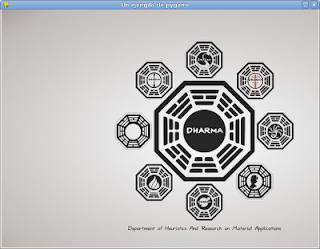
I have wanted to post some articles about pygame for a while. The first one I will publish is a basic one that loads an image in a window with a defined size.
The code follows:
!/usr/bin/env python
# -*- coding: utf-8 -*-


import pygame
import sys


ANCHO = 800
ALTO = 600
#Iniciar pygame
pygame.init()
#Generar la ventana con el ancho y alto definido
screen = pygame.display.set_mode((WIDTH, HEIGHT))
#Cargar el titulo de la ventana
pygame.display.set_caption("Un ejemplo de pygame")
#Cargar la imagen de fondo
fondo = pygame.image.load('dharma.jpg')
#Se genera un ciclo que repinta la imagen de fondo hasta que se cierra la ventana.
while True:
    #Se captura los eventos
    for eventos in pygame.event.get():
        #Si el evento es cerrar la ventana se sale de la aplicacion
        if eventos.type == QUIT:
            sys.exit()
    #Se dibuja la imagen de fondo.
    screen.blit(fondo, (0, 0))
    pygame.display.flip()
The following image shows the program running:
===
Make a donation! If you liked this article you can donate with Bitcoin (BTC) using the digital wallet of your choice to the following address: 17MtNybhdkA9GV3UNS6BTwPcuhjXoPrSzV
Or by scanning the QR code from your wallet:
