Continuing with the examples on ZeroMQ, I will now show how to use different types of transport (before, only tcp was shown; now both tcp and ipc will be used, the latter being an inter-process communication model that can help when low latency is needed).
After choosing the transport layer, a message pattern is selected. In previous articles the REQ/REP, PUB/SUB and Pair patterns have been shown, so what remains is to explain how the UPSTREAM/DOWNSTREAM pattern works.
The UPSTREAM/DOWNSTREAM pattern is similar to the REQ/REP pattern; the difference is that in REQ/REP there can be bidirectional communication, whereas with UPSTREAM/DOWNSTREAM the communication goes in one direction only and allows processes to be parallelized. The figure shows the workflow.
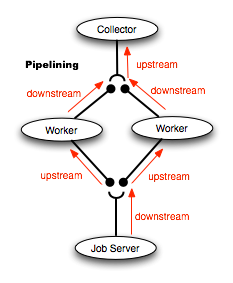
An example of its possible use, taken from Nicholas Piël's article, is a real-time image recognition system: the server captures the images and sends them to the workers to be processed, and when that process finishes the images are sent to the collector.
The server simply has 2 lists, one of them a list of text strings that at the end sends 2 "x" so that the clients finish. A socket with the tcp transport layer is created to send the list of numbers, then the socket for ipc is created and the text strings are sent.
You will notice that the clients simply connect to the server, one of the clients connecting over tcp and the other over ipc.
The server code is shown below:
#!/usr/bin/env python

#Se importa zeroMQ y sleep de time

import zmq

from time import sleep


#Se crea la instancia del contexto

ctx = zmq.Context()

#Se crea el socket con parametro DOWNSTREAM

socket = ctx.socket(zmq.DOWNSTREAM)

#Se crea una lista de textos

lista1 = ("Esta es una prueba,1","Desde zeroMQ,2","Sigo probando,3","Prueba...,4","q,5","1,6","q,7","x","x")

#Se crea una lista de un rango de numeros

lista2 = range(1,4)

#Se asocia el socket a una IP y puerto

socket.bind("tcp://127.0.0.1:12345")


#Se envia la lista de numeros a los clientes

#que se conectan al servidor.

#El envio se hace cada segundo.

for i in lista2:

 socket.send("%s" %i)

 print "Enviado %s" %i

 sleep(1)


#Se asocia el socket a un archivo por

#medio del transporte ipc

socket.bind("ipc:///tmp/zmqdemo")

#Se envia la lista de textos a los clientes conectados

#el envio se realiza cada segundo.

for i in lista1:

 socket.send(i)

 print "Enviado %s" %i

 sleep(1)
The code of the client that uses tcp as transport is shown below:
#!/usr/bin/env python

#Se importa el modulo zeroMQ

import zmq

#Se crea la instancia del contexto

ctx = zmq.Context()

#Se crea el socket con Parametro UPSTREAM

socket = ctx.socket(zmq.UPSTREAM)

#Se conecta el socket (tcp) al servidor y su puerto

socket.connect("tcp://127.0.0.1:12345")

#Se crea un ciclo que recibe lo que envia el

#servidor y lo muestra en pantalla

#y se recibe la letra x finaliza la conexion del cliente

while True:

 rcv =  socket.recv()

 if rcv == "x" :

  print rcv

  break

 print rcv
The client code using ipc as transport is shown:
#!/usr/bin/env python

#Se importa el modulo zeroMQ

import zmq

#Se crea la instancia del contexto

ctx = zmq.Context()

#Se crea el socket con parametro UPSTREAM

socket = ctx.socket(zmq.UPSTREAM)


#Se conecta el socket a un archivo temporal

#por medio de ipc como transporte

socket.connect("ipc:///tmp/zmqdemo")

#Se crea un ciclo para recibir

#la informacion del servidor

#se muestra en pantalla

#si se recibe la letra x

#finaliza la conexion con el servidor

while True:

 rcv = socket.recv()

 if rcv ==  'x':

  print rcv

  break

 print rcv
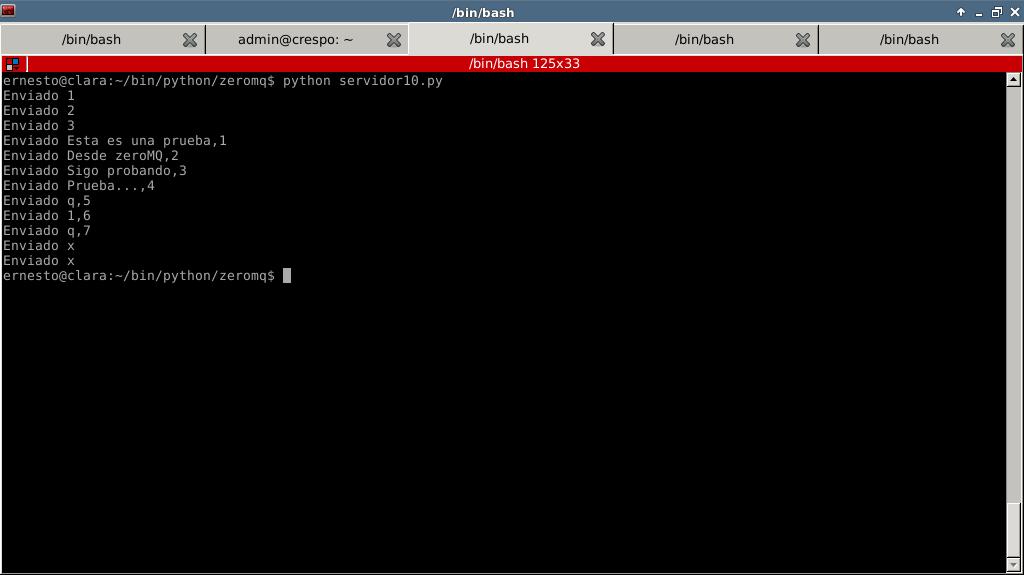
The following figures show the result on the server and on both clients: Server:
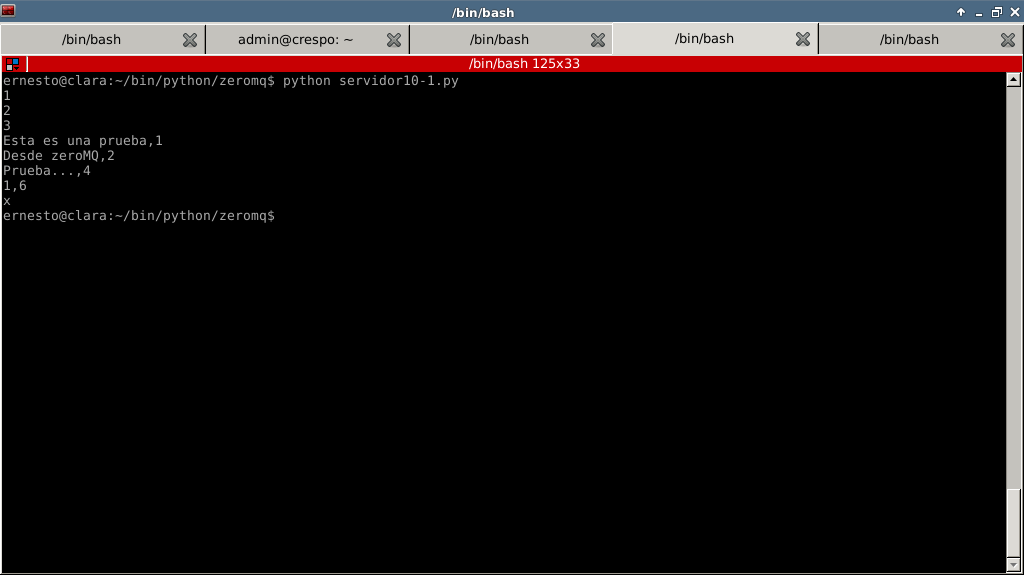
Client (tcp):
Client (ipc):
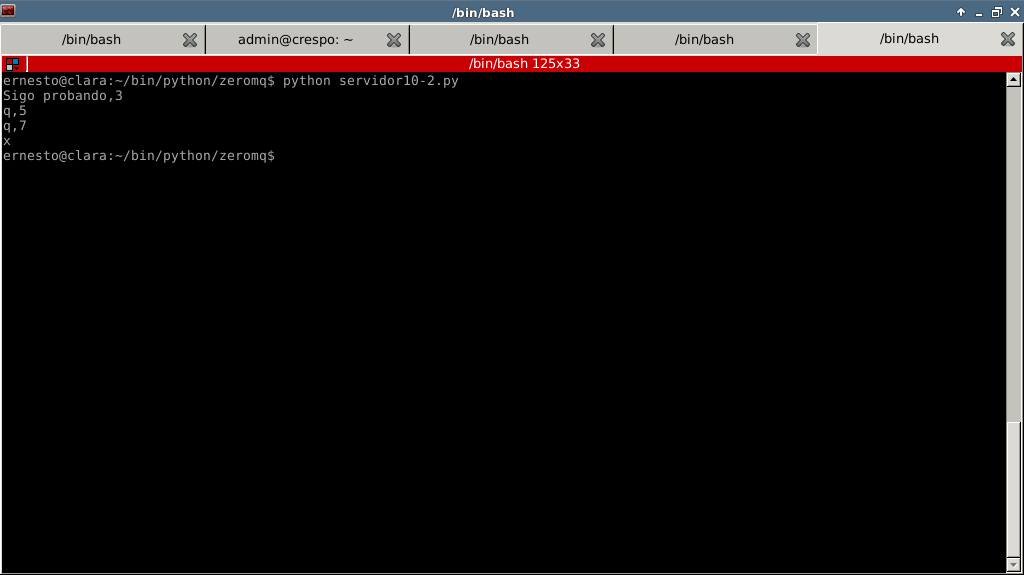
As can be seen in the client figures, the information the server sends to the clients is distributed between both of them.
Make a donation! If you liked the article you can make a donation with Bitcoin (BTC) using the digital wallet of your choice to the following address: 17MtNybhdkA9GV3UNS6BTwPcuhjXoPrSzV
Or by scanning the QR code from your wallet:
