Continuing with the ZeroMQ tutorials, this time I show how to use Publish/Subscribe.
In the pub/sub pattern the components are loosely coupled, which is a great help for scaling since there is no need to worry about the subscribers. However, this coupling can lead to unexpected behavior when it is not fully understood.
The example developed here is based on the post about the introduction to ZeroMQ by Nicholas Piël (broken link).
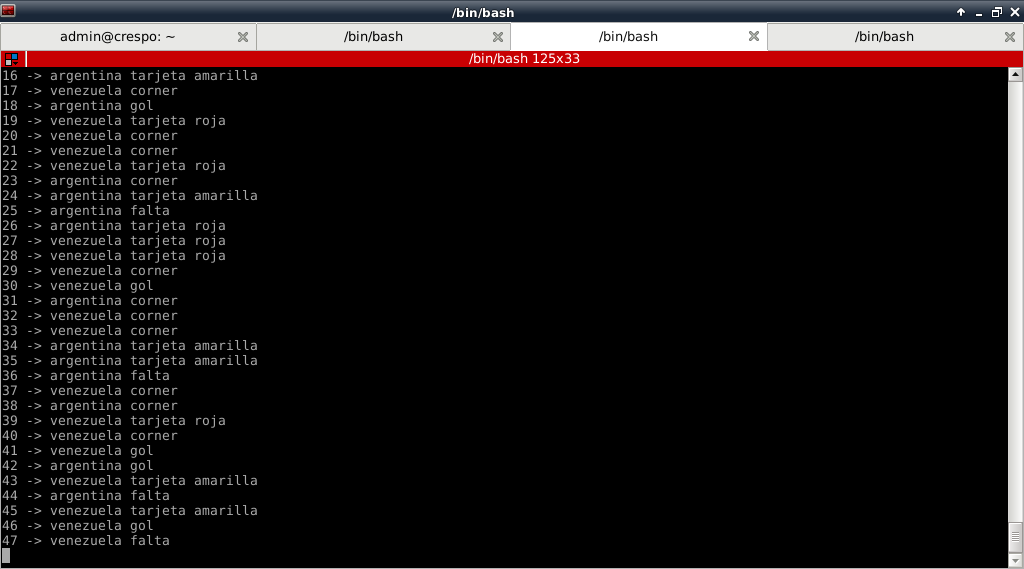
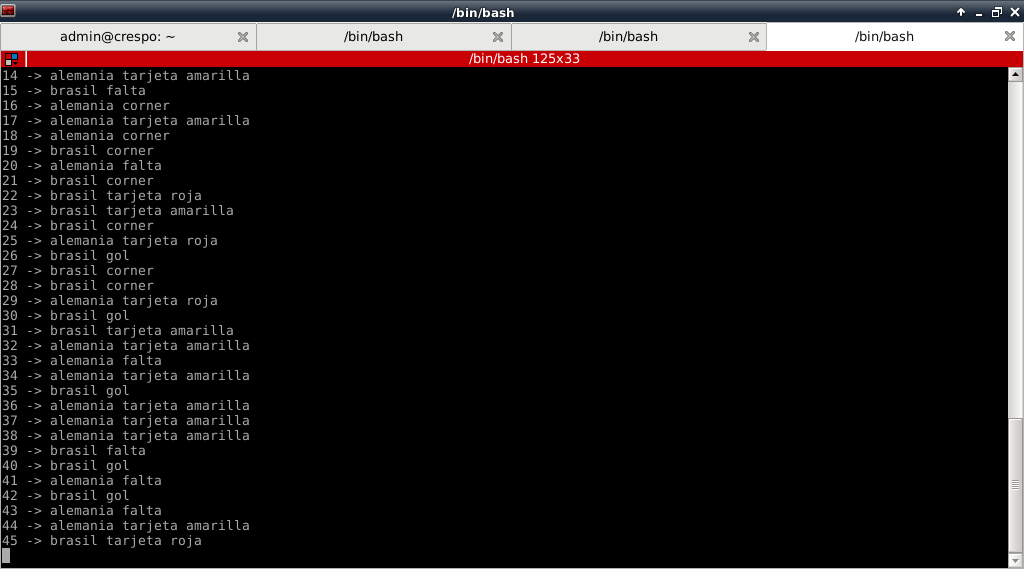
The server generates a series of messages with countries and events per country; the idea is to publish a random country and event. Two clients will be created, each showing the information of 2 countries. This is thanks to PUB/SUB, since the subscriber only receives the information it needs.
The server code is shown below:
#!/usr/bin/env python
#Se importa ZeroMQ
import zmq
#Se importa choice a partir de random
from random import choice
#Se crea la instancia del contexto
context = zmq.Context()
#Se crea el socket pasandole argumento de publicacion PUB
socket = context.socket(zmq.PUB)
#Se asocia la IP y el puerto que va a escuchar.
socket.bind("tcp://127.0.0.1:5000")
#Se importa sleep
from time import sleep
#Se crea una lista de paises y de eventos
paises = ['holanda','brasil','alemania','portugal','argentina','italia','rusia','venezuela']
eventos = ['tarjeta amarilla','tarjeta roja','gol','corner','falta']

#Se crea un contador con valor inicial 1
c = 1
#Se crea un ciclo indefinido
while True:
    #Se define un mensaje pasando de forma aleatoria un pais y un evento
    mensaje = choice( paises) + " " + choice(eventos)
    #Se muestra en pantalla el valor del contador y el mensaje.
    print "->",c , mensaje
    #Se envia el mensaje
    socket.send(mensaje)
    #Se genera un retardo de 1 seg
    sleep(1)
    #Se incrementa el contador
    c += 1
    #Si se llega a 180 se termina el ciclo si no continua.
    if c == 180:
        break
    else:
        continue
Next, the code of the 2 clients (subscribers): Client 1:
#!/usr/bin/env python

#Se importa zeroMQ
import zmq
#Se importa sleep a partir de time
from time import sleep
#Se crea la instancia del contexto de zeroMQ
context = zmq.Context()
#Se crea el socket del suscriptor SUB
socket = context.socket(zmq.SUB)
#Se crea la conexion a la IP y puerto del servidor
socket.connect("tcp://127.0.0.1:5000")
#Se define una opcion del socket del suscriptor con argentina y venezuela
socket.setsockopt(zmq.SUBSCRIBE, "argentina")
socket.setsockopt(zmq.SUBSCRIBE, "venezuela")
#Se define el valor inicial de un contador
c = 1
#Se crea un ciclo indefinido
while True:
    #Se muestra en pantalla el valor del contador y el mensaje recibido
    print  c, "->",socket.recv()
    #Se genera un retardo de 1 seg en cada ciclo
    sleep(1)
    #Se incrementa el contador en 1
    c += 1
    #Si el contador llega a 90 se termina el ciclo, si no continua
    if c == 90:
        break
    else:
        continue
Client 2:
#!/usr/bin/env python

#Se importa zeroMQ
import zmq
#Se importa sleep a partir de time
from time import sleep
#Se crea la instancia del contexto de zeroMQ
context = zmq.Context()
#Se crea el socket del suscriptor SUB
socket = context.socket(zmq.SUB)
#Se crea la conexion a la IP y puerto del servidor
socket.connect("tcp://127.0.0.1:5000")
#Se define una opcion del socket del suscriptor con brasil y alemania
socket.setsockopt(zmq.SUBSCRIBE, "brasil")
socket.setsockopt(zmq.SUBSCRIBE, "alemania")
#Se define el valor inicial de un contador
c = 1
#Se crea un ciclo indefinido
while True:
    #Se muestra en pantalla el valor del contador y el mensaje recibido
    print  c, "->",socket.recv()
    #Se genera un retardo de 1 seg en cada ciclo
    sleep(1)
    #Se incrementa el contador en 1
    c += 1
    #Si el contador llega a 90 se termina el ciclo, si no continua
    if c == 90:
        break
    else:
        continue
It is as if the server were narrating several football matches and the clients only show the information of the match they are interested in.
The following figure shows the server output:
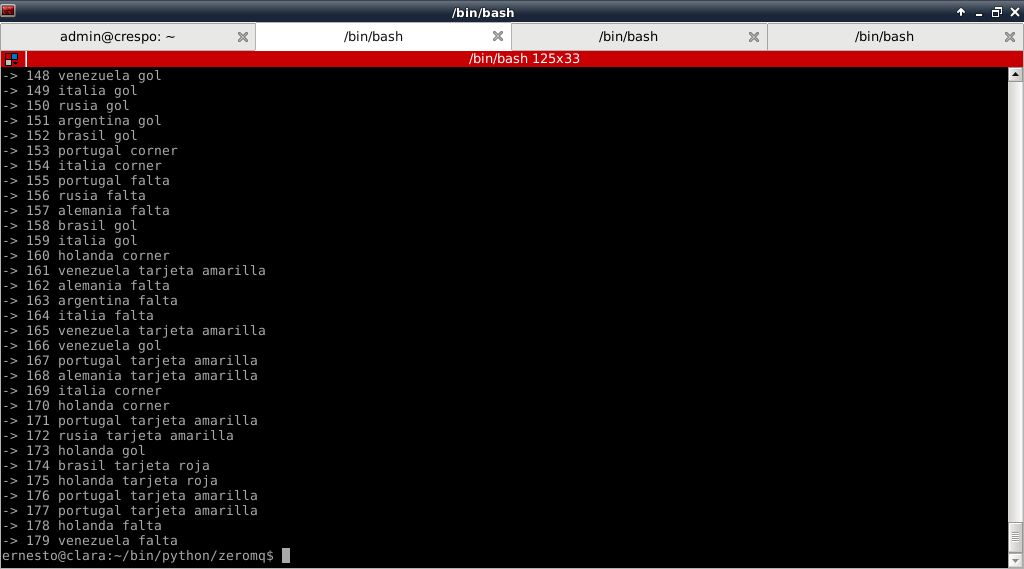
Next are the 2 figures of the clients: Client 1 (Venezuela, Argentina):
Client 2 (Brazil, Germany):
More complicated things that can be done with ZeroMQ are starting to show up, and there are still more to come...
Make a donation! If you liked this article you can donate with Bitcoin (BTC) using the digital wallet of your choice to the following address: 17MtNybhdkA9GV3UNS6BTwPcuhjXoPrSzV
Or by scanning the QR code from your wallet:
