This article will explain how to call 2 windows created with qtdesigner.
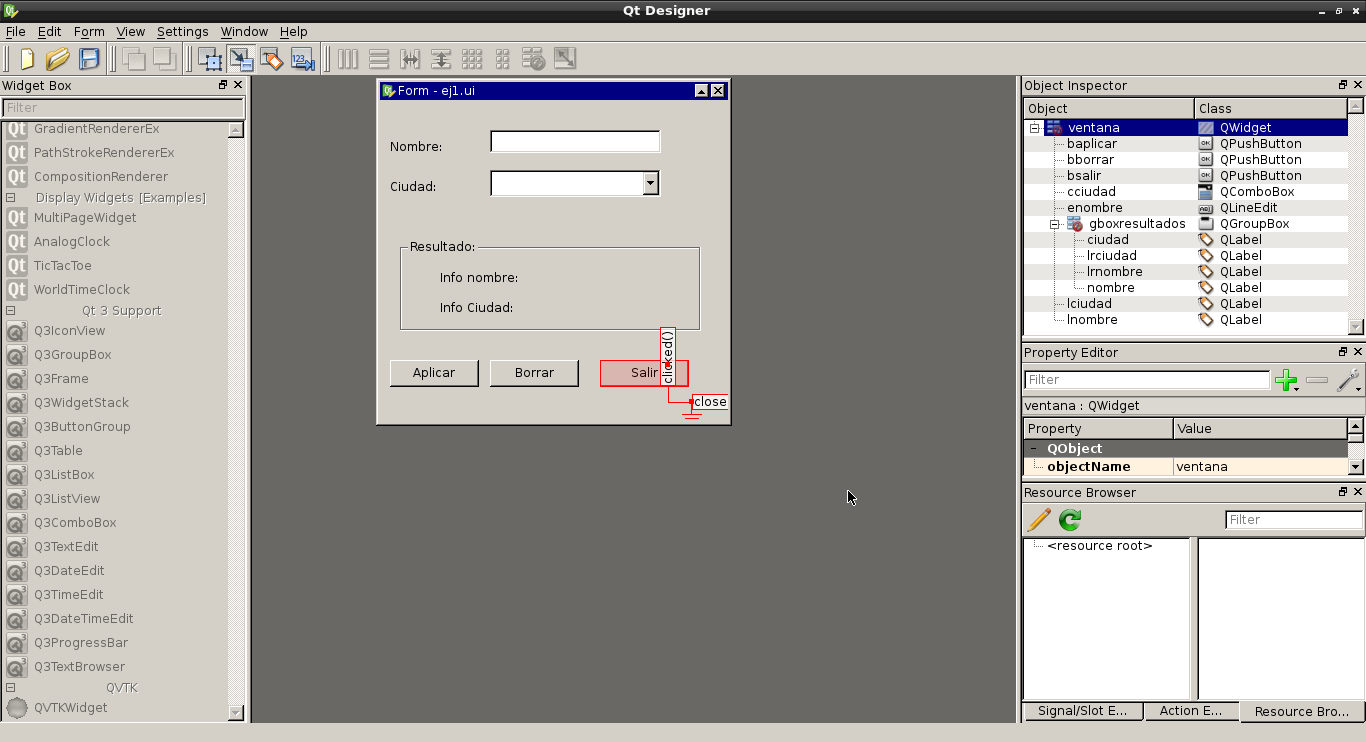
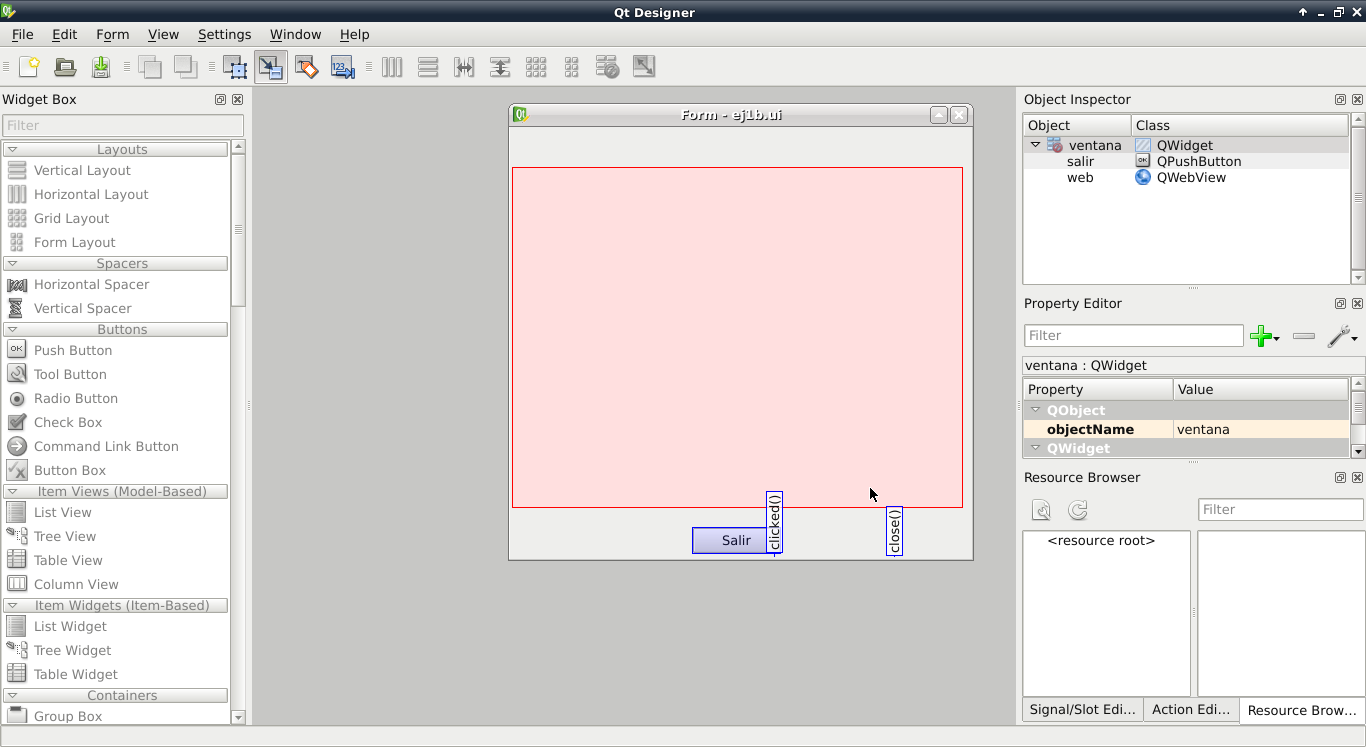
The first window has a data entry field for the name and a combo box listing cities, and it has 3 buttons: apply, clear and quit. Apply takes the name and the city and shows them in a pair of labels; additionally, it shows a window with html information about the name and the city, and that window has a quit button that hides it.
Both windows are shown below with the signals defined in qtdesigner:
Main window:
Secondary window:
Both windows are saved with the names ej1.ui and ej1b.ui, and then both files are converted to python code with the following commands:
pyuic4 -x ej1.ui -o ej1.py
pyuic4 -x ej1b.ui -o ej1b.py
The code of ej1.py and ej1b.py is shown below:
File ej1.py:
# -*- coding: utf-8 -*-

# Form implementation generated from reading ui file 'ej1.ui'
#
# Created: Sun Sep 16 13:21:47 2012
#      by: PyQt4 UI code generator 4.9.3
#
# WARNING! All changes made in this file will be lost!

from PyQt4 import QtCore, QtGui

try:
    _fromUtf8 = QtCore.QString.fromUtf8
except AttributeError:
    _fromUtf8 = lambda s: s

class Ui_ventana(object):
    def setupUi(self, ventana):
        ventana.setObjectName(_fromUtf8("ventana"))
        ventana.resize(348, 322)
        self.lnombre = QtGui.QLabel(ventana)
        self.lnombre.setGeometry(QtCore.QRect(10, 40, 62, 15))
        self.lnombre.setObjectName(_fromUtf8("lnombre"))
        self.lciudad = QtGui.QLabel(ventana)
        self.lciudad.setGeometry(QtCore.QRect(10, 80, 62, 15))
        self.lciudad.setObjectName(_fromUtf8("lciudad"))
        self.gboxresultados = QtGui.QGroupBox(ventana)
        self.gboxresultados.setGeometry(QtCore.QRect(20, 140, 301, 91))
        self.gboxresultados.setObjectName(_fromUtf8("gboxresultados"))
        self.lrnombre = QtGui.QLabel(self.gboxresultados)
        self.lrnombre.setGeometry(QtCore.QRect(40, 30, 91, 16))
        self.lrnombre.setObjectName(_fromUtf8("lrnombre"))
        self.lrciudad = QtGui.QLabel(self.gboxresultados)
        self.lrciudad.setGeometry(QtCore.QRect(40, 60, 81, 16))
        self.lrciudad.setObjectName(_fromUtf8("lrciudad"))
        self.nombre = QtGui.QLabel(self.gboxresultados)
        self.nombre.setGeometry(QtCore.QRect(140, 30, 111, 16))
        self.nombre.setText(_fromUtf8(""))
        self.nombre.setObjectName(_fromUtf8("nombre"))
        self.ciudad = QtGui.QLabel(self.gboxresultados)
        self.ciudad.setGeometry(QtCore.QRect(140, 60, 101, 16))
        self.ciudad.setText(_fromUtf8(""))
        self.ciudad.setObjectName(_fromUtf8("ciudad"))
        self.baplicar = QtGui.QPushButton(ventana)
        self.baplicar.setGeometry(QtCore.QRect(10, 260, 89, 27))
        self.baplicar.setObjectName(_fromUtf8("baplicar"))
        self.bsalir = QtGui.QPushButton(ventana)
        self.bsalir.setGeometry(QtCore.QRect(220, 260, 89, 27))
        self.bsalir.setObjectName(_fromUtf8("bsalir"))
        self.cciudad = QtGui.QComboBox(ventana)
        self.cciudad.setGeometry(QtCore.QRect(110, 70, 171, 27))
        font = QtGui.QFont()
        font.setFamily(_fromUtf8("Liberation Sans"))
        font.setPointSize(12)
        self.cciudad.setFont(font)
        self.cciudad.setMaxVisibleItems(5)
        self.cciudad.setObjectName(_fromUtf8("cciudad"))
        self.enombre = QtGui.QLineEdit(ventana)
        self.enombre.setGeometry(QtCore.QRect(110, 30, 171, 23))
        self.enombre.setObjectName(_fromUtf8("enombre"))
        self.bborrar = QtGui.QPushButton(ventana)
        self.bborrar.setGeometry(QtCore.QRect(110, 260, 89, 27))
        self.bborrar.setObjectName(_fromUtf8("bborrar"))

        self.retranslateUi(ventana)
        QtCore.QObject.connect(self.bsalir, QtCore.SIGNAL(_fromUtf8("clicked()")), ventana.close)
        QtCore.QObject.connect(self.bborrar, QtCore.SIGNAL(_fromUtf8("clicked()")), self.ciudad.clear)
        QtCore.QObject.connect(self.bborrar, QtCore.SIGNAL(_fromUtf8("clicked()")), self.nombre.clear)
        QtCore.QObject.connect(self.bborrar, QtCore.SIGNAL(_fromUtf8("clicked()")), self.enombre.clear)
        QtCore.QMetaObject.connectSlotsByName(ventana)

    def retranslateUi(self, ventana):
        ventana.setWindowTitle(QtGui.QApplication.translate("ventana", "Form", None, QtGui.QApplication.UnicodeUTF8))
        self.lnombre.setText(QtGui.QApplication.translate("ventana", "Nombre:", None, QtGui.QApplication.UnicodeUTF8))
        self.lciudad.setText(QtGui.QApplication.translate("ventana", "Ciudad:", None, QtGui.QApplication.UnicodeUTF8))
        self.gboxresultados.setTitle(QtGui.QApplication.translate("ventana", "Resultado:", None, QtGui.QApplication.UnicodeUTF8))
        self.lrnombre.setText(QtGui.QApplication.translate("ventana", "Info nombre:", None, QtGui.QApplication.UnicodeUTF8))
        self.lrciudad.setText(QtGui.QApplication.translate("ventana", "Info Ciudad:", None, QtGui.QApplication.UnicodeUTF8))
        self.baplicar.setText(QtGui.QApplication.translate("ventana", "Aplicar", None, QtGui.QApplication.UnicodeUTF8))
        self.bsalir.setText(QtGui.QApplication.translate("ventana", "Salir", None, QtGui.QApplication.UnicodeUTF8))
        self.bborrar.setText(QtGui.QApplication.translate("ventana", "Borrar", None, QtGui.QApplication.UnicodeUTF8))


if __name__ == "__main__":
    import sys
    app = QtGui.QApplication(sys.argv)
    ventana = QtGui.QWidget()
    ui = Ui_ventana()
    ui.setupUi(ventana)
    ventana.show()
    sys.exit(app.exec_())
The ej1b.py file is shown below:
# -*- coding: utf-8 -*-

# Form implementation generated from reading ui file 'ej1b.ui'
#
# Created: Sun Sep 16 11:55:31 2012
#      by: PyQt4 UI code generator 4.9.3
#
# WARNING! All changes made in this file will be lost!

from PyQt4 import QtCore, QtGui

try:
    _fromUtf8 = QtCore.QString.fromUtf8
except AttributeError:
    _fromUtf8 = lambda s: s

class Ui_ventana_web(object):
    def setupUi(self, ventana_web):
        ventana_web.setObjectName(_fromUtf8("ventana_web"))
        ventana_web.resize(458, 430)
        self.salir = QtGui.QPushButton(ventana_web)
        self.salir.setGeometry(QtCore.QRect(180, 400, 89, 27))
        self.salir.setObjectName(_fromUtf8("salir"))
        self.web = QtWebKit.QWebView(ventana_web)
        self.web.setGeometry(QtCore.QRect(0, 40, 451, 341))
        self.web.setUrl(QtCore.QUrl(_fromUtf8("about:blank")))
        self.web.setObjectName(_fromUtf8("web"))

        self.retranslateUi(ventana_web)
        QtCore.QObject.connect(self.salir, QtCore.SIGNAL(_fromUtf8("clicked()")), ventana_web.hide)
        QtCore.QMetaObject.connectSlotsByName(ventana_web)

    def retranslateUi(self, ventana_web):
        ventana_web.setWindowTitle(QtGui.QApplication.translate("ventana_web", "Form", None, QtGui.QApplication.UnicodeUTF8))
        self.salir.setText(QtGui.QApplication.translate("ventana_web", "Salir", None, QtGui.QApplication.UnicodeUTF8))

from PyQt4 import QtWebKit

if __name__ == "__main__":
    import sys
    app = QtGui.QApplication(sys.argv)
    ventana_web = QtGui.QWidget()
    ui = Ui_ventana_web()
    ui.setupUi(ventana_web)
    ventana_web.show()
    sys.exit(app.exec_())
As both files show, there are 2 classes in which each window, its widgets, its signals and its methods are defined.
These 2 files are not modified directly: if changes are needed in the interface with qtdesigner and the files are generated again, everything that was modified in those files will be lost. The solution is to create a python script that imports the classes from these 2 files and makes the necessary modifications (new signals, changes to widget values, calls to the windows, etc).
The run.py file will handle the customization of the signals, new methods, new variables and the management of the windows:
#!/usr/bin/env python
# -*- coding: utf-8 -*-

#Se importa el módulo sys
import sys

#Se importa de PyQt4 QtCore y QtGui
from PyQt4 import QtCore, QtGui

#Se importa la clase Ui_ventana de ej1
from ej1 import Ui_ventana
#Se importa la clase Ui_ventana_web de ej1b
from ej1b import Ui_ventana_web

#Se crea la clase de la ventana secundaria
#Se define el archivo html que abrirá el widget web

class DialogSecundaria(QtGui.QDialog):

    def __init__(self, parent=None):
        QtGui.QWidget.__init__(self, parent)
        self.ui_d = Ui_ventana_web()
        self.ui_d.setupUi(self)
        self.ui_d.web.setUrl(QtCore.QUrl("file:///home/ernesto/bin/python/qtdesigner/ej1/temporal.html"))

#Se crea la clase principal
#Donde se define la lista de ciudades y se agregan al widget combobox
#Se genera la señal del botón baplicar con el método AbrirVentana,
#el cual hace el llamado a la clase ventana secundaria.
class VentanaPrincipal(QtGui.QDialog):

    def __init__(self, parent=None):
        QtGui.QWidget.__init__(self, parent)
        self.ui = Ui_ventana()
        self.__ciudades = ["Valencia","Maracay","Barquisimeto","Merida","Caracas"]

        self.ui.setupUi(self)
        for ciudad in self.__ciudades:
            self.ui.cciudad.addItem(ciudad)

    QtCore.QObject.connect(self.ui.baplicar, QtCore.SIGNAL("clicked()"), self.AbrirVentana)


    def AbrirVentana(self):
        #Se crea un archivo html donde se le pasa los datos del nombre y ciudad en formato html
        archivo = open("/home/ernesto/bin/python/qtdesigner/ej1/temporal.html","w")
    mensaje = """<html>
        <head><title>Reporte de prueba</title></head>
        <body>
        <h1>Nombre:%s</h1>
        <h2>Ciudad:%s</h2>
        </body>
        </html>""" %(self.ui.enombre.text(),self.ui.cciudad.currentText())
    lista = [mensaje]
    archivo.writelines(lista)
    archivo.close()
    #Se publica el nombre y la ciudad en la ventana principal
    self.ui.nombre.setText(self.ui.enombre.text())
    self.ui.ciudad.setText(self.ui.cciudad.currentText())
        #Se muestra la ventana secundaria.
        self.w = DialogSecundaria()
        self.w.show()

    def quit(self):
        sys.exit(app.exec_())


if __name__ == "__main__":
    app = QtGui.QApplication(sys.argv)
    myapp = VentanaPrincipal()
    myapp.show()
    sys.exit(app.exec_())
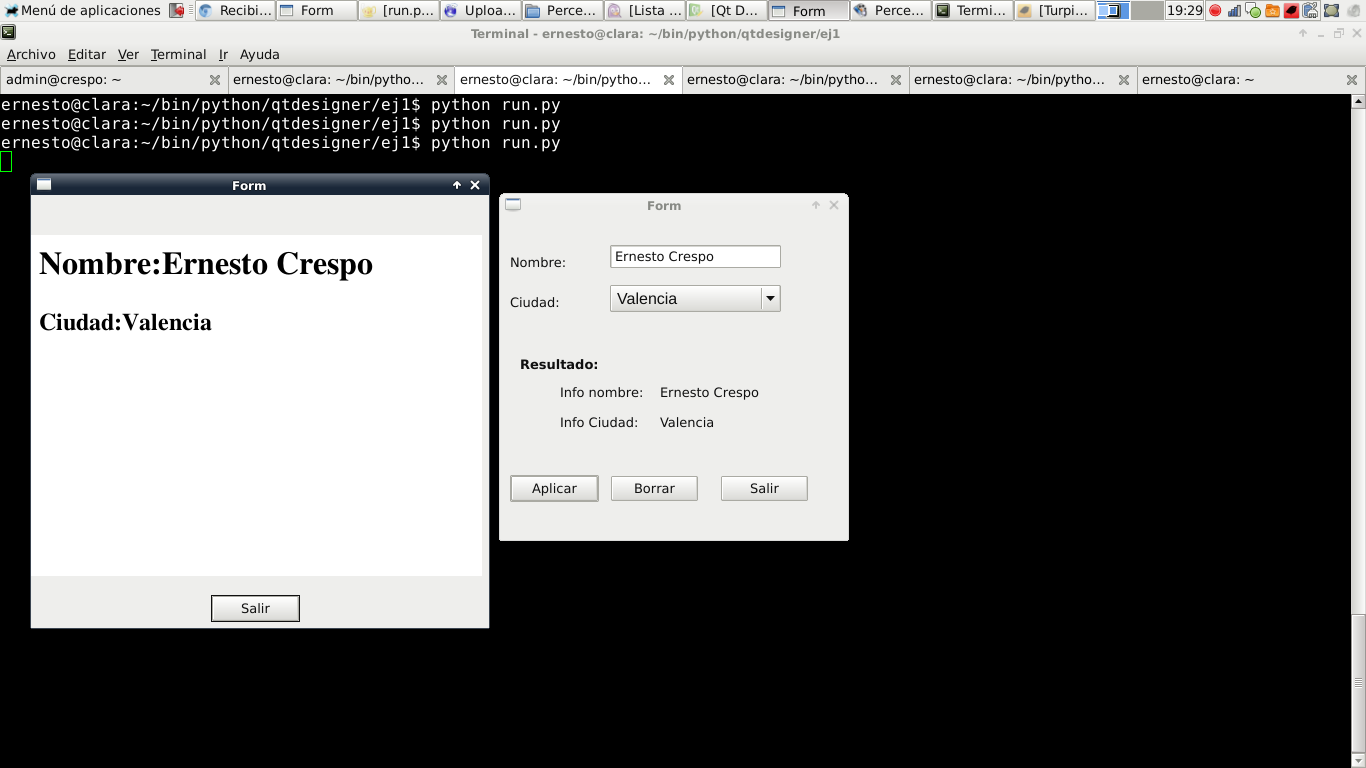
The following figure shows the application running:
If you are interested in reviewing the interfaces made with qtdesigner and the python code, you can find them (broken link) in my bitbucket repository.
I want to thank Hernán Ramírez for the tips on handling several windows; here is his blog.
Make a donation! If you liked the article you can make a donation with Bitcoin (BTC) using the digital wallet of your choice to the following address: 17MtNybhdkA9GV3UNS6BTwPcuhjXoPrSzV
Or by scanning the QR code from your wallet:
