To review the articles about pyQt you can check the following link.
In this case, instead of writing all the code of the graphical interface, the QtDesigner tool will be used.
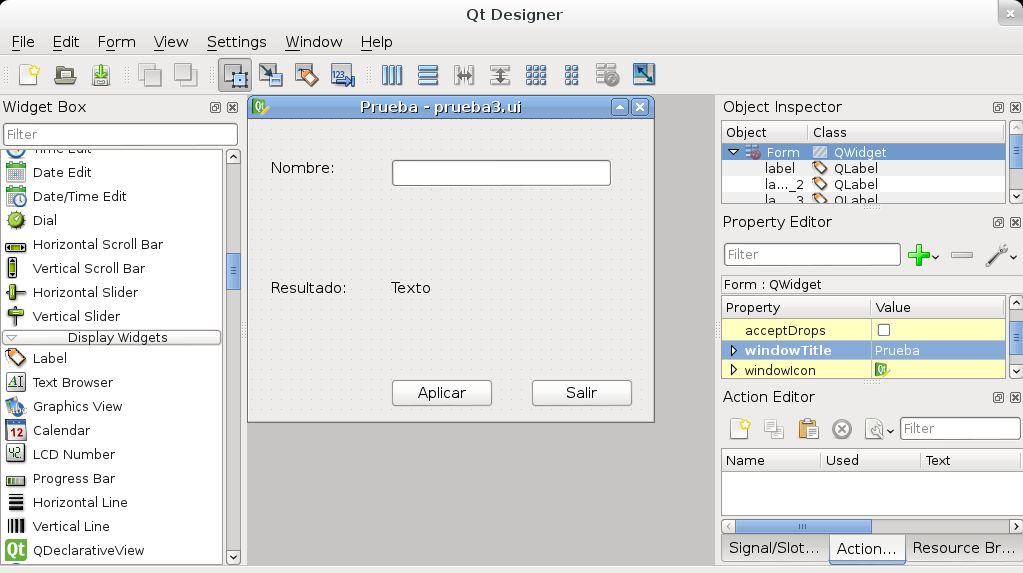
The person's name will be requested, and when the Apply button is clicked the name typed in the input field will be shown in the label. There is a second button which ends the application when clicked.
The following figure shows the interface design:
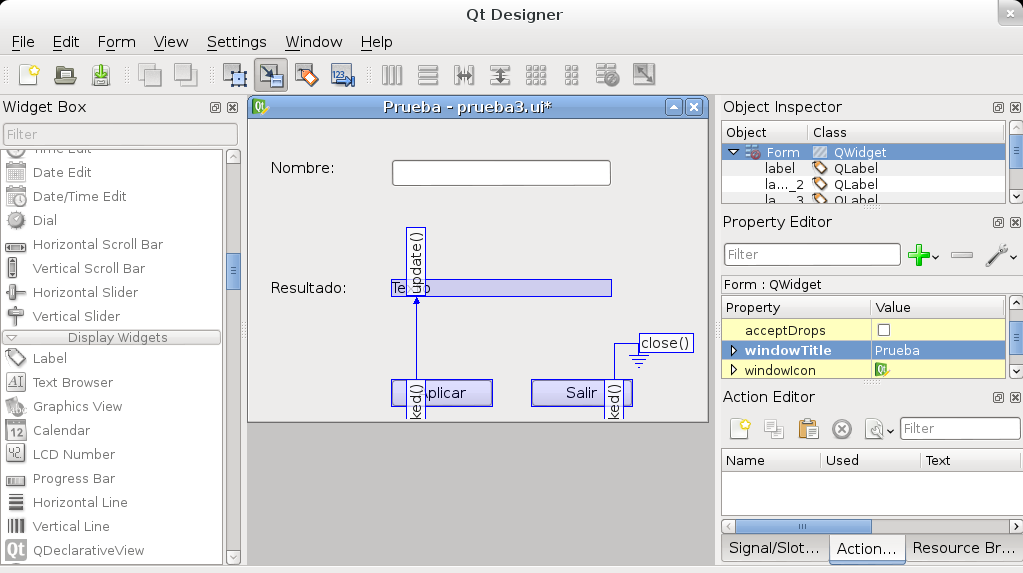
The following figure shows the relationship between the buttons and signals:
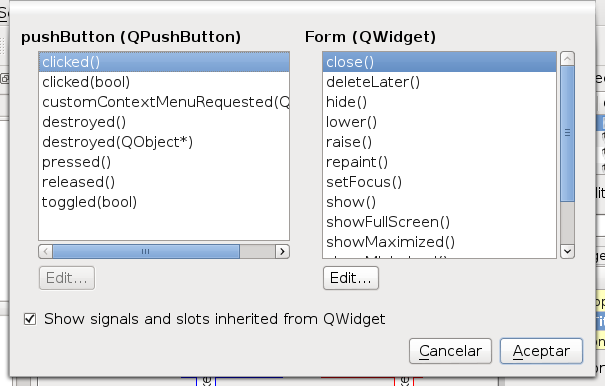
A function is associated with each button, as the following two figures show: Quit button:
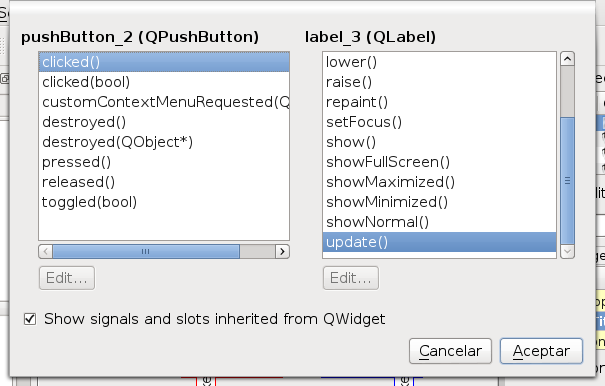
Apply button:
After saving the graphical interface with the name prueba3.ui, the python code will be generated with the command:
pyuic4 -x prueba3.ui -o prueba3.py
The generated code is shown below:
# -*- coding: utf-8 -*-

# Form implementation generated from reading ui file 'prueba3.ui'

#

# Created: Sun Jul 29 22:49:50 2012

#      by: PyQt4 UI code generator 4.9.1

#

# WARNING! All changes made in this file will be lost!


from PyQt4 import QtCore, QtGui


try:

    _fromUtf8 = QtCore.QString.fromUtf8

except AttributeError:

    _fromUtf8 = lambda s: s


class Ui_Form(object):

    def setupUi(self, Form):

        Form.setObjectName(_fromUtf8("Form"))

        Form.resize(400, 300)

        self.pushButton = QtGui.QPushButton(Form)

        self.pushButton.setGeometry(QtCore.QRect(280, 260, 102, 28))

        self.pushButton.setObjectName(_fromUtf8("pushButton"))

        self.pushButton_2 = QtGui.QPushButton(Form)

        self.pushButton_2.setGeometry(QtCore.QRect(140, 260, 102, 28))

        self.pushButton_2.setObjectName(_fromUtf8("pushButton_2"))

        self.lineEdit = QtGui.QLineEdit(Form)

        self.lineEdit.setGeometry(QtCore.QRect(140, 40, 221, 28))

        self.lineEdit.setObjectName(_fromUtf8("lineEdit"))

        self.label = QtGui.QLabel(Form)

        self.label.setGeometry(QtCore.QRect(20, 40, 69, 18))

        self.label.setObjectName(_fromUtf8("label"))

        self.label_2 = QtGui.QLabel(Form)

        self.label_2.setGeometry(QtCore.QRect(20, 160, 81, 18))

        self.label_2.setObjectName(_fromUtf8("label_2"))

        self.label_3 = QtGui.QLabel(Form)

        self.label_3.setGeometry(QtCore.QRect(140, 160, 221, 18))

        self.label_3.setObjectName(_fromUtf8("label_3"))

        self.retranslateUi(Form)

        QtCore.QObject.connect(self.pushButton, QtCore.SIGNAL(_fromUtf8("clicked()")), Form.close)

        QtCore.QObject.connect(self.pushButton_2, QtCore.SIGNAL(_fromUtf8("clicked()")), self.label_3.update)

        QtCore.QMetaObject.connectSlotsByName(Form)

    def retranslateUi(self, Form):

        Form.setWindowTitle(QtGui.QApplication.translate("Form", "Prueba", None, QtGui.QApplication.UnicodeUTF8))

        self.pushButton.setText(QtGui.QApplication.translate("Form", "Salir", None, QtGui.QApplication.UnicodeUTF8))

        self.pushButton_2.setText(QtGui.QApplication.translate("Form", "Aplicar", None, QtGui.QApplication.UnicodeUTF8))

        self.label.setText(QtGui.QApplication.translate("Form", "Nombre:", None, QtGui.QApplication.UnicodeUTF8))

        self.label_2.setText(QtGui.QApplication.translate("Form", "Resultado:", None, QtGui.QApplication.UnicodeUTF8))

        self.label_3.setText(QtGui.QApplication.translate("Form", "Texto", None, QtGui.QApplication.UnicodeUTF8))


if __name__ == "__main__":

    import sys

    app = QtGui.QApplication(sys.argv)

    Form = QtGui.QWidget()

    ui = Ui_Form()

    ui.setupUi(Form)

    Form.show()

    sys.exit(app.exec_())
The relationship of both buttons (Quit and Apply) with the events (Form.close and label_3.update) is highlighted in blue.
The change that has to be made in the code is to create a method in the generated class that takes the content of the lineEdit widget and passes it to label_3; it is shown in the console with print and in the label with the label's set method.
Below is the modified code with the sections in blue showing what was explained above:
#!/usr/bin/env python

# -*- coding: utf-8 -*-

# Form implementation generated from reading ui file 'prueba3.ui'

#

# Created: Sun Jul 29 22:27:29 2012

#      by: PyQt4 UI code generator 4.9.1

#

# WARNING! All changes made in this file will be lost!

from PyQt4 import QtCore, QtGui

try:

    _fromUtf8 = QtCore.QString.fromUtf8

except AttributeError:

    _fromUtf8 = lambda s: s

class Ui_Form(object):

    def Actualizar(self):

        texto = self.lineEdit.text()

        print texto

        self.label_3.setText(texto)


    def setupUi(self, Form):

        Form.setObjectName(_fromUtf8("Form"))

        Form.resize(400, 300)

        self.pushButton = QtGui.QPushButton(Form)

        self.pushButton.setGeometry(QtCore.QRect(280, 260, 102, 28))

        self.pushButton.setObjectName(_fromUtf8("pushButton"))

        self.pushButton_2 = QtGui.QPushButton(Form)

        self.pushButton_2.setGeometry(QtCore.QRect(140, 260, 102, 28))

        self.pushButton_2.setObjectName(_fromUtf8("pushButton_2"))

        self.lineEdit = QtGui.QLineEdit(Form)

        self.lineEdit.setGeometry(QtCore.QRect(140, 40, 221, 28))

        self.lineEdit.setObjectName(_fromUtf8("lineEdit"))

        self.label = QtGui.QLabel(Form)

        self.label.setGeometry(QtCore.QRect(20, 40, 69, 18))

        self.label.setObjectName(_fromUtf8("label"))

        self.label_2 = QtGui.QLabel(Form)

        self.label_2.setGeometry(QtCore.QRect(20, 160, 81, 18))

        self.label_2.setObjectName(_fromUtf8("label_2"))

        self.label_3 = QtGui.QLabel(Form)

        self.label_3.setGeometry(QtCore.QRect(140, 160, 221, 18))

        self.label_3.setObjectName(_fromUtf8("label_3"))

        self.retranslateUi(Form)

        QtCore.QObject.connect(self.pushButton, QtCore.SIGNAL(_fromUtf8("clicked()")), Form.close)

        QtCore.QObject.connect(self.pushButton_2, QtCore.SIGNAL(_fromUtf8("clicked()")), self.Actualizar)

        QtCore.QMetaObject.connectSlotsByName(Form)

    def retranslateUi(self, Form):

        Form.setWindowTitle(QtGui.QApplication.translate("Form", "Prueba", None, QtGui.QApplication.UnicodeUTF8))

        self.pushButton.setText(QtGui.QApplication.translate("Form", "Salir", None, QtGui.QApplication.UnicodeUTF8))

        self.pushButton_2.setText(QtGui.QApplication.translate("Form", "Aplicar", None, QtGui.QApplication.UnicodeUTF8))

        self.label.setText(QtGui.QApplication.translate("Form", "Nombre:", None, QtGui.QApplication.UnicodeUTF8))

        self.label_2.setText(QtGui.QApplication.translate("Form", "Resultado:", None, QtGui.QApplication.UnicodeUTF8))

        self.label_3.setText(QtGui.QApplication.translate("Form", "Texto", None, QtGui.QApplication.UnicodeUTF8))

if __name__ == "__main__":

    import sys

    app = QtGui.QApplication(sys.argv)

    Form = QtGui.QWidget()

    ui = Ui_Form()

    ui.setupUi(Form)

    Form.show()

    sys.exit(app.exec_())
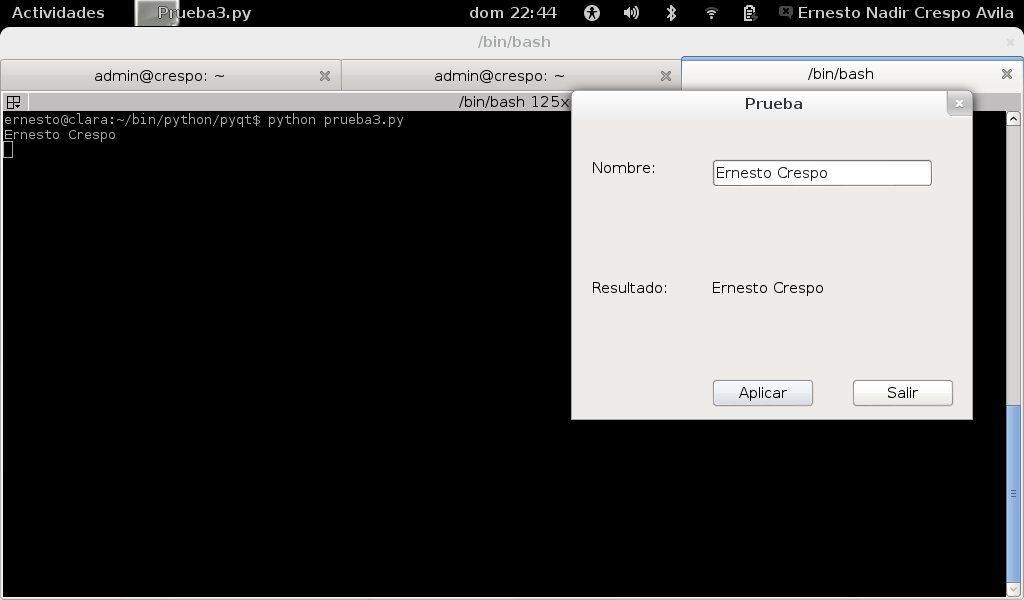
The following figure shows the application running after capturing and showing the information from the LineEdit widget:
Make a donation! If you liked the article you can make a donation with Bitcoin (BTC) using the digital wallet of your choice to the following address: 17MtNybhdkA9GV3UNS6BTwPcuhjXoPrSzV
Or by scanning the QR code from your wallet:
