Continuing with the series of flask tutorials, this time we will use what was covered in the database part to let users log in.
The previous articles are:
This article is based on the English article The Flask Mega tutorial, Part V: User Logins.
Python3 compatibility
So that openid supports python3, the Dockerfile was updated so that instead of using the openid from pip, the version from the github repository is downloaded:
FROM python


WORKDIR /code


RUN pip install --upgrade pip


RUN pip install  flask


RUN pip install  flask-login


RUN pip install  git+git://github.com/mitsuhiko/flask-openid.git


RUN pip install  flask-mail


RUN pip install  flask-sqlalchemy


RUN pip install  sqlalchemy-migrate


RUN pip install  flask-whooshalchemy


RUN pip install  flask-wtf


RUN pip install  flask-babel


RUN pip install  guess_language


RUN pip install  flipflop


RUN pip install  coverage


RUN pip install  redis


EXPOSE 5000


ADD . /code


CMD python run.py
The file and directory structure of the project for this article is the following:
tutorial-flask
├── app
│   ├── forms.py
│   ├── __init__.py
│   ├── models.py
│   ├── __pycache__
│   ├── templates
│   │   ├── base.html
│   │   ├── edit.html
│   │   ├── index.html
│   │   ├── login.html
│   │   ├── post.html
│   │   └── user.html
│   └── views.py
├── app.db
├── config.py
├── db_create.py
├── db_downgrade.py
├── db_migrate.py
├── db_repository
│   ├── __init__.py
│   ├── manage.py
│   ├── migrate.cfg
│   ├── __pycache__
│   ├── README
│   └── versions
│       ├── 001_migration.py
│       ├── 002_migration.py
│       ├── __init__.py
│       └── __pycache__
├── db_upgrade.py
├── docker-compose.yml
├── Dockerfile
├── __pycache__
├── README.md
├── run.py
└── tmp
Reviewing the user in models.py
The models.py file has changes in the User class; this update makes it friendly for using flask-login:
#de app se importa db


from app import db


#Se crea la tabla User que hereda de db.Model


class User(db.Model):


    #Se crea la columna id como clave primaria e integer


    id = db.Column(db.Integer, primary_key=True)


    #Se crea la columna nickname como string de tamagn 64, como unico.


    usuario = db.Column(db.String(64), index=True, unique=True)


    #Columna correo, de 120 de tamagno del string y unico.


    correo = db.Column(db.String(120), index=True, unique=True)


    #Posts. que tiene relacion con la clase Post (tabla post),


    posts = db.relationship('Post', backref='author', lazy='dynamic')


#Se usa el decorador property, se consulta si esta atenticado


    @property


    def is_authenticated(self):


        return True


#Se usa el decorador property y se consulta si esta activo


    @property


    def is_active(self):


        return True


#Se usa el decorador property, se consulta si es anonimo el usuario


    @property


    def is_anonymous(self):


        return False


#Se tra el id del usuario


    def get_id(self):


        try:


            return unicode(self.id)  # python 2


        except NameError:


            return str(self.id)  # python 3


    def __repr__(self):


        return '<User %r>' % (self.usuario)


#Tabla Post que hereda de model


class Post(db.Model):


    #Se crea el id del post como entero y clave primaria


    id = db.Column(db.Integer, primary_key=True)


    #Se crea la columna body como string de 140 caracteres


    cuerpo = db.Column(db.String(140))


    #Se define la marca de tiempo.


    timestamp = db.Column(db.DateTime)


    #Se define el id del usuario, es una clave foranea de la tabla usuario


    #Columna id.


    user_id = db.Column(db.Integer, db.ForeignKey('user.id'))


    def __repr__(self):


        return '<Post %r>' % (self.cuerpo)
views.py file
The views.py file now handles starting and ending the session. Below are the contents of the file:
#Se importa render_template, flash,redirect, session,url_for, request y g


from flask import render_template, flash, redirect, session, url_for, request, g


#Se importa login_user,logout_user,current_user y login_required


from flask.ext.login import login_user, logout_user, current_user, \


    login_required


#Se importa la aplicacion app, db, lm y oid


from app import app, db, lm, oid


#De forms.py se importa LoginForm


from .forms import LoginForm


#Se importa User de models


from .models import User


#Se retorna  el usuario a partir el id de la base de datos


#la funcion se usara por parte de flask-login


@lm.user_loader


def load_user(id):


    return User.query.get(int(id))


#Se define g.user a partir del usuario actual.


#Esta funcion corre cada vez que una solicitud se realiza a


#fin de saber si el usuario hizo login y es el usuario actual


@app.before_request


def before_request():


    g.user = current_user


#Se define la pagina index por defecto y se requiere que haga login el usuario


@app.route('/')


@app.route('/index')


@login_required


def index():


    #Ahora no se usa un usuario por defecto, se comenta esa linea


    #Ahora se toma el usuario g.user el cual es el usuario actual


    user = g.user


    #user = {'usuario': 'Ernesto'}


    posts = [


      {


          'autor': {'usuario': 'John'},


          'asunto': 'Un gran dia en Edimburgo!'


      },


      {


          'autor': {'usuario': 'Jane'},


          'asunto': 'Civil War, una gran pelicula!'


      }


   ]


   return render_template('index.html',


                         title='Inicio',


                         user=user,


                         posts=posts)


#Se define login con url /login con metodos GET y POST


#Se define el manejador de login.


@app.route('/login', methods=['GET', 'POST'])


@oid.loginhandler


def login():


    #Se consulta si el usuario existe, y si esta autenticado


    #Se redrcciona a la pagina index


    if g.user is not None and g.user.is_authenticated:


        return redirect(url_for('index'))


    #Se crea una instancia de LoginForm


    form = LoginForm()


    #Se consulta si validate existe


    if form.validate_on_submit():


        #Se maneja la sesion a partir del formulario con la variable recuerdame


        session['recuerdame'] = form.recuerdame.data


        #Se returna el inicio de login y correo.


        return oid.try_login(form.openid.data, ask_for=['usuario', 'correo'])


    #Se renderiza la plantilla de login.


    return render_template('login.html',


                         title='Inicio sesion',


                         form=form,


                         providers=app.config['PROVEEDORES_OPENID'])


#Se define after_login para la llamada de flask-login


@oid.after_login


def after_login(resp):


    #Si no existe el campo correo o esta vacio


    #Se devuelve un mensaje de login invalido y se redirecciona


    #a la pagina de login


    if resp.correo is None or resp.correo == "":


        flash('Login invalido, intente de nuevo.')


        return redirect(url_for('login'))


    #Se trae los datos del usuario de la base de datos


    user = User.query.filter_by(email=resp.correo).first()


    #SI el usuario no existe


    if user is None:


        #Se trae el usuario de la resp


        usuario = resp.usuario


        #si usuario no existe o esta en blanco


        #Se toma el nombre del usuario del correo


        if usuario is None or usuario == "":


            usuario = resp.correo.split('@')[0]


        #Se agrega el usuario y correo a la base de datos.


        user = User(usuario=usuario, correo=resp.correo)


        db.session.add(user)


        db.session.commit()


    #Se define la variable recuerdame como falsa


    recuerdame = False


    #Si la variable recuerdame esta en el manejo de session


    if 'recuerdame' in session:


        #Se asigna el valor que maneja recuerdame en la sesion


        recuerdame = session['recuerdame']


        session.pop('recuerdame', None)


    #Se inicia login, pasando el usuario y la variable recuerdame


    #Se redirecciona de pagina


    login_user(user, remember=recuerdame)


    return redirect(request.args.get('next') or url_for('index'))


#Se define el fin de la sesion cuando se ve la pagina logout


#Se redirecciona a la pagina index pero primero se finaliza la session


@app.route('/logout')


def logout():


    logout_user()


    return redirect(url_for('index'))
The __init__.py file is shown below:
#Se impostan os, Flask, sqlalchemy,  LoginManager, OpenID y basedir.

import os

from flask import Flask

from flask.ext.sqlalchemy import SQLAlchemy

from flask.ext.login import LoginManager

from flask.ext.openid import OpenID

from config import basedir


#Se crea la instancia de Flask

app = Flask(__name__)

#Se carga la configuracion de config.py

app.config.from_object('config')

#Se carga la info de la base de datos

db = SQLAlchemy(app)

#Se maneja login. con la app.

lm = LoginManager()

lm.init_app(app)

lm.login_view = 'login'

#Se define la carga de la info de OPenID

oid = OpenID(app, os.path.join(basedir, 'tmp'))


#Se importa views y models de app

from app import views, models
base.html file
This file now handles the session handling that was done in views.py:
<html>


  <head>


    {% if title %}


    <title>{{ title }} - microblog</title>


    {% else %}


    <title>microblog</title>


    {% endif %}


  </head>


  <body>


    <div>Microblog:


        <a href="{{ url_for('index') }}">Home</a>


        {% if g.user.is_authenticated %}


        | <a href="{{ url_for('logout') }}">Logout</a>


        {% endif %}


    </div>


    <hr>


    {% with messages = get_flashed_messages() %}


    {% if messages %}


    <ul>


    {% for message in messages %}


        <li>{{ message }} </li>


    {% endfor %}


    </ul>


    {% endif %}


    {% endwith %}


    {% block content %}{% endblock %}


  </body>


</html>
Build the Docker image:
docker-compose build
docker-compose up
When the application starts, the following output appears:
Recreating tutorialflask_tutorial_1
Attaching to tutorialflask_tutorial_1
tutorial_1 |  * Running on http://0.0.0.0:5000/ (Press CTRL+C to quit)
tutorial_1 |  * Restarting with stat
tutorial_1 |  * Debugger is active!
tutorial_1 |  * Debugger pin code: 733-227-386
The source code on gitlab has the following changes:
- The code and the page are in English (since a future article will use internationalization).
- It is necessary to disable sqlalchemy's track notifications in the config.py file: SQLALCHEMY_TRACK_MODIFICATIONS = False
- Deprecated modules are replaced with updated ones; the updated modules are:
- flask_login
- flask_openid
- flask_sqlalchemy
You can see the repository here.
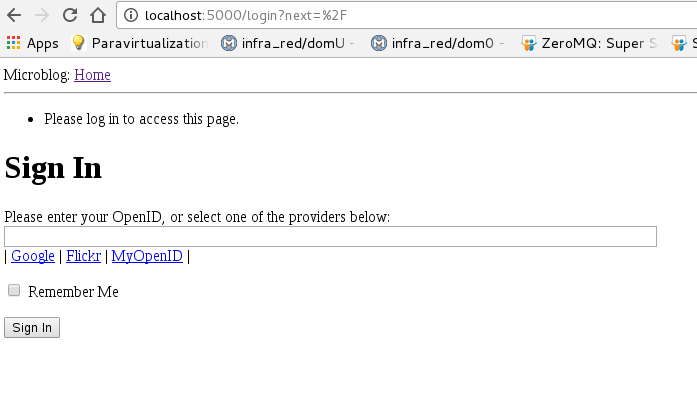
When you open the browser at http://localhost:5000 you get the following figure:
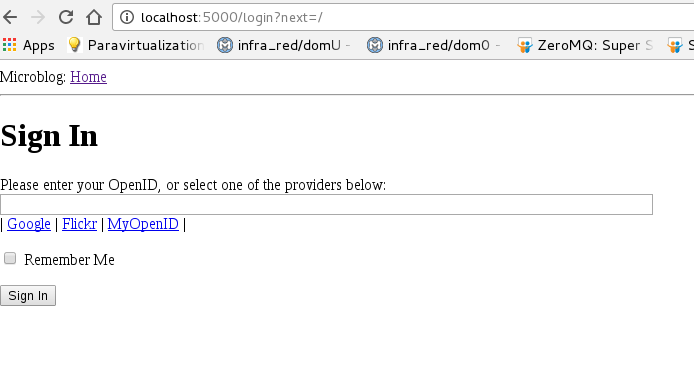
After filling in the form you get the following figure (the message asking you to log in to access the page was removed):
To log out, open the following link http://localhost:5000/logout , which closes the session and returns to the home page.
The application's messages are the following:
tutorial_1 | 172.17.0.1 - - [25/Sep/2016 01:13:39] "GET / HTTP/1.1" 302 -
tutorial_1 | 172.17.0.1 - - [25/Sep/2016 01:13:39] "GET /login?next=%2F HTTP/1.1" 200 -
tutorial_1 | 172.17.0.1 - - [25/Sep/2016 01:15:48] "POST /login?next=%2F HTTP/1.1" 302 -
tutorial_1 | 172.17.0.1 - - [25/Sep/2016 01:15:48] "GET /login?next=/ HTTP/1.1" 200 -
tutorial_1 | 172.17.0.1 - - [25/Sep/2016 01:18:23] "GET /logout HTTP/1.1" 302 -
tutorial_1 | 172.17.0.1 - - [25/Sep/2016 01:18:23] "GET /index HTTP/1.1" 302 -
tutorial_1 | 172.17.0.1 - - [25/Sep/2016 01:18:23] "GET /login?next=%2Findex HTTP/1.1" 200 -
Note the redirects from the index page to the login page, and from logout to index and then to login.
To follow the tutorial correctly, it is recommended to download the source code from the repository.
Make a donation! If you liked the article you can make a donation with Bitcoin (BTC) using the digital wallet of your choice to the following address: 17MtNybhdkA9GV3UNS6BTwPcuhjXoPrSzV
Or by scanning the QR code from your wallet:
