The articles on remote script execution, the version connected over USB and the version over wifi, explain, in the first case, how to send text messages and, in the second, how to run an application remotely on the phone.
In this case both types of connection will be merged in order to send text messages over both USB and wifi.
For this, an AndroidSMS class was created, in which the following data is defined:
- Connection type (wifi or usb)
- Port (the port of the SL4A server that is activated on the phone)
- Host (the IP assigned to the phone on the wifi network)
The articles mentioned above explain how to use the adb command of the Android sdk and how to create environment variables so that scripts can be run remotely from Linux on the Android phone. In this case that whole process is automated in the script, but for the USB case you need to run SL4A with the private option and for the wifi case with the public option. You also have to check the port number assigned in the SL4A server so that this data can be passed to the program as parameters from the command line.
The program code is shown below:
#!/usr/bin/env python
# -*- coding: utf-8 -*-

#Script que permite enviar mensaje de texto a un celular android desde Linux.
#Autor: Ernesto Crespo
#Correo:ecrespo@gmail.com
#Licencia: GPLv3
#Version:0.4

#Importando el modulo android,sys,re y getstatusoutput
import android,sys,re
from commands import getstatusoutput

class AndroidSMS:
    def __init__(self,conexion,puerto,host="192.168.0.100"):
        #Asignacion de la estructura de datos del Objeto
        self.__adb = "/home/ernesto/android-sdk-linux_x86/platform-tools/adb"
        self.__puerto = puerto
        self.__host = host
        self.__conexion = conexion

    def __ValidarNumero__(self,numero):
        """Valida si los numeros tienen 11 digitos y que sean
        de los proveedores movilnet, digitel y movistar
        """
        if len(numero) == 11 and ((re.search("041[2|4|6]\d\d\d\d\d\d\d",numero)) or (re.search("042[4|6]\d\d\d\d\d\d\d",numero))) :
            return 1
        else:
            return 0

    def __ConfigAndroid__(self):
        """__ConfigAndroid: Metodo que permite habilitar el funcionamiento
        del celular Android desde Linux tanto para wifi como para conexion USB
        """
        #Se apaga el servidor adb en el Linux
        getstatusoutput("%s kill-server" %self.__adb)
        #Se borra las variables de entorno AP_PORT y AP_HOST
        getstatusoutput("export AP_PORT=\"\"")
        getstatusoutput("export AP_HOST=\"\"")
        #Se inicia el servidor adb y se verifica que funciona correctamente
        r = getstatusoutput("%s devices" %self.__adb)
        if r[0] <> 0:
            print "Problemas con la configuracion del celular"
            sys.exit
        else:
            if self.__conexion == "usb":
                #Se verifica que el dispositivo aparece identificado
                if r[1].split("\n")[1] == "":
                    print "NO hay un celular conectado"
                    sys.exit
        #En este punto se tiene el dispositivo funcionando
        #Tanto por wifi como por usb.
        getstatusoutput("%s  forward tcp:9999 tcp:%s" %(self.__adb,self.__puerto))
        if self.__conexion == "wifi":
            #Se crean las variables de entorno AP_PORT y AP_HOST
            #para el caso de wifi
            getstatusoutput("export AP_PORT=%s" %self.__puerto)
            getstatusoutput("export AP_HOST=%s" %self.__host)
        elif self.__conexion == "usb":
            #Se crea la variable de entorno AP_PORT
            #para el caso conexion usb
            getstatusoutput("export AP_PORT=9999")
        print "Se configuro el celular sin problemas"


    def EnviarMensaje(self,numero,mensaje):
        """EnviarMensaje: Metodo que permite enviar un mensaje de texto
        pasando el numero y el mensaje
        Maneja ambos casos conexion USB o por red wifi.
        """
        if self.__ValidarNumero__(numero) == 0:
            print "Numero invalido"
            sys.exit
        #Creando la instancia droid del objeto Android
        self.__ConfigAndroid__()
        #Se crea la instancia del objeto Android dependiendo si es conexion
        #wifi se le pasa el host y el puerto
        #Si es conexion USB simplemente se crea la instancia
        if self.__conexion == "wifi":
            droid = android.Android((self.__host,self.__puerto))
        elif self.__conexion == "usb":
            droid = android.Android()
        #Enviando el mensaje de texto
        droid.smsSend(numero,mensaje)


if __name__ == '__main__':
    """Se capturan los valores de:
    *numero
    *mensaje
    *conexion
    *puerto
    *host
    """
    if len(sys.argv) == 6:
        numero = sys.argv[1]
        mensaje = sys.argv[2]
        conexion = sys.argv[3]
        puerto = sys.argv[4]
        host = sys.argv[5]
    elif len(sys.argv) == 5:
        numero = sys.argv[1]
        mensaje = sys.argv[2]
        conexion = sys.argv[3]
        puerto = sys.argv[4]
        host = ""
    else:
        print "Error: No se pasaron los parametros completos"
        sys.exit
    #Se crea la instancia de la clase AndroidSM pasando conexion,puerto y host
    androidsms = AndroidSMS(conexion,puerto,host)
    #Se envie el mensaje de texto
    androidsms.EnviarMensaje(numero,mensaje)
The execution of the program is shown below: First the phone number is passed, then the message, then the connection type (usb,wifi), then the port and finally the IP in the wifi case.
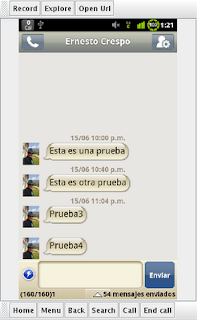
- wifi: python mensaje4.py 0xxyyyzzww "Prueba3" wifi 47529 "192.168.0.100"
- usb: python mensaje4.py 0xxyyyzzww "Prueba4" usb 43421
The following figure shows the messages received on the phone:
===
Make a donation! If you liked the article you can make a donation with Bitcoin (BTC) using the digital wallet of your choice to the following address: 17MtNybhdkA9GV3UNS6BTwPcuhjXoPrSzV
Or by scanning the QR code from your wallet:
