Article 31 introduced the silverpoint Python package. This article takes it to a web application: Flask and Django. Both follow the same idea. The application serves the @silverpoint/embed standalone file, which comes inside the package, and two template functions write the <script> and the chart.
Install
pip install "silverpoint[flask]" # or [django]The extra only adds the framework. What matters is the submodule: silverpoint.contrib.flask or silverpoint.contrib.django.
Flask
Silverpoint(app), or Silverpoint().init_app(app) if you use an application factory, does two things:
- It serves the script at
/_silverpoint/with an immutable one-year cache. - It adds two global functions to Jinja:
silverpoint_script()andsilverpoint_chart(chart), which also takes a spec as a dictionary.
from flask import Flask, render_template_string
import silverpoint
from silverpoint.contrib.flask import Silverpoint

app = Flask(__name__)
Silverpoint(app)  # serves the script at /_silverpoint/, immutable, and adds two Jinja globals

PAGE = """<!doctype html>
<html lang="en"><head><meta charset="utf-8"><title>Wins</title>{{ silverpoint_script() }}</head>
<body><h1>Wins per team</h1>{{ silverpoint_chart(chart) }}</body></html>"""


@app.after_request
def csp(response):
    response.headers["Content-Security-Policy"] = "script-src 'self'; style-src 'self'"
    return response


@app.route("/")
def index():
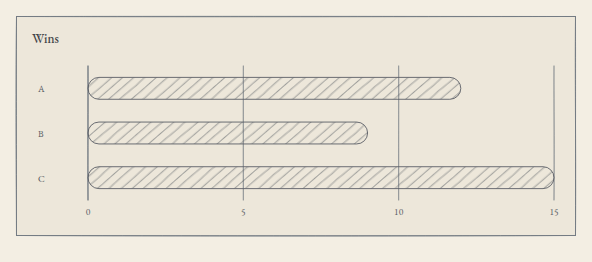
    rows = [{"team": "A", "wins": 12}, {"team": "B", "wins": 9}, {"team": "C", "wins": 15}]
    chart = silverpoint.bar_chart(rows, x="team", value="wins", title="Wins", orientation="rows")
    return render_template_string(PAGE, chart=chart)
Note the Content-Security-Policy header. The example sets it on purpose: script-src 'self'; style-src 'self' forbids any inline script or style, and the chart draws all the same.
Django
In Django, the script is one more static file. Add the app to INSTALLED_APPS, next to django.contrib.staticfiles, and collectstatic will copy it with the rest:
# settings.py
INSTALLED_APPS = [
    "django.contrib.staticfiles",
    "silverpoint.contrib.django",   # the template tags and the script as a static file
    # …
]
The view builds the chart as in any Python script:
# views.py
from django.shortcuts import render
import silverpoint


def index(request):
    rows = [{"team": "A", "wins": 12}, {"team": "B", "wins": 9}, {"team": "C", "wins": 15}]
    chart = silverpoint.bar_chart(rows, x="team", value="wins", title="Wins", orientation="rows")
    return render(request, "index.html", {"chart": chart})
And the template loads the tag library and uses its two tags:
{% load silverpoint %}<!doctype html>
<html lang="en"><head><meta charset="utf-8"><title>Wins</title>{% silverpoint_script %}</head>
<body><h1>Wins per team</h1>{% silverpoint_chart chart %}</body></html>
Why it works under a strict CSP
The markup Flask and Django write has no inline script or style. The spec travels in a <script type="application/json">, which the browser does not run, and the silverpoint script loads from the same origin. That is why both examples work under Content-Security-Policy: script-src 'self'; style-src 'self'.
Two things you are spared:
- No CDN. Your application serves the script; no page depends on a third party.
- Errors before the response. Since the chart is validated when it is created, a misspelled column raises
SpecErrorin the view, with the closest valid name, and a page with a broken chart never reaches the browser.
Any other framework
If you use another Python framework (FastAPI, Starlette, Litestar…), silverpoint.static_path() gives you the folder holding silverpoint-embed.full.js to serve as static files, and chart.to_html(full_document=False, render="client") gives you the fragment that goes in the template. The recipe is the same one the two modules in this article follow: serve the file from your origin and write the chart as markup.
Next
- The official guide: Python: notebooks, Flask, Django, Flask and Django sections.
- The repository: ecrespo/silverpoint-python.
- The next article, 33, leaves code behind: silverpoint charts as KNIME nodes.