A coding assistant that does not know silverpoint writes props that sound right and do not exist: valueKey where the chart asks for actualKey, or a substrate that no ground has. The code compiles and the chart comes out empty.
silverpoint ships two pieces to prevent that. An MCP server, @silverpoint/mcp, that answers from the catalog of the version it describes: which chart to use, which props it has, what code draws it and what is wrong with your props. And two skills the assistant reads before it writes: silverpoint for React, Vue and Angular, and reflex-silverpoint for Reflex.
This article uses them to add a chart to the operations panel. Every answer shown is the one the hosted server gave, with silverpoint 0.10.1.
What you will build
A new chart for the panel: the share of requests each service answers in under 300 ms, against its objective. The assistant chooses it with recommend_chart, writes the code with generate_code, reviews it with validate_props and draws it with render_chart before touching the project.
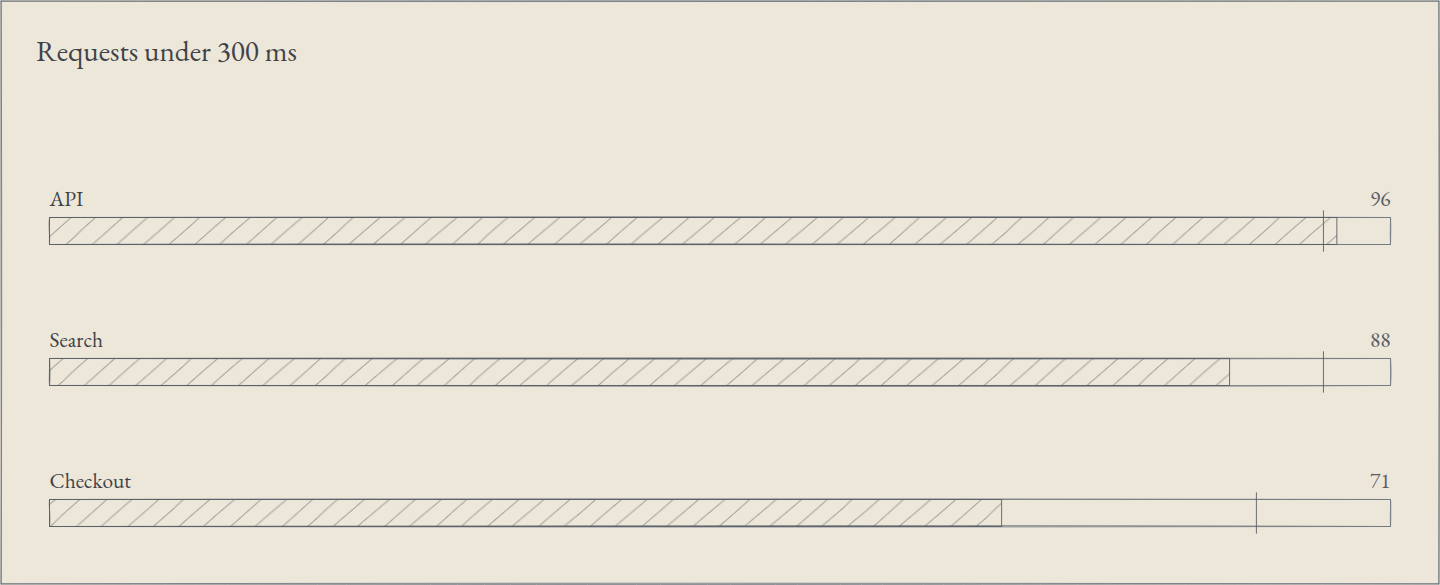
The image is the SVG that render_chart returned, without going through any framework.
What you need
An MCP client: Claude Code, Claude, Cursor or VS Code. For the last step, the React project from article 03 or the Reflex one from 06.
1. The server: hosted or local
The server is hosted at https://silverpointweb.vercel.app/mcp. It is read-only and needs no account. In Claude Code you connect it like this:
claude mcp add --transport http silverpoint https://silverpointweb.vercel.app/mcpIf you would rather run it on your machine, the same server installs from npm and talks over standard input and output (stdio):
claude mcp add silverpoint -- npx -y @silverpoint/mcpBoth expose the same thing. I connected a client to each and the list of tools, resources and prompts came out identical. The difference is the version: the hosted one describes the latest release, and the local one, the package you installed.
The “Use with AI” page of the documentation gives the configuration for other clients:
| Client | Where |
|---|---|
| Claude | Settings → Connectors → Add custom connector, with the server's address |
| Cursor | ~/.cursor/mcp.json, or .cursor/mcp.json in the project |
| VS Code | .vscode/mcp.json |
In Cursor:
{
  "mcpServers": {
    "silverpoint": {
      "url": "https://silverpointweb.vercel.app/mcp"
    }
  }
}
In VS Code:
{
  "servers": {
    "silverpoint": {
      "type": "http",
      "url": "https://silverpointweb.vercel.app/mcp"
    }
  }
}
You do not need a client to try it. The hosted server keeps no sessions: every POST request is a complete JSON-RPC message, so curl is enough:
curl -s https://silverpointweb.vercel.app/mcp \
  -H 'content-type: application/json' -H 'accept: application/json, text/event-stream' \
  -d '{"jsonrpc":"2.0","id":1,"method":"tools/call","params":{"name":"get_version","arguments":{}}}'
Among other things, the answer carries this object:
{"version":"0.10.1","reflex":{"version":"0.10.0","wraps":"0.10.0","stale":false},"protocol":"2025-11-25"}Every answer from the server carries the silverpoint version it describes. reflex says which version of reflex-silverpoint-react the catalog knows and which silverpoint version it wraps. We will come back to stale in the section on skills.
2. The tools
The server declares 13 tools, all read-only (readOnlyHint). This is the list it returns, with their arguments:
| Tool | Arguments | What it answers |
|---|---|---|
get_version | none | The silverpoint version, the Reflex wrapper's and the protocol's |
list_charts | family, intent, shape | The charts, filtered by family, intent or data shape |
get_chart | slug, framework | One chart: data shape, fields, props with their defaults, name and import |
list_components | family, group | The UI components |
get_component | slug, framework | One component: props, events, slots and states |
recommend_chart | shape, intent, rows, fields | Up to five charts for a shape and an intent, with their reasons |
generate_code | target, framework, fields, props, ground, substrate, mode, palette | The imports, the stylesheets and the code of a chart, a component or a deck |
search_catalog | query, limit | A search over names, summaries, props and diagnostic codes |
validate_props | chart, props, width, height | The diagnostics the engine raises with those props, and the props the chart does not declare |
render_chart | chart, props, data, width, height, id, ground, substrate, mode, palette, embedFonts | The chart as a standalone SVG |
check_palette | palette, substrate | The colour pairs of a palette that fall short of the minimum contrast |
validate_deck | markdown | The slide count of a deck and its warnings |
render_deck | markdown, slide, ground, substrate, mode, palette, size, embedFonts | The deck as a standalone HTML document |
No tool uses a language model. recommend_chart reads a reviewed table, validate_props builds the chart with the engine and render_chart draws it with the same code as the adapters. That is why the same question always gets the same answer.
A name the catalog does not hold is a tool error, with the closest names. With get_chart and the slug bar-chrt:
{"version":"0.10.1","code":"unknown_name","message":"No chart named \"bar-chrt\".","suggestions":["bar-chart","area-chart","radar-chart"]}3. The resources and the prompts
Besides tools, the server offers resources, documents the client can read:
| Resource | What it holds |
|---|---|
silverpoint://catalog | The whole catalog |
silverpoint://diagnostics | The diagnostic codes, from SP001 on |
silverpoint://deck | The deck reference |
silverpoint://charts/{slug} | One chart; there are 60 |
silverpoint://components/{slug} | One component; there are 38 |
silverpoint://guides/{topic} | A guide in Markdown |
There are 11 guides: choosing-charts, grounds-and-palettes, dashboard, ui-components, overlays, timeline, deck, react, vue, angular and reflex. They are the same references the silverpoint skill ships.
The prompts are two conversation templates: choose-chart, which takes a description of the data, and build-dashboard, which takes the framework and the charts.
4. Choosing the chart
The new chart's data is three rows, one per service:
[{"service":"API","fast":96,"objective":95},{"service":"Search","fast":88,"objective":95},{"service":"Checkout","fast":71,"objective":90}]fast is the share of requests answered in under 300 ms, and objective, that service's objective. In the catalog's vocabulary, the data shape is categories (one row per category) and the intent is progress (how far from a goal). That is the question for recommend_chart:
{"shape":"categories","intent":"progress","rows":3}The answer:
| Chart | Score | Reason |
|---|---|---|
bullet-chart | 0.9 | Each bar against its own target. |
radial-rings | 0.75 | Concentric rings, each swept to its percent. |
funnel-chart | 0.7 | Stages that narrow, such as a conversion. |
radial-arc-group | 0.5 | Tracks swept relative to the largest. |
gauge-arc | 0.15 | Serves progress, with its data reshaped. |
bullet-chart draws one bar per row with a marker at its target. get_chart with the slug bullet-chart says which fields it reads:
| Role | Prop | Type | Required |
|---|---|---|---|
title | titleKey | string | Yes |
actual | actualKey | number | Yes |
target | targetKey | number | Yes |
And its summary: “One bar per target, with a marker at the target. Values in 0-100.” The panel's percentages fit that scale. With "framework":"reflex", the same answer gives the builder's name, bullet_chart, and the props in Python, such as title_key.
5. Generating the code
generate_code takes the chart, the framework, the field of your rows that plays each role, and the props:
{"target":{"chart":"bullet-chart"},"framework":"react","fields":{"title":"service","actual":"fast","target":"objective"},"props":{"title":"Requests under 300 ms"}}It returned the imports, the stylesheets and this code:
import '@silverpoint/fonts/fonts.css';
import '@silverpoint/grounds/styles.css';
import { BulletChart } from '@silverpoint/react/bullet-chart';

export function BulletChartView({ rows }: { rows: readonly Record<string, unknown>[] }) {
  return (
    <BulletChart
      data={rows}
      titleKey="service"
      actualKey="fast"
      targetKey="objective"
      title="Requests under 300 ms"
    />
  );
}
With a note: “The rows are the rows prop: plain objects, one per datum, read through the accessor props.” I used it as is in the React project, with typed rows:
import { BulletChartView } from './BulletChartView';

type ServiceLatency = { service: string; fast: number; objective: number };

const latency: ServiceLatency[] = [
  { service: 'API', fast: 96, objective: 95 },
  { service: 'Search', fast: 88, objective: 95 },
  { service: 'Checkout', fast: 71, objective: 90 },
];

export default function App() {
  return (
    <main style={{ maxWidth: 640 }}>
      <BulletChartView rows={latency} />
    </main>
  );
}
The rows are declared with type, not interface: a type is assignable to Record<string, unknown>, and an interface is not.
With "framework":"reflex" and the same fields and props, it returned:
import reflex as rx
from reflex_silverpoint_react import bullet_chart


class State(rx.State):
    rows: list[dict] = []


def bullet_chart_view() -> rx.Component:
    return bullet_chart(
        data=State.rows,
        title_key="service",
        actual_key="fast",
        target_key="objective",
        title="Requests under 300 ms",
    )
And two notes: “State is a placeholder name: merge its fields into your own state class.” and “Fill State.rows with the rows, a list of dicts, from an event handler.” Following the second, this is the Reflex project's whole file:
import reflex as rx
from reflex_silverpoint_react import bullet_chart


LATENCY = [
    {"service": "API", "fast": 96, "objective": 95},
    {"service": "Search", "fast": 88, "objective": 95},
    {"service": "Checkout", "fast": 71, "objective": 90},
]


class State(rx.State):
    rows: list[dict] = []

    @rx.event
    def load(self):
        self.rows = LATENCY


def bullet_chart_view() -> rx.Component:
    return bullet_chart(
        data=State.rows,
        title_key="service",
        actual_key="fast",
        target_key="objective",
        title="Requests under 300 ms",
    )


def index() -> rx.Component:
    return rx.box(bullet_chart_view(), max_width="640px", padding="32px")


app = rx.App()
app.add_page(index, on_load=State.load)
Both projects compiled and drew the chart with data-status="ready", and the accessible description was the same in both: “Requests under 300 ms. Bullet chart of 3 targets on a 0 to 100 scale; 1 of 3 reach their target.”
6. Checking the props
Now the mistake from the start. The props below have two faults: actualKey points to fast_pct, a field the rows do not have, and valueKey is extra, since it is the line chart's prop:
{"chart":"bullet-chart","props":{"data":[{"service":"API","fast":96,"objective":95},{"service":"Search","fast":88,"objective":95},{"service":"Checkout","fast":71,"objective":90}],"titleKey":"service","actualKey":"fast_pct","targetKey":"objective","valueKey":"fast","title":"Requests under 300 ms"}}validate_props returned "valid": false, "unknownProps": ["valueKey"] and three SP002 diagnostics, one per row. The first:
[SP002] BulletChart: a value cannot be drawn as given (null, not finite, or outside the data contract); it is corrected or omitted (`fast_pct`). Row 0 has no finite value; its bar is omitted. Check the value against the chart's data contract (Data Model §2). (REQ-008)Each diagnostic carries its code, its severity (warn), the specification requirement that defines it (REQ-008) and what to do. With "actualKey":"fast" and no valueKey, the answer was "valid": true, with no diagnostics and an empty unknownProps.
In React, TypeScript would have flagged valueKey. Nothing flags the fast_pct field: it is a valid string, and the chart simply does not draw the bars. That kind of mistake is the one validate_props finds.
7. Drawing before writing
render_chart draws the chart without any framework:
{"chart":"bullet-chart","props":{"titleKey":"service","actualKey":"fast","targetKey":"objective","title":"Requests under 300 ms"},"data":[{"service":"API","fast":96,"objective":95},{"service":"Search","fast":88,"objective":95},{"service":"Checkout","fast":71,"objective":90}],"width":640,"height":200,"id":"under-300","embedFonts":true}It returned a 640 × 260 pixel SVG, with no diagnostics: the height of 200 is the drawing area's, and the rest is the card. It is the image at the start of the article. The SVG is standalone: it carries the ground's stylesheet in a <style> and, with embedFonts, the EB Garamond font inside. Its root has role="img" and aria-labelledby, which points to a <title> and a <desc> whose ids start with under-300, the call's id.
It lets the assistant look at the chart before writing the code, and lets you put a chart in a document or an email.
8. Palettes and decks
check_palette checks the contrast of a palette over a substrate. With a preset, {"palette":"verdigris"}, there are no findings. With a palette of your own whose muted text is too light:
{"palette":{"ink":"#2C6355","textMuted":"#A8B8B2"},"substrate":"cream"}The answer:
{
  "version": "0.10.1",
  "findings": [
    {
      "pair": "text-muted",
      "foreground": "#A8B8B2",
      "background": "#EDE7DA",
      "ratio": 1.68,
      "threshold": 4.5
    }
  ],
  "substrate": "#EDE7DA"
}
#A8B8B2 on cream gives 1.68 to 1, and the minimum for text is 4.5. With "textMuted":"#3E6A5E", the verdigris colour, there are no findings.
validate_deck does the same for a deck from article 22. This one has two mistakes, a substrate that does not exist and a misspelt chart:
---
ground: silverpoint
substrate: chalk
---

# Operations

---

## Errors by hour

```silverpoint
{"chart":"bar-chrt","data":[{"hour":"10","errors":9},{"hour":"11","errors":8},{"hour":"12","errors":11}],"props":{"xKey":"hour","valueKey":"errors"}}
```
La respuesta:
{
  "version": "0.10.1",
  "valid": false,
  "total": 2,
  "diagnostics": [
    {
      "code": "SP027",
      "severity": "warn",
      "req": "REQ-586",
      "message": "Slide 1: substrate \"chalk\" is not a substrate of any registered ground; the inherited value holds.",
      "todo": "Use a registered ground, one of its substrates, and `ink` or `precision`",
      "slide": 1
    },
    {
      "code": "SP026",
      "severity": "warn",
      "req": "REQ-591",
      "message": "Chart fence on slide 2: unknown chart \"bar-chrt\". Did you mean \"bar-chart\"?",
      "todo": "Fix the fence: a JSON object whose `chart` is a catalog slug, with props the chart declares",
      "slide": 2,
      "slot": "s2-c1"
    }
  ]
}
With green and bar-chart, the answer was "valid": true, with 2 slides and no diagnostics.
9. The skills
A skill is a folder with a SKILL.md and its references, which the assistant loads when the task calls for it. It works without the server: it holds the same tables in Markdown.
| Skill | For | Where it lives |
|---|---|---|
silverpoint | React, Vue and Angular | skills/silverpoint in the silverpoint repository |
reflex-silverpoint | Reflex | skills/reflex-silverpoint in the reflex-silverpoint-react repository |
In Claude Code, each one installs as a plugin that brings the skill and connects the hosted server in one step:
/plugin marketplace add ecrespo/silverpoint
/plugin install silverpoint@silverpoint
/plugin marketplace add ecrespo/reflex-silverpoint-react
/plugin install reflex-silverpoint@reflex-silverpointThe silverpoint skill describes silverpoint 0.10.1. Its SKILL.md gives the workflow (choose the chart, read its entry, write the code, check it) and the rules that fail most: props have the same names in the three frameworks, each chart is imported from its own path, without data a chart draws its demo rows, and an overlay's trigger is a native <button>. Under references/ there is a guide per framework, one per chart family, the components, grounds and palettes, the dashboard, the timeline, decks, the diagnostics and the common pitfalls.
The reflex-silverpoint skill describes reflex-silverpoint-react 0.10.0. It adds what only exists in Python: the snake_case builders, the rx.State patterns and the payloads that reach event handlers.
Both are generated, not written by hand. The text of silverpoint comes from its templates and from the agent catalog, the same one the server reads; the header of each reference says it is regenerated with pnpm --filter @silverpoint/agent-catalog generate. The Reflex one comes from scripts/make_skill.py and the package's catalog, reflex-catalog.json.
Both say the same thing: if the server is connected, use its tools before the files.
Stale Reflex names
The server knows the Reflex names because silverpoint's catalog joins reflex-catalog.json. But the two packages are released separately, and the catalog can be left with an older release of the wrapper. get_version says so with reflex.stale.
stale is true when the wrapper wraps another release line: the code compares only the first two numbers. Today the server describes silverpoint 0.10.1 and knows reflex-silverpoint-react 0.10.0, which wraps 0.10.0. Both are on the 0.10 line, so stale is false.
The Reflex skill gives the rule: if stale is true, or if reflex.version is not the version your project installs, the server's Python names describe another release, and the skill and the .pyi files of the installed package win.
The same goes for skills installed as a plugin: they update when you update the plugin. If the header of the SKILL.md you have names a different version from your project's, update it.
Common problems
- The assistant does not use the tools. Check that the server appears in your client's list of MCP servers and ask it to use it.
curlreturns 405. The hosted server only accepts POST: GET and DELETE answer 405, since there are no sessions.- A tool answers with
unknown_name. The slug does not exist in that version; the answer carries the closest ones. - The Reflex code uses a name your version does not have. Look at
reflex.staleandreflex.versioninget_version, and compare with your.pyi. - The SVG from
render_chartcomes out in another typeface. WithoutembedFonts, the SVG names EB Garamond with a serif fallback, and where the font is not installed the fallback shows. Pass"embedFonts":true.
What comes next
The server and the skills describe the library from a catalog generated from the code. That way of working, specification first and everything else generated and checked, is the subject of the last article of the series: 29, how silverpoint was built.