Some time ago I explained how to install a DNS proxy server with dnsmasq. Now I will explain the configuration of PDNSD using the root servers of OpenNIC as the DNS server, because of the possible problems that the passing of the SOPA Act and Internet censorship may cause us.
If you want to use the closest OpenNIC DNS servers you can visit the following link (broken link). If you want more information about OpenNIC you can read the following article (broken link) and the project page.
In my case, after checking the closest OpenNIC servers, I will use the following DNS server: 192.121.86.100.
Installing pdnsd.
On Debian you simply run an apt-get install.
#apt-get install pdnsd
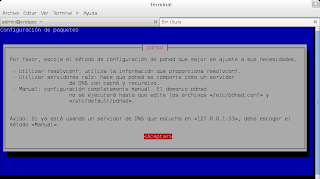
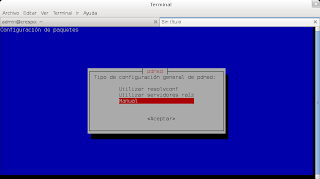
The application shows a dialog window that mentions 3 configuration methods (resolvconf, root DNS servers or manual).
In this case the manual method will be used, selected in the dialog window.
Edit the /etc/pdnsd.conf file.
Add the following information:
server {
    label = "OpenNIC";
    ip = 192.121.86.100; //IP del servidor DNS
    uptest = query;     //Lrealiza consultas  DNS de una solicitud DNS.
    interface=wlan0;     //La interface conectada a la red.
}
Change the START_DAEMON parameter in the /etc/default/pdnsd file to yes so that the pdnsd service starts automatically.
START_DAEMON=yes
Edit the /etc/resolv.conf file and add the DNS server 127.0.0.1.
nameserver 127.0.0.1
Restart the pdnsd service:
# invoke-rc.d pdnsd restart
Stopping pdnsd.
Starting pdnsd.
Run a query with dig:
dig www.barrapunto.com|grep "Query time"
;; Query time: 316 msec

dig www.barrapunto.com|grep "Query time"
;; Query time: 2 msec
To verify that the server works, run the following command:
# pdnsd-ctl status

Opening socket /var/cache/pdnsd/pdnsd.status

pdnsd-1.2.8-par running on jewel.

Cache status:
=============
2048 kB maximum disk cache size.
56894 of 2107392 bytes (2.7%) memory cache used in 216 entries.

Thread status:
==============
server status thread is running.
pdnsd control thread is running.
tcp server thread is running.
udp server thread is running.
19 query threads spawned in total (0 queries dropped).
10 running query threads (10 active, 0 queued).

Configuration:
==============
Global:
-------
    Cache size: 2048 kB
    Server directory: /var/cache/pdnsd
    Scheme file (for Linux pcmcia support): /var/lib/pcmcia/scheme
    Server port: 53
    Server ip (0.0.0.0=any available one): 127.0.0.1
    Ignore cache when link is down: off
    Maximum ttl: 604800
    Minimum ttl: 900
    Negative ttl: 900
    Negative RRS policy: default
    Negative domain policy: auth
    Run as: pdnsd
    Strict run as: on
    Use NSS: on
    Paranoid mode (cache pollution prevention): on
    Ignore CD ('checking disabled') flag in queries: on
    Control socket permissions (mode): 600
    Maximum parallel queries served: 40
    Maximum queries queued for serving: 60
    Global timeout setting: 10
    Parallel queries increment: 2
    Randomize records in answer: on
    Query method: udp_only
    Query port start: 1024
    Query port end: 65535
    TCP server thread: on
    TCP query timeout: 30
    Delegation-only zones: (none)
Server 0:
------
    label: OpenNIC
    ip: 192.121.86.100
    server assumed available: yes
    port: 53
    uptest: query
    timeout: 120
    uptest interval: 900
    ping timeout: 600
    ping ip: (using server ip)
    interface: wlan0
    device (for special Linux ppp device support):
    uptest command:
    uptest user: (process owner)
    force cache purging: off
    server is cached: on
    lean query: on
    Use only proxy?: off
    Assumed root server: no
    Randomize server query order: no
    Default policy: included
    Policies: (none)
Succeeded
You can add as many IPs as you want.
If you want more information on configuring pdnsd, check the following links:
https://wiki.archlinux.org/index.php/Pdnsd_(Espa%C3%B1ol) (broken link)
http://manualinux.heliohost.org/pdnsd.html
Make a donation! If you liked the article you can make a donation with Bitcoin (BTC) using the digital wallet of your choice to the following address: 17MtNybhdkA9GV3UNS6BTwPcuhjXoPrSzV
Or by scanning the QR code from your wallet:
