Continuing with the series of articles about django, this one shows how to create a restful API with django tastypie; its documentation can be found here.
On Debian/Ubuntu and other derived distributions, the following programs will be installed:
Django south.lxml.mimeparse.tastypie.
This article is based on the following article in English. To install the programs, run apt-get:
#apt-get install python-django-south python-tastypie python-mimeparse python-lxml python3-lxmlInstallation through pip is as follows:
#pip install Django South python-mimeparse dateutil django-tastypie lxmlNow create the pasarela project with django-admin:
mkdir -p pruebas
cd pruebas
ernesto@pruebas:~/pruebas$ django-admin startproject pasarela
List the contents of the pasarela directory:
ernesto@pruebas:~/pruebas$ ls -l pasarela/
total 8
-rwxr-xr-x 1 ernesto ernesto  251 may  3 18:17 manage.py
drwxr-xr-x 2 ernesto ernesto 4096 may  3 18:17 pasarela
Edit the settings.py inside pasarela:
ernesto@pruebas:~/pruebas$ vim pasarela/pasarela/settings.pyThe part of the settings.py file that was modified is shown below:
The project admin:
ADMINS = (
    ('Ernesto Crespo', 'ecrespo@xxxx'),
)
The database used for testing will be sqlite3 and the database name will be pasarela.db:
DATABASES = {
    'default': {
        'ENGINE': 'django.db.backends.sqlite3', # Add 'postgresql_psycopg2', 'mysql', 'sqlite3' or 'oracle'.
        'NAME': 'pasarela.db',                      # Or path to database file if using sqlite3.
        'USER': '',                      # Not used with sqlite3.
        'PASSWORD': '',                  # Not used with sqlite3.
        'HOST': '',                      # Set to empty string for localhost. Not used with sqlite3.
        'PORT': '',                      # Set to empty string for default. Not used with sqlite3.
    }
}
The allowed hosts are the server where django runs and the machine where the tests will be done:
ALLOWED_HOSTS = ["127.0.0.1","192.168.0.106"]The time zone will be Caracas, Venezuela:
TIME_ZONE = 'America/Caracas'The application language will be Venezuelan Spanish:
LANGUAGE_CODE = 'es-veThe applications to install are: django.contribution.admin, south, tastypie, pasarela.apps.sms:
INSTALLED_APPS = (
    'django.contrib.auth',
    'django.contrib.contenttypes',
    'django.contrib.sessions',
    'django.contrib.sites',
    'django.contrib.messages',
    'django.contrib.staticfiles',
    # Uncomment the next line to enable the admin:
    'django.contrib.admin',
    'south',
    'tastypie',
    'pasarela.apps.sms',
    # Uncomment the next line to enable admin documentation:
    # 'django.contrib.admindocs',
)
Create the apps directory and inside it create the __init__.py file:
ernesto@pruebas:~/pruebas/pasarela/pasarela$ mkdir -p apps

ernesto@pruebas:~/pruebas/pasarela/pasarela$ touch apps/__init__.py
List the files inside apps:
ernesto@pruebas:~/pruebas/pasarela/pasarela$ ls -l apps
total 0
-rw-r--r-- 1 ernesto ernesto 0 may  3 18:41 __init__.py
Now create the sms django application inside apps:
ernesto@pruebas:~/pruebas/pasarela/pasarela/apps$ django-admin startapp smsList the contents of sms:
ernesto@pruebas:~/pruebas/pasarela/pasarela/apps$ ls -l sms/
total 12
-rw-r--r-- 1 ernesto ernesto   0 may  3 18:42 __init__.py
-rw-r--r-- 1 ernesto ernesto  57 may  3 18:42 models.py
-rw-r--r-- 1 ernesto ernesto 383 may  3 18:42 tests.py
-rw-r--r-- 1 ernesto ernesto  26 may  3 18:42 views.py
Now the data model to be used will be created; edit the models.py file of sms:
Two tables will be handled: one holds the history of sent messages and the second one holds the completion of the sending of all messages.
#se importa models de django.db
from django.db import models

# Create your models here.

#Se crea la clase Evento que hereda de model.Model
class Evento(model.Model):
    #Se crea la columna evento que será entero y clave primaria de la base de datos
    evento = models.IntegerField(primary_key=True)
    #Se crea el campo estatus que será booleano y por defecto será falso.
    estatus = models.CharField(default=False)

    #Se define la información que se requiere en el panel de administración web de django.
    def __unicode__(self):
       evento = "%Evento: %s, Estatus: %s " %(self.evento,self.estatus)
       return evento


#Se crea la clase historicoSMS que hereda de models.Model
class HistoricoSMS(models.Model):
    #Se crea la columna evento que es clave foranea de la tabla evento.
    evento = models.ForeignKey(Evento)
    #se crea mensaje con un tamaño de 150 caracteres
    mensaje = models.CharField(max_length=150)
    #Se crea numcel con un tamaño de 11 caracteres que será el numero celular.
    numcel = models.CharField(max_length=11)
    #Se crea estatus que tiene el valor booleano si se envío o no el mensaje al número celular.
    estatus = models.CharField(default=False)

    #Se define la información que se requiere en el panel de administración web de django.
    def __unicode__(self):
        mensaje = "%s %s  %s %s "  %(self.evento,self.mensaje,self.numcel,self.estatus)
        return mensaje
Now create the api.py file in the sms application (this file defines which information will be shown through the restful API):
#Se importa ModelResource de tastypie.resources
from tastypie.resources import ModelResource
#Se importa de models.py en la apps sms HistoricoSMS y Evento
from .models import HistoricoSMS,Evento

#Se crea la clase SMSResource que hereda de ModelResource
class SMSResource(ModelResource):
    #Se crea una clase Meta
    class Meta:
        #queryset se trae todo el contenido de la tabla HistoricoSMS
        queryset = HistoricoSMS.objects.all()
        #El nombre del recurso es mensajes, de está forma se consulta en el restful api
        resource_name = 'msg'

#Se crea la clase EventoResource que hereda de ModelResource
class EventoResource(ModelResource):
    #Se crea la clase Meta
    class Meta:
        #Se define queryset que se trae todos los datos de la tabla Evento
        queryset = Evento.objects.all()
       #El nombre del recurso es evento.
        resource_name = 'event'
Now we want the Restful API queries to be viewable; to do so, edit the urls.py file of pasarela (only the changes made to the file will be commented):
from django.conf.urls import patterns, include, url

# Uncomment the next two lines to enable the admin:
#Se descomento la importación de admin y admin.autodiscover() .
from django.contrib import admin
admin.autodiscover()

#Se importa Api de tastypie.api
from tastypie.api import Api
#Se importa SMSResource y EventoResource del api de la aplicación sms.
from apps.sms.api import SMSResource,EventoResource

#Se instancia Api con la versión v1.
v1_api = Api(api_name='v1')
#Se registra los recursos en la instancia del api.
v1_api.register(SMSResource())
v1_api.register(EventoResource())


urlpatterns = patterns('',
    # Examples:
    # url(r'^$', 'pasarela.views.home', name='home'),
    # url(r'^pasarela/', include('pasarela.foo.urls')),

    # Uncomment the admin/doc line below to enable admin documentation:
    # url(r'^admin/doc/', include('django.contrib.admindocs.urls')),

    # Uncomment the next line to enable the admin:
    #Se descomenta admin
    url(r'^admin/', include(admin.site.urls)),
    #Se define el url del api.
    url(r'^api/', include(v1_api.urls)),
)
Now synchronize or create the database:
ernesto@pruebas:~/pruebas/pasarela$ python manage.py syncdb
Syncing...
Creating tables ...
Creating table auth_permission
Creating table auth_group_permissions
Creating table auth_group
Creating table auth_user_user_permissions
Creating table auth_user_groups
Creating table auth_user
Creating table django_content_type
Creating table django_session
Creating table django_site
Creating table django_admin_log
Creating table south_migrationhistory
Creating table tastypie_apiaccess
Creating table tastypie_apikey
Creating table sms_evento
Creating table sms_historicosms

You just installed Django's auth system, which means you don't have any superusers defined.
Would you like to create one now? (yes/no): yes
Username (leave blank to use 'ernesto'): ernesto
E-mail address: ecrespo@xyzw.com
Password:
Password (again):
/usr/lib/python2.7/dist-packages/django/db/models/fields/__init__.py:808: RuntimeWarning: DateTimeField received a naive datetime (2014-05-03 20:30:49.555592) while time zone support is active.
  RuntimeWarning)
Superuser created successfully.
Installing custom SQL ...
Installing indexes ...
Installed 0 object(s) from 0 fixture(s)

Synced:
 > django.contrib.auth
 > django.contrib.contenttypes
 > django.contrib.sessions
 > django.contrib.sites
 > django.contrib.messages
 > django.contrib.staticfiles
 > django.contrib.admin
 > south
 > tastypie
 > pasarela.apps.sms

Not synced (use migrations):
 -
(use ./manage.py migrate to migrate these)
Now it asks to migrate the schemas with south:
python manage.py migrate Now some data is needed in the database; the interactive sqlite3 shell will be used. Several rows will be inserted as shown by the following sql command For the eventos table:
insert into sms_evento (evento,estatus) values (3,0);For the historicosms table:
insert into sms_historicosms (evento_id,mensaje,numcel,estatus) values (2,"otra prueba","04158339101","False");The result is shown below:
sqlite> select * from sms_evento;
1|1
2|1
3|0

sqlite> select * from sms_historicosms;
1|1|prueba|04158339191|True
2|1|prueba|04158339192|True
3|1|prueba|04158339193|False
4|1|prueba|04158339194|False
5|1|prueba|04158339195|True
6|2|otra prueba|04158339197|True
7|2|otra prueba|04158339198|True
8|2|otra prueba|04158339199|True
9|2|otra prueba|04158339100|True
10|2|otra prueba|04158339100|False
11|2|otra prueba|04158339101|False
With this data you can start the service to display the restful api information:
ernesto@pruebas:~/pruebas/pasarela$ python manage.py runserver 192.168.0.100:8080
Validating models...

0 errors found
Django version 1.4.5, using settings 'pasarela.settings'
Development server is running at http://192.168.0.100:8080/
Quit the server with CONTROL-C.
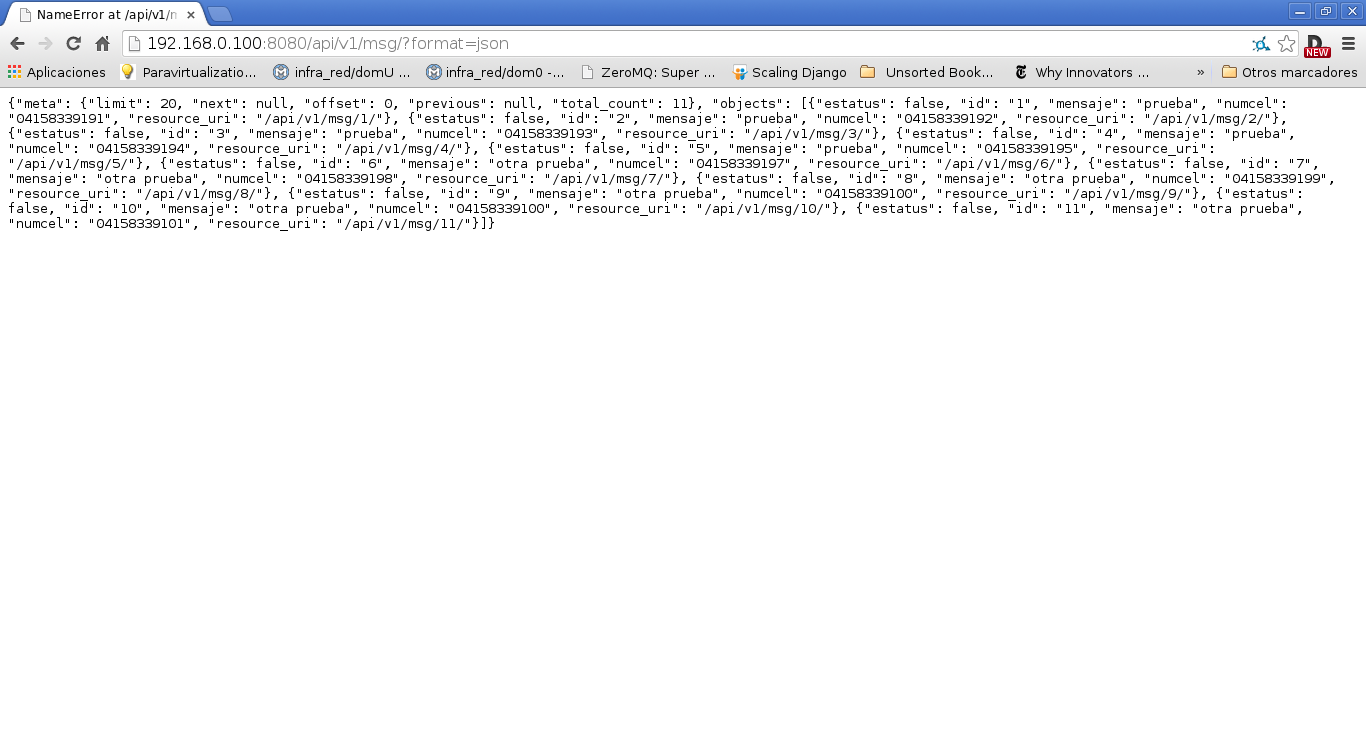
The screenshot below shows the result of querying the messages: http://192.168.0.100:8080/api/v1/msg/?format=json
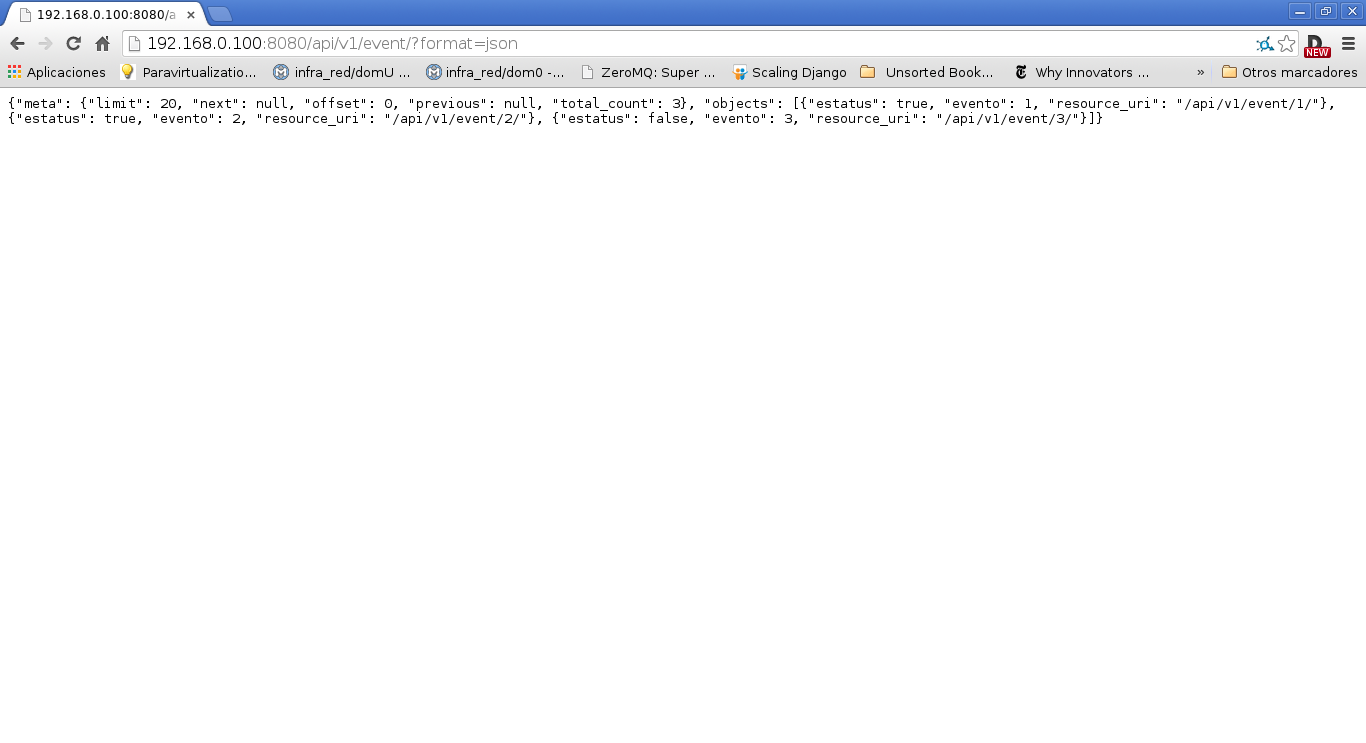
The following figure shows the query of the events http://192.168.0.100:8080/api/v1/event/?format=json:
To query event 1 of the events: http://192.168.0.100:8080/api/v1/event/1/?format=json
{"estatus": true, "evento": 1, "resource_uri": "/api/v1/event/1/"}To query message 1 of msg: http://192.168.0.100:8080/api/v1/msg/1/?format=json
{"estatus": false, "id": "1", "mensaje": "prueba", "numcel": "04158339191", "resource_uri": "/api/v1/msg/1/"}A later article will explain how to do a POST/PUT/DELETE in addition to a get, but that requires authentication.
Other articles about tastypie:
-
http://blog.brabadu.com/2011/06/easy-rest-api-with-django-tastypie.html
-
http://www.realpython.com/blog/python/create-a-super-basic-rest-api-with-django-tastypie/
Make a donation! If you liked the article you can make a donation with Bitcoin (BTC) using the digital wallet of your choice to the following address: 17MtNybhdkA9GV3UNS6BTwPcuhjXoPrSzV
Or by scanning the QR code from the wallet:
 file:///home/ernesto/Documentos/day/parte%204/2014-restfulapicondjangotastypie.md