ORJSON is an alternative library to Python's json support that lets you work with dataclasses, datetimes and numpy.
orjson features:
- Serializes dataclass.
- Serializes datetime, numpy.ndarray and UUID objects natively.
- Serializes to bytes instead of string.
- Serializes strings without escaping unicode to ASCII.
- Faster to serialize and deserialize.
- It has no load() and dump() to read from or write to a file.
Installation
To install, pip will be used:
pip install orjsonImplementation
- First, the module is imported:
import orjson
from datetime import datetime
import uuid
In addition, datetime and uuid are imported.
- Define the data.
dato = {
    "emoji_lagrimas": "😂",
    "emoji_reloj": "⏰",
    "entero": 123,
    "flotante": 10.4,
    "boleano": False,
    "lista": ["element1", "element2"],
    "diccionario": {"key1": "value1", "key2": "value2"},
    "ruso": "Привет",
    "chino": "您好",
    "japones": "こんにちは",
    "datetime": datetime.now(),
    "uuid": uuid.uuid1()
}

print(data)

{'emoji_tears': '😂', 'emoji_clock': '⏰', 'integer': 123, 'float': 10.4, 'boolean': False, 'list': ['element1', 'element2'], 'dict': {'key1': 'value1', 'key2': 'value2'}, 'russian': 'Привет', 'chinese': '您好', 'japanese': 'こんにちは', 'datetime': datetime.datetime(2022, 1, 20, 19, 25, 28, 555227), 'uuid': UUID('40d49edc-7a48-11ec-865d-9078414427c1')}
We have a dictionary with several data types and strings.
When printing the data, the UUID and datetime objects are shown.
- Serialize and return bytes instead of a string
json_byte = orjson.dumps(data)

print(json_byte)

b'{"emoji_tears":"\xf0\x9f\x98\x82","emoji_clock":"\xe2\x8f\xb0","integer":123,"float":10.4,"boolean":false,"list":["element1","element2"],"dict":{"key1":"value1","key2":"value2"},"russian":"\xd0\x9f\xd1\x80\xd0\xb8\xd0\xb2\xd0\xb5\xd1\x82","chinese":"\xe6\x82\xa8\xe5\xa5\xbd","japanese":"\xe3\x81\x93\xe3\x82\x93\xe3\x81\xab\xe3\x81\xa1\xe3\x81\xaf","datetime":"2022-01-20T19:20:56.518677","uuid":"9f8d3b92-7a47-11ec-865d-9078414427c1"}'
As the output shows, we now have bytes instead of a string. The datetime and uuid fields are no longer objects.
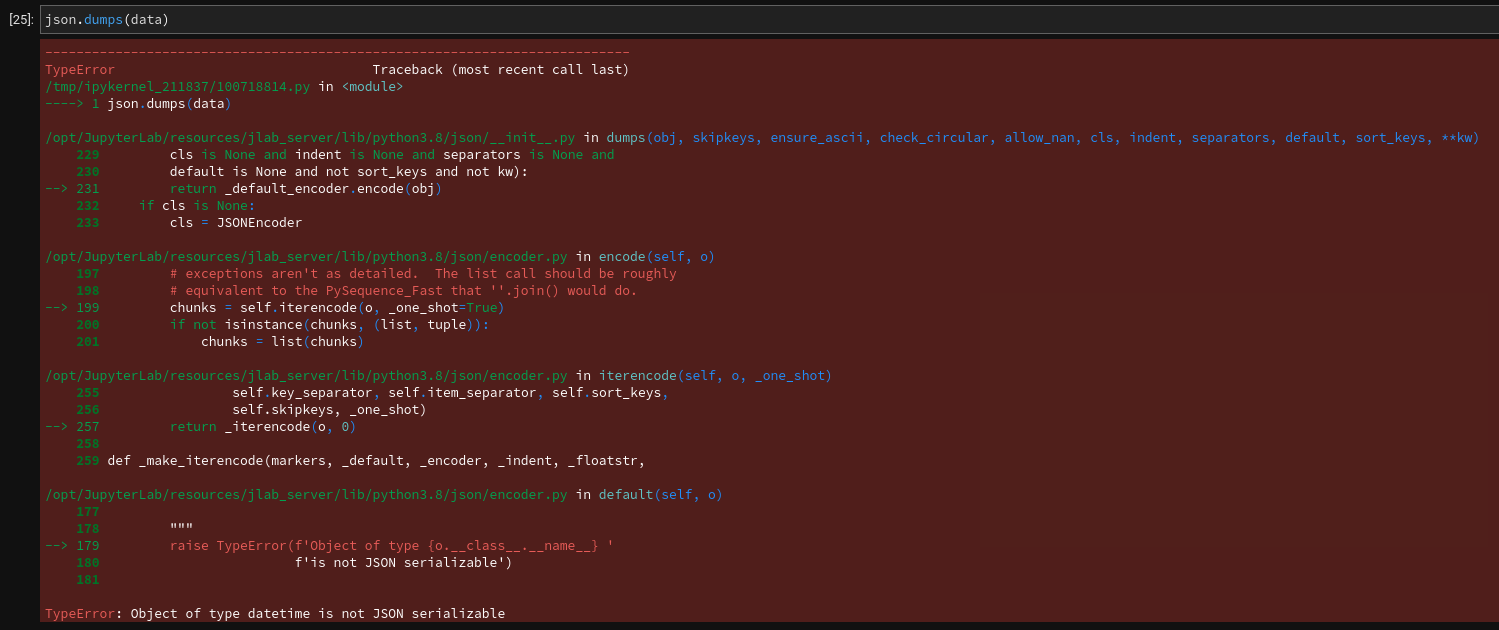
- Use the json module
When trying to convert the data dictionary to json, it will return an error.
- Deserialize json_byte
json_data = orjson.loads(json_byte)

print(json_data)

{'emoji_tears': '😂',
 'emoji_clock': '⏰',
 'integer': 123,
 'float': 10.4,
 'boolean': False,
 'list': ['element1', 'element2'],
 'dict': {'key1': 'value1', 'key2': 'value2'},
 'russian': 'Привет',
 'chinese': '您好',
 'japanese': 'こんにちは',
 'datetime': '2022-01-20T19:25:28.555227',
 'uuid': '40d49edc-7a48-11ec-865d-9078414427c1'}
When deserializing, the objects are already strings.
Additional arguments for serialization
The following parameters can be passed:
- default: A callable that returns a compatible type.
- option: To modify how data is serialized through an integer constant in orjson.
Default
If there is a data entry of type Decimal.
import decimal
orjson.dumps(decimal.Decimal("3.141592653"))
Trying to convert a decimal returns an error:
TypeError: Type is not JSON serializable. decimal.Decimal
This is solved by using the Default parameter.
import decimal
import math
def default(obj):
    if isinstance(obj, decimal.Decimal):
        return str(obj)
    raise TypeError
orjson.dumps(decimal.Decimal(f"{math.pi}"), default=default)

b'"3.141592653589793"'
In this case a string is passed that contains the value of pi using the math library, and it is passed with the default argument along with a function that evaluates whether it is a decimal and converts it into a string, otherwise it raises an error.
In the end, instead of returning an error, it returns bytes with the value of pi.
Option
It lets you define the serialization method.
import orjson
import datetime
import numpy as np
data = {
"datetime": datetime.datetime.now(),
"numpy": np.array([[1, 2], [3, 4]])
}
json_byte = orjson.dumps(data, option=orjson.OPT_NAIVE_UTC | orjson.OPT_SERIALIZE_NUMPY)
print(json_byte)

print(orjson.loads(json_byte))

b'{"datetime":"2022-01-20T19:48:45.924867+00:00","numpy":[[1,2],[3,4]]}'

{'datetime': '2022-01-20T19:48:45.924867+00:00', 'numpy': [[1, 2], [3, 4]]}
In this case the following options are passed:
- orjson.OPT_NAIVE_UTC: to make the datetime conversion easier.
- orjson.OPT_SERIALIZE_NUMPY: to make the numpy conversion easier.
Details:
- OPT_APPEND_NEWLINE — Appends \n .
- OPT_INDENT_2 — Indents the output by 2 spaces .
- OPT_NAIVE_UTC — Serializes datetime.datetime objects without tzinfo as UTC.
- OPT_SERIALIZE_NUMPY — Serializes numpy.ndarray instances.
Dataclass
ORJSON serializes dataclass as maps, with each attribute serialized.
import dataclasses, orjson, typing
@dataclasses.dataclass
class Person:
    id: int
    name: str
    status: bool = dataclasses.field(default=True)
@dataclasses.dataclass
class Class:
    id: int
    name: str
    students: typing.List[Person]
data = Class(1, "Class A", [Person(1, "John Doe", False), Person(2, "Mary Sue")])
json_byte = orjson.dumps(data)
print(json_byte)
print(orjson.loads(json_byte))


b'{"id":1,"name":"Class A","students":[{"id":1,"name":"John Doe","status":false},{"id":2,"name":"Mary Sue","status":true}]}'
{'id': 1,
 'name': 'Class A',
 'students': [{'id': 1, 'name': 'John Doe', 'status': False},
  {'id': 2, 'name': 'Mary Sue', 'status': True}]}
In this example the Person class is defined with three arguments id (integer), name (string) and status (boolean); for status the default value True is defined.
The Class class is also defined with id (integer), name (string) and students (which is a list of persons).
Then the data variable is defined, which is an instance of Class with its data.
Then it is serialized and deserialized.
Writing/Reading files
To write to a file we use the data variable from the previous example.
with open("example.json", "wb") as f:
    f.write(orjson.dumps(data))
Opening the file shows the json:

To read the json file:
with open("example.json", "rb") as f:
    json_data = orjson.loads(f.read())

print(json_data)

{'id': '1',
 'name': 'Class A',
 'students': [{'id': 1, 'name': 'John Doe', 'status': False},
  {'id': 2, 'name': 'Mary Sue', 'status': True}]}
To conclude, the most useful thing about orjson is that it allows or eases the handling of datetime and uuid objects, and it eases the conversion of the decimal data type without raising an error in the conversion, as Python's json module does.
References:
- Choosing a faster JSON library for Python
- orjson — A fast json parser for python (broken link) (article in English on which this article is based)
- orjson performance
- github repository
Make a donation! If you liked the article you can make a donation with Bitcoin (BTC) using the digital wallet of your choice to the following address: 17MtNybhdkA9GV3UNS6BTwPcuhjXoPrSzV
Or by scanning the QR code from your wallet:
