The article is based on the English article from:
The calendar library lets you display the months of a year; the first thing we have to do is import the library.
import calendarDisplay the calendar for a year and month:
The variables year and month are defined, and the month method of calendar is called passing these variables; it returns the calendar of the defined month and year.
year = 2023
month = 3
print(calendar.month(year, month))
March 2023
Mo Tu We Th Fr Sa Su
1 2 3 4 5
6 7 8 9 10 11 12
13 14 15 16 17 18 19
20 21 22 23 24 25 26
27 28 29 30 31Display the calendar for the year 2023:
The calendar year is defined and then all the months are shown.
year = 2023
print(calendar.calendar(year))
2023
January February March
Mo Tu We Th Fr Sa Su Mo Tu We Th Fr Sa Su Mo Tu We Th Fr Sa Su
1 1 2 3 4 5 1 2 3 4 5
2 3 4 5 6 7 8 6 7 8 9 10 11 12 6 7 8 9 10 11 12
9 10 11 12 13 14 15 13 14 15 16 17 18 19 13 14 15 16 17 18 19
16 17 18 19 20 21 22 20 21 22 23 24 25 26 20 21 22 23 24 25 26
23 24 25 26 27 28 29 27 28 27 28 29 30 31
30 31
April May June
Mo Tu We Th Fr Sa Su Mo Tu We Th Fr Sa Su Mo Tu We Th Fr Sa Su
1 2 1 2 3 4 5 6 7 1 2 3 4
3 4 5 6 7 8 9 8 9 10 11 12 13 14 5 6 7 8 9 10 11
10 11 12 13 14 15 16 15 16 17 18 19 20 21 12 13 14 15 16 17 18
17 18 19 20 21 22 23 22 23 24 25 26 27 28 19 20 21 22 23 24 25
24 25 26 27 28 29 30 29 30 31 26 27 28 29 30
July August September
Mo Tu We Th Fr Sa Su Mo Tu We Th Fr Sa Su Mo Tu We Th Fr Sa Su
1 2 1 2 3 4 5 6 1 2 3
3 4 5 6 7 8 9 7 8 9 10 11 12 13 4 5 6 7 8 9 10
10 11 12 13 14 15 16 14 15 16 17 18 19 20 11 12 13 14 15 16 17
17 18 19 20 21 22 23 21 22 23 24 25 26 27 18 19 20 21 22 23 24
24 25 26 27 28 29 30 28 29 30 31 25 26 27 28 29 30
31
October November December
Mo Tu We Th Fr Sa Su Mo Tu We Th Fr Sa Su Mo Tu We Th Fr Sa Su
1 1 2 3 4 5 1 2 3
2 3 4 5 6 7 8 6 7 8 9 10 11 12 4 5 6 7 8 9 10
9 10 11 12 13 14 15 13 14 15 16 17 18 19 11 12 13 14 15 16 17
16 17 18 19 20 21 22 20 21 22 23 24 25 26 18 19 20 21 22 23 24
23 24 25 26 27 28 29 27 28 29 30 25 26 27 28 29 30 31
30 31Calendar class
The calendar class lets you create a calendar object, which lets you obtain calendar information and format its output.
How to use the calendar class:
- The iterweekdays() method:
It lets you iterate over the days of the week; the method returns an iterator that iterates over the days of the week, the first day of the week is Monday, the last is Sunday.
import calendar

cal = calendar.calendar()
for dia in cal.iterweekdays():
    print(dia,end=' ')
0 1 2 3 4 5 6So it returns Monday, Tuesday, Wednesday, Thursday, Friday, Saturday and Sunday.
- The monthdayscalendar() method:
The method lets you iterate over the whole month, the days of each week.
cal = calendar.Calendar()
for mes in cal.monthdayscalendar(2023,3):
    print(mes)
[0, 0, 1, 2, 3, 4, 5]
[6, 7, 8, 9, 10, 11, 12]
[13, 14, 15, 16, 17, 18, 19]
[20, 21, 22, 23, 24, 25, 26]
[27, 28, 29, 30, 31, 0, 0]TextCalendar class
This is a class used to generate calendars in text format.
- The formatmonth() method:
It generates the month output in calendar format but as text.
textcal = calendar.TextCalendar()
year = 2023
month = 3
w = 4 # ancho de cada columna
l = 2 # número de líneas por semana
print(textcal.formatmonth(year, month, w, l))
March 2023
Mo Tu We Th Fr Sa Su
1 2 3 4 5
6 7 8 9 10 11 12
13 14 15 16 17 18 19
20 21 22 23 24 25 26
27 28 29 30 31- The prmonth() method:
This method prints the month in the calendar format returned by the formatmonth method. It takes the same arguments as the formatmonth method.
textcal.prmonth(year,month,6,3)
March 2023


 Mon    Tue    Wed    Thu    Fri    Sat    Sun


                 1      2      3      4      5


   6      7      8      9     10     11     12


  13     14     15     16     17     18     19


  20     21     22     23     24     25     26


  27     28     29     30     31
HTMLCalendar class
It is used to generate calendars in html format.
- The formatmonth() method:
htmlcal = calendar.HTMLCalendar()
print(htmlcal.formatmonth(2023, 3))
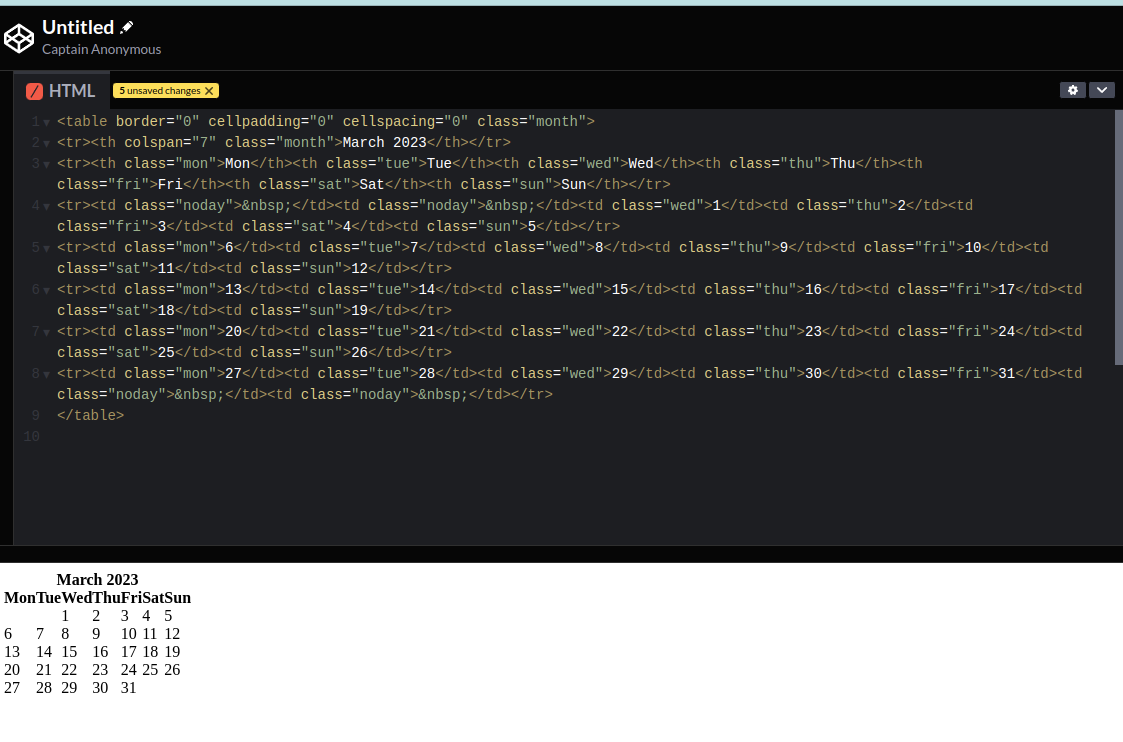
<table border="0" cellpadding="0" cellspacing="0" class="month">
<tr><th colspan="7" class="month">March 2023</th></tr>
<tr><th class="mon">Mon</th><th class="tue">Tue</th><th class="wed">Wed</th><th class="thu">Thu</th><th class="fri">Fri</th><th class="sat">Sat</th><th class="sun">Sun</th></tr>
<tr><td class="noday"> </td><td class="noday"> </td><td class="wed">1</td><td class="thu">2</td><td class="fri">3</td><td class="sat">4</td><td class="sun">5</td></tr>
<tr><td class="mon">6</td><td class="tue">7</td><td class="wed">8</td><td class="thu">9</td><td class="fri">10</td><td class="sat">11</td><td class="sun">12</td></tr>
<tr><td class="mon">13</td><td class="tue">14</td><td class="wed">15</td><td class="thu">16</td><td class="fri">17</td><td class="sat">18</td><td class="sun">19</td></tr>
<tr><td class="mon">20</td><td class="tue">21</td><td class="wed">22</td><td class="thu">23</td><td class="fri">24</td><td class="sat">25</td><td class="sun">26</td></tr>
<tr><td class="mon">27</td><td class="tue">28</td><td class="wed">29</td><td class="thu">30</td><td class="fri">31</td><td class="noday"> </td><td class="noday"> </td></tr>
</table>
Taking the code and passing it through codepen gives:
This library makes it easy to display yearly and/or monthly calendars.