This post will explain how to use radio buttons in PyQt.
The idea is that the user selects one of the options presented; in this case they are asked for their sex. When they click with the mouse or press alt+f for female or alt+m for male, the result is shown automatically in a label. There is a button to quit the program.
The new widget in this continuation of the PyQt tutorials is:
- QRadioButton : Creates an instance of a RadioButton widget.
Since this widget inherits from the Button widget, the clicked signal can be used to capture the moment one of the options is selected.
The code of the program is shown below:
#!/usr/bin/env python
# -*- coding: utf-8 -*-

#Se importa el modulo sys
import sys

#De PyQt4 importar QtGui y QtCore.
from PyQt4 import QtGui
from PyQt4 import QtCore


class App(QtGui.QWidget):
    def __init__(self,parent=None):
        QtGui.QWidget.__init__(self, parent)
        #Se define el tamano de la ventana
        self.setGeometry(0, 50, 350, 250)
        #Se le coloca un titulo a la ventana y se asocia un icono.
        self.setWindowTitle('Prueba')
        self.setWindowIcon(QtGui.QIcon('./openlogo-50.png'))

        #Se define la etiqueta donde se pregunta por el sexo.
        etiqueta = QtGui.QLabel("Sexo:")
        #Se define la etiqueta que muestra la palabra resultado.
        resultado = QtGui.QLabel("Resultado:")
        #Se define la etiqueta donde se mostrara la informacion
        #seleccionada del boton de radio
        self.texto = QtGui.QLabel("")

        #Se crea los botones de radio para seleccionar masculino o femenino.
        #Se define ahi el uso del alt+m y alt+f para seleccionar
        #un boton.
        self.botonradio1 = QtGui.QRadioButton("&Masculino",self)
        self.botonradio2 = QtGui.QRadioButton("&Femenino",self)

        #Se crea el boton para salir del programa
        quit = QtGui.QPushButton('Salir', self)

        #Empaquetamiento de los widgets en una cuadricula.
        grid = QtGui.QGridLayout()
        grid.setSpacing(10)
        #Se agrega los widgets de etiquetas,radiobuttons y
        #el boton salir
        grid.addWidget(etiqueta, 0, 0)
        grid.addWidget(self.botonradio1,0,1)
        grid.addWidget(self.botonradio2,0,3)
        grid.addWidget(resultado,2,0)
        grid.addWidget(self.texto,2,1)
        grid.addWidget(quit,3,0)
        self.setLayout(grid)

        #Se conecta la segnal con los 2 botones de radio y el boton para
        #salir del programa, se asocian a los metodos respectivos.
        self.connect(quit, QtCore.SIGNAL('clicked()'),QtGui.qApp, QtCore.SLOT('quit()'))
        self.connect(self.botonradio1,QtCore.SIGNAL('clicked()'),self.Mostrar1)
        self.connect(self.botonradio2,QtCore.SIGNAL('clicked()'),self.Mostrar2)

    def Mostrar1(self):
        #Se muestra el resultado seleccionado
        self.texto.setText("Masculino")

    def Mostrar2(self):
        #Se muestra el resultado seleccionado
        self.texto.setText("Femenino")


#Se ejecuta el programa principal
if __name__ == "__main__":
   #Se instancia la clase QApplication
   app = QtGui.QApplication(sys.argv)
   #Se instancia el objeto QuitButton
   qb = App()
   #Se muestra la aplicacion
   qb.show()
   #Se sale de la aplicacion
   sys.exit(app.exec_())
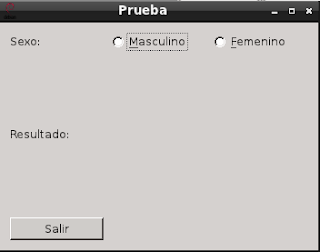
The figure below shows the program starting:
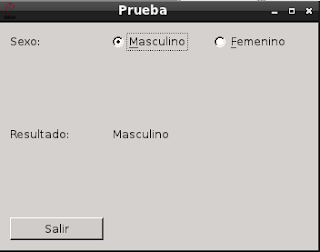
The following figure shows the result of clicking the Masculino radio button:
The following figure shows the result of pressing alt+f to select the Femenino radio button:
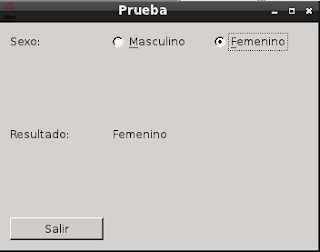
Notice that the information shown changes when you select one of the radio buttons.
===
Make a donation! If you liked the article you can make a donation with Bitcoin (BTC) using the digital wallet of your choice to the following address: 17MtNybhdkA9GV3UNS6BTwPcuhjXoPrSzV
Or by scanning the QR code from your wallet:
