Continuing with the PyQt tutorials, it is now time to explain how to create a web browser.
The idea is to have an input field where you type the url to visit, next to it a button that navigates to the given url, below it the browsing widget and finally, at the bottom, a quit button. You can also navigate by pressing enter in the url field.
The new widget being used is:
- QWebView: Lets you create a web browsing view.
The program code is shown below:
#!/usr/bin/env python
# -*- coding: utf-8 -*-

#Se importa el modulo sys
import sys

#De PyQt4 importar QtGui,QtCore y QtWebkit.
from PyQt4 import QtGui
from PyQt4 import QtCore
from PyQt4 import QtWebKit


class App(QtGui.QWidget):
    def __init__(self,parent=None):
        QtGui.QWidget.__init__(self, parent)
        #Se define el tamano de la ventana
        # posicion en x,y, ancho y alto
        self.setGeometry(0, 50, 1024, 550)
        #Se le coloca un titulo a la ventana y se asocia un icono.
        self.setWindowTitle('Navegador')
        self.setWindowIcon(QtGui.QIcon('./openlogo-50.png'))

        #Se crea una entrada de datos donde se pasa el url a navegar
        self.entradaUrl = QtGui.QLineEdit("http://www.debian.org.ve")
        #Se crea el boton para ir a una pagina web
        navegar = QtGui.QPushButton("Ir",self)
        #Se crea el boton salir
        quit = QtGui.QPushButton("Salir",self)
        #Se crea el widget donde se mostrara la pagina web
        self.web = QtWebKit.QWebView()
        #Se habilita el atributo de plugins
        self.web.settings().setAttribute(QtWebKit.QWebSettings.PluginsEnabled,True)
        #Se carga la pagina de debian venezuela al inicio
        self.web.load(QtCore.QUrl("http://www.debian.org.ve"))


        #Empaquetamiento de los widgets en una cuadricula.
        grid = QtGui.QGridLayout()
        grid.setSpacing(10)
        #Se agrega la entrada de datos
        grid.addWidget(self.entradaUrl, 1, 0)
        #Se agrega el boton navegar al lado de la
        #entrada de datos
        grid.addWidget(navegar,1,1)
        #Se agrega el widget web
        grid.addWidget(self.web,2,0)
        #Se agrega el boton salir
        grid.addWidget(quit,3,0)

        #Se define el layout pasando la grilla
        self.setLayout(grid)

        #Se define la asociacion de segnales:
        #Se define la segnal del boton quit, salir del programa
        self.connect(quit, QtCore.SIGNAL('clicked()'),QtGui.qApp, QtCore.SLOT('quit()'))
        #Se define la segnal del boton navegar, al darle clip se ejecuta el metodo navegar
        self.connect(navegar,QtCore.SIGNAL('clicked()'),self.navegar)
        #Se define la segnal de la entrada de datos
        #Al darle enter se ejecuta el metodo navegar
        self.connect(self.entradaUrl,QtCore.SIGNAL('returnPressed()'),self.navegar)


    def navegar(self):
        #Navegar captura el texto de la entrada de datos
        #Y se carga la nueva pagina.
        url = self.entradaUrl.text()
        self.web.load(QtCore.QUrl("%s" %url))


#Se ejecuta el programa principal
if __name__ == "__main__":
   #Se instancia la clase QApplication
   app = QtGui.QApplication(sys.argv)
   #Se instancia el objeto QuitButton
   qb = App()
   #Se muestra la aplicacion
   qb.show()
   #Se sale de la aplicacion
   sys.exit(app.exec_())
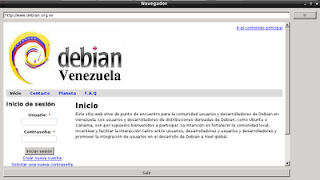
The browser window when running the program is shown below:
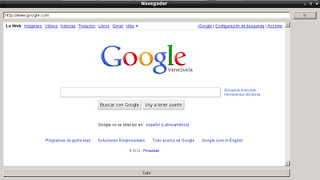
The following figure shows a new url being typed; you can click the go button or press enter in the input field:
===
Make a donation! If you liked the article you can make a donation with Bitcoin (BTC) using the digital wallet of your choice to the following address: 17MtNybhdkA9GV3UNS6BTwPcuhjXoPrSzV
Or by scanning the QR code from your wallet:
