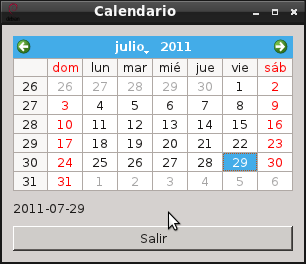
Continuing with the articles about PyQt, I will now explain how to use a calendar and capture the selection of a given date; the selected date is shown dynamically in a label and at the end a quit button is added.
Basically QtGui.QCalendarWidget will be used, with a grid through the setGridVisible method, which has two options: True or False.
Here is the program code:
#!/usr/bin/env python
# -*- coding: utf-8 -*-

#Se importa el modulo sys
import sys


#De PyQt4 importar QtGui y QtCore
from PyQt4 import QtGui
from PyQt4 import QtCore


class App(QtGui.QWidget):


    def __init__(self, parent=None):
        QtGui.QWidget.__init__(self, parent)
        #Se define el tamano de la ventana
        self.setGeometry(400, 400, 250, 150)
        #Se le coloca un titulo a la ventana y se asocia un icono.
        self.setWindowTitle('Calendario')
        self.setWindowIcon(QtGui.QIcon('./openlogo-50.png'))

        #Define el calendario en una ventana
        self.cal = QtGui.QCalendarWidget(self)
        #Se define una cuadricula al calendario
        self.cal.setGridVisible(True)
        #Se define una etiqueta donde se mostrara
        #La fecha seleccionada
        self.etiqueta = QtGui.QLabel(self)

        #Se captura la fecha y se muestra en la etiqueta
        self.fecha = self.cal.selectedDate()
        self.etiqueta.setText(str(self.fecha.toPyDate()))

        #Se define el boton para salir

        quit = QtGui.QPushButton('Salir', self)
        #Se define como empaquetar los widgets.
        #En este caso se usa grilla.
        #Se crea la instancia
        grid = QtGui.QGridLayout()
        grid.setSpacing(10)

        grid.addWidget(self.cal, 1, 0)
        grid.addWidget(self.etiqueta, 2, 0)

        grid.addWidget(quit,3,0)
        #Se define el layout pasando la grilla
        self.setLayout(grid)

        self.connect(quit, QtCore.SIGNAL('clicked()'),QtGui.qApp, QtCore.SLOT('quit()'))
        self.connect(self.cal, QtCore.SIGNAL('selectionChanged()'),
            self.mostrarFecha)

    def mostrarFecha(self):
        self.fecha = self.cal.selectedDate()
        self.etiqueta.setText(str(self.fecha.toPyDate()))


#Se ejecuta el programa principal
if __name__ == "__main__":
   #Se instancia la clase QApplication
   app = QtGui.QApplication(sys.argv)
   #Se instancia el objeto QuitButton
   qb = App()
   #Se muestra la aplicacion
   qb.show()
   #Se sale de la aplicacion
   sys.exit(app.exec_())
The figure shows the program running:
===
Make a donation! If you liked the article you can make a donation with Bitcoin (BTC) using the digital wallet of your choice to the following address: 17MtNybhdkA9GV3UNS6BTwPcuhjXoPrSzV
Or by scanning the QR code from your wallet:
