Pyprocessing is a python package for creating graphics, based on the OpenGL and Pyglet (broken link). The project is hosted on google code.
In the documentation you will find the quick reference guide, a basic tutorial, a more complete tutorial and the usage instructions.
To install it on linux, use easy_install or pip:
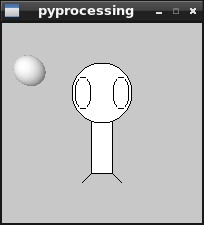
easy_install pyprocessingpip install pyprocessingThe example is to create, with a rectangle, lines and ellipses, a sort of armless doll next to a small sphere. This example is based on the small example the project has on its front page.
The code is shown below:
#!/usr/bin/env python

# -*- coding: utf-8 -*-

#Se importa pyprocessing

from pyprocessing import *

#define el tamaño de la ventana.

size(200,200)

#Define un rectangulo en el centro de la ventana

rectMode(CENTER)

#Se crea el rectangulo(x,y,ancho,alto)

rect(100,100,20,100)

#Se crean 3 elipses(x,y,ancho,alto)

ellipse(100,70,60,60)

ellipse(81,70,16,32)

ellipse(119,70,16,32)

#Se crean 2 lineas(x1,y1,x2,y2)

line(90,150,80,160)

line(110,150,120,160)

#No se crea bordes en la figura

noStroke();

#Define que tendrá luz la esfera

lights();

#Define la cantidad de desplazamiento con respecto a la ventana.

#(derecha/izquierda,arriba/abajo,delante/detrás)

translate(28, 48, 0);

#Se crea una esfera con radio 15

sphere(15)

#Se muestra en la ventana.

run()
The following figure shows the result of running the code:
Make a donation! If you liked this article you can donate with Bitcoin (BTC) using the digital wallet of your choice to the following address: 17MtNybhdkA9GV3UNS6BTwPcuhjXoPrSzV
Or by scanning the QR code from your wallet:
