The Raspberry Pi has a PCB revision number, which indicates that there are small changes in the PCB. These changes can affect how Python programs work and even how the pins (power, input/output, etc.) are laid out on the board.
This information can be obtained from the /proc/cpuinfo file as shown below:
ernesto@raspberrypi ~ $ cat /proc/cpuinfo

Processor	: ARMv6-compatible processor rev 7 (v6l)

BogoMIPS	: 697.95

Features	: swp half thumb fastmult vfp edsp java tls

CPU implementer	: 0x41

CPU architecture: 7

CPU variant	: 0x0

CPU part	: 0xb76

CPU revision	: 7


Hardware	: BCM2708

Revision	: 000f

Serial		: 00000000bcd34f5e
The Revision number is 00f and the serial is 00000000bcd34f5e. The Raspberry Pi variants according to version number are listed below (taken from here):
- Model B Revision 1.0: The cpuinfo value is 0002.
- Model B Revision 1.0+ECN001 (no fuses, D14 removed): The cpuinfo value is 0003.
- Model B Revision 2.0: The cpuinfo value is 0004,0005, 0006...
The Raspberrypi spy site has a couple of scripts to get the revision number and the serial of the board.
The script is shown below (with a small fix):
#!/usr/bin/env python

# -*- coding: utf-8 -*-

"""
Script que busca la informacion del serial y numero de revision en el Raspberry Pi.
Este script se obtiene de los siguientes enlaces:
Numero de Revision:
http://www.raspberrypi-spy.co.uk/2012/09/getting-your-raspberry-pi-revision-number-using-python/#more-574
Numero de Serial:
http://www.raspberrypi-spy.co.uk/2012/09/getting-your-raspberry-pi-serial-number-using-python/#more-570

"""python

def getrevision():
    # Extrae la informacion del numero de revision del raspberry pi
    #Se asigna a revision un string de 4 ceros.
    revision = "0000"
    #Se abre el archivo cpuinfo
    #Se
    try:
        f = open('/proc/cpuinfo','r')
        #Se recorre el archivo
        for linea in f:
            #Si existe el contenido Revision en una linea
            if linea[0:8]=='Revision':
                #Se toma la longitud de la linea
                longitud =len(linea)
                #Se agrega la informacion completa de la revision
                revision = linea[11:longitud-1]
        #Se cierra el archivo
        f.close()
#Si no abre el archivo se asigna 4 ceros a revision
    except IOError:
        revision = "0000"
    #Se retorna el valor de revision
    return revision
def getserial():
    # Extrae la informacion del serial desde cpuinfo
    #Se asigna un string con ceros a cpuserial
    cpuserial = "00000000"
    #Se intenta a capturar la informacion del archivo cpuinfo,
    #si no se tiene un mensaje de error.
    try:
        f = open('/proc/cpuinfo','r')
        #se recorre el archivo linea a linea
        for linea in f:
            #Si existe el contenido Serial en la linea
            if linea[0:6]=='Serial':
                #Se agrega la informacion completa del serial del cpu
                cpuserial = linea[10:-1]
        #Se cierra el archivo
        f.close()
    #Si no abre el archivo se asigna el valor de error al serial
    except IOError:
        cpuserial = "ERROR000000000"
    #retorna el valor del serial del cpu
    return cpuserial

if __name__ == '__main__':
    print u"El número de Serial del Raspberry Pi es: %s " %getserial()
    print u"El número de Revision del Raspberry Pi es: %s" %getrevision()
Running the script gives the following:
ernesto@raspberrypi ~ $ ./versionSerial.py

El número de Serial del Raspberry Pi es: 00000000bcd34f5e

El número de Revision del Raspberry Pi es: 000f
With this information we know the Raspberry Pi is revision 2.0.
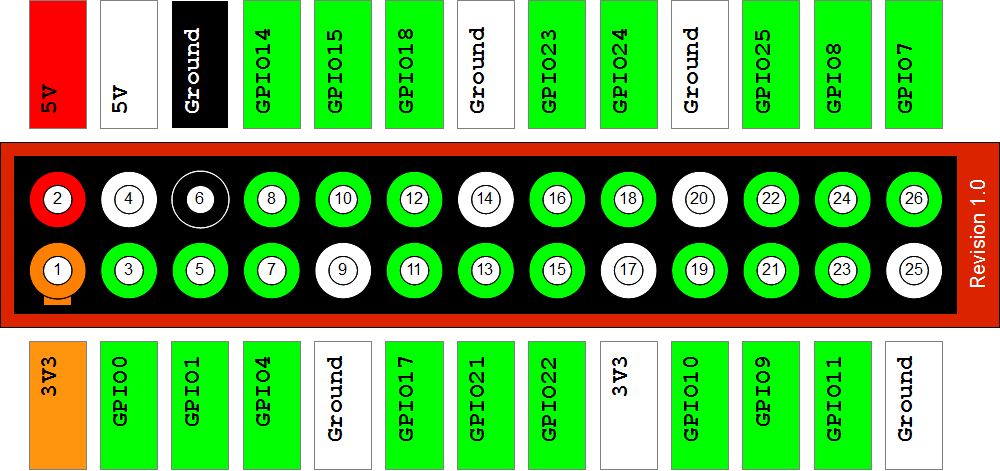
The pin layout of revision 1.0 is shown below:
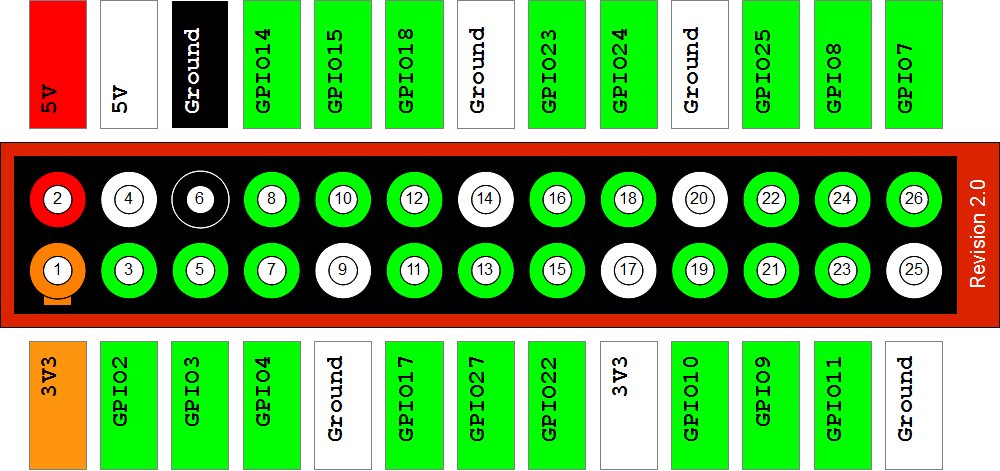
And the pin layout of revision 2.0:
With this information you now know how to wire up circuits to the Rasberry Pi.
Make a donation! If you liked the article you can make a donation with Bitcoin (BTC) using the digital wallet of your choice at the following address: 17MtNybhdkA9GV3UNS6BTwPcuhjXoPrSzV
Or by scanning the QR code from your wallet:
