This article is thanks to the code developed by William Cabrera, who mentions on his blog (broken link) that he created a Telegram Channel about Earthquakes in Venezuela. The source code of his php scripts was the basis for the Python code shown in this article.
Thank you William for this information tool that is the Telegram Channel.
mechanize and BeautifulSoup will be used to get the information from the funvisis site through WebScraping. The information we want to get is shown in a box in the following figure:
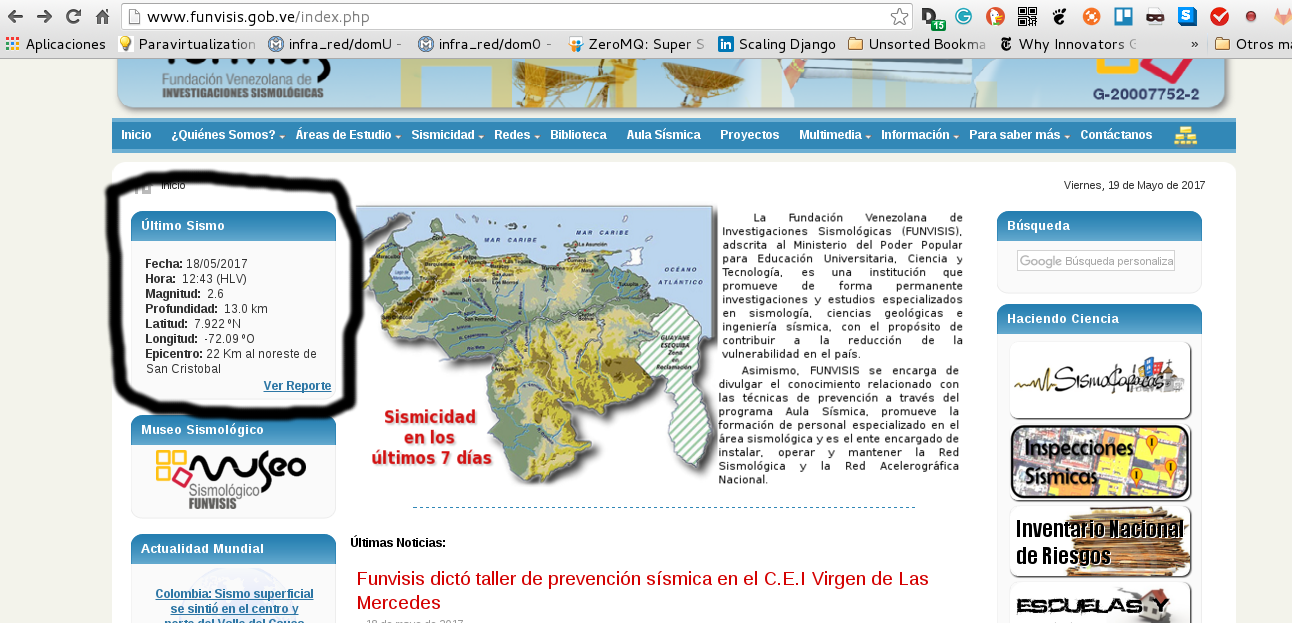
To see which section of the html code to look for, right-click and choose inspect element; the following figure shows the result:
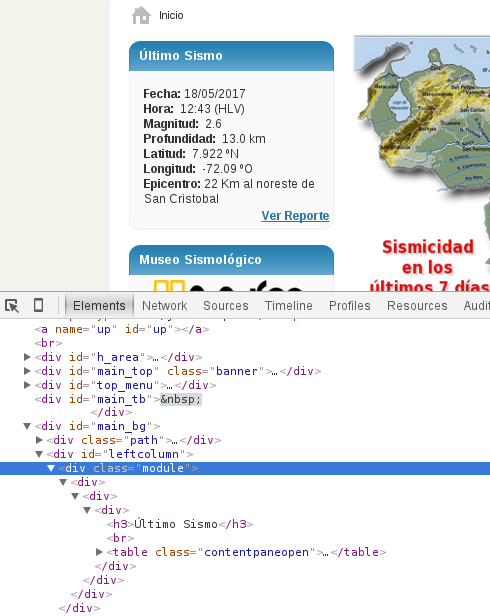
There you can clearly see the html tag that needs to be searched for.
The application code is shown below:
#!/usr/bin/env python


#Se importa mechanize y cookielib

import mechanize

import cookielib

#Se importa beautifulSoup

from BeautifulSoup import BeautifulSoup


def Sismo():

    br = mechanize.Browser()

    #Se crea una instancia para la Cookie

    cj = cookielib.LWPCookieJar()

    #Se asocia la instancia del cookie con el navegador.

    br.set_cookiejar(cj)

    #Se deshabilita el manejo de robots.txt

    br.set_handle_robots(False)

    #Se define el tiempo de refrescamiento

    br.set_handle_refresh(mechanize._http.HTTPRefreshProcessor(), max_time=1)

    #Se pasa el url del sitio timeanddate con la informacion

    url = "http://www.funvisis.gob.ve/"


    urlhome = url + "index.php"

    #de la salida y ocultamiento del sol en Venezuela.

    #Se define las cabeceras del navegador, en este caso se le esta diciendo

    # que el navegador es un firefox desde Linux Debian

    br.addheaders = [('SSL_VERIFYHOST', False),\

        ('FRESH_CONNECT',True),\

        ('RETURNTRANSFER',True),\

        ('SSL_VERIFYPEER', False),\

        ('Referer', 'http://www.cantv.com.ve'),\

        ('User-agent','Mozilla/5.0 (X11; U; Linux i686; es-VE; rv:1.9.0.1)Gecko/2008071615 Debian/6.0 Firefox/9')]

    #Se abre el url

    r = br.open(urlhome)

    #Se lee el htmml de la pagina

    html = br.response().read()

    #Se crea una instancia de BeautifulSoup pasando el html

    #a verificar

    soup = BeautifulSoup(html)

    sismo = {}


    #SE obtiene el primer  div que tengan class module

    for row in soup('div', {'class': 'module'})[0]:

        #Se obtiene el tag a para luego obtener el href y tener el url

        #del gif del sitio de funvisis que tiene la imagen del sitio donde

        #fue el sismo.

        trs = row.find('a')

        if trs == -1:

            continue

        sismo['urlref'] = url  + trs.get('href',None)


        trs = row.find('tr')

        if trs == -1:

            continue

        #Obtiene los datos del sismo del sitio de funvisis

        datos = trs.find('td').getText()

        sismo['fecha'] = datos.split(' ')[1][:-5]

        sismo['hora'] =  datos.split(' ')[2][-20:-14]

        sismo['magnitud'] = datos.split(' ')[3][-16:-12]

        sismo['profundidad'] = datos.split(' ')[4][-6:] + " " + datos.split(' ')[5][-11:-8]

        sismo['latitud'] = datos.split(' ')[6].split('º')[0][-9:] +datos.split(' ')[6][-10:-9]

        linea = datos.split(' ')[7].split('º')

        sismo['longitud'] = linea[0][-9:]+ linea[1][0]

        sismo['epicentro'] = datos.split(' ')[8]

        return sismo


def EventoSismoJSON():

    #Devuelve los datos del sismo en formato JSON

    import json

    return json.dumps(Sismo())


if __name__ == '__main__':

    print Sismo()

    print EventoSismoJSON()
When run, the script returns the dictionary with the seismic event information.
python sismux_getdata.py
{'hora': u'16:13 ', 'latitud': u'   11.73 N', 'epicentro': u'52 Km al sur de Curazao', 'profundidad': u'  40.6 km', 'fecha': u'19/05/2017', 'urlref': u'http://www.funvisis.gob.ve/images/reportes/2017/05/reporte_7415.gif', 'magnitud': u' 3.0', 'longitud': u'  -68.93 O'}
{"hora": "16:13 ", "latitud": "   11.73 N", "epicentro": "52 Km al sur de Curazao", "profundidad": "  40.6 km", "fecha": "19/05/2017", "urlref": "http://www.funvisis.gob.ve/images/reportes/2017/05/reporte_7415.gif", "magnitud": " 3.0", "longitud": "  -68.93 O"}
You can see the script's source code in the gitlab repository.
The next article will be about uploading the information to a mongoDB database on mongolab and checking whether the seismic event is already registered.
Make a donation! If you liked the article you can make a donation in Bitcoin (BTC) using the digital wallet of your choice to the following address: 17MtNybhdkA9GV3UNS6BTwPcuhjXoPrSzV
Or by scanning the QR code from your wallet:
