Continuing with the series of articles on Tensorflow, in this case I will explain the meaning and use of Graph.
Before continuing, here is the list of articles in this series:
- Hello world from TensorFlow
- Basic math with TensorFlow
- Handling matrices with Tensorflow
- Variables and placeholders in Tensorflow
tf.Graph:
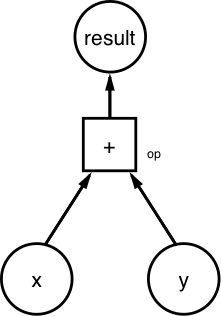
Every computation in Tensorflow is represented by a data flow Graph, which has two elements:
- A tf.Operation object, which represents the unit of computation.
- A tf.Tensor object, which represents units of data, needed for the operations.
Below is a figure of the representation of a Graph:
Below is the use of Graph:
In [1]:
#Se importa tensorflow
import tensorflow as tf
In [2]:
#Se define dos constantes
n1 = tf.constant(10)
n2 = tf.constant(20)
In [3]:
#Se realiza la suma de las dos constantes
n3 = n1+n2
In [4]:
#Se instancia la sesión y se ejecuta almacenando el resultado de n3 que se muestra

with tf.Session() as sess:
    result = sess.run(n3)
print (result)

30
In [5]:
#Se imprime la constante n3, es una suma, y de tipo int32
print(n3)

Tensor("add:0", shape=(), dtype=int32)
In [6]:
#Se obtiene el valor por defecto del grafo en memoria
print (tf.get_default_graph())

<tensorflow.python.framework.ops.Graph object at 0x7f1026aa1cf8>
In [7]:
#Se instancia el objeto grafo
g = tf.Graph()
In [8]:
#Se imprime su valor, los valores en memoria serán distintos del por defecto al creado.
print(g)

<tensorflow.python.framework.ops.Graph object at 0x7f1026ad00b8>
In [9]:
#Se define graph1 como el grafo por defecto
graph1 = tf.get_default_graph()
In [10]:
#Se imprime graph1, será el valor por defecto en memoria
print(graph1)

<tensorflow.python.framework.ops.Graph object at 0x7f1026aa1cf8>
In [11]:
#Se instancia el grafo2
graph2 = tf.Graph()
In [12]:
#Se muestra el valor de grafo2
print(graph2)

<tensorflow.python.framework.ops.Graph object at 0x7f1026ad0390>
In [13]:
#Se define el grafo2 como si fuera  por defecto y se muestra si en verdad es por defecto
with graph2.as_default():
    print(graph2 is tf.get_default_graph())

True
In [14]:
#Se evalua si grafo 2, es el de por defecto
print(graph2 is tf.get_default_graph())

False
Another Graph example
In [15]:
#Se define el grafo
grafo = tf.Graph()
In [16]:
#Se define la sesión pasandole el grafo
with tf.Session(graph=grafo) as sess:
    #Se define las constantes x y y que son arreglos
    x = tf.constant([11,13,16])
    y = tf.constant([10,10,10])
    #Se realiza la operación de suma de x+y
    op = tf.add(x,y)
    #Se ejecuta la operación en la sesión
    resultado = sess.run(fetches=op)
    print(resultado)

[21 23 26]
In [ ]:
undefinedIf you want to investigate Graph further, you can check its documentation on tensorflow (API documentation and programmer's guide), you can read the article on medium Tensorflow in a nutshell-Part 1: Basics (broken link), and you can also check the tutorial from the datacamp people Tensorflow tutorial for beginners (broken link).
Make a donation! If you liked the article you can make a donation in Bitcoin (BTC) using the digital wallet of your choice to the following address: 17MtNybhdkA9GV3UNS6BTwPcuhjXoPrSzV
Or by scanning the QR code from your wallet:
