Continuing with the articles on distributed version control with Mercurial, it is now time to back up and keep the versions of the configuration files in /etc with etckeeper.
Most of the articles you can find about etckeeper use git or bazaar.
For this guide you need basic knowledge of mercurial; you can read the article on version control with mercurial on this blog.
Keeping a history of the files inside the /etc/ directory is essential for a healthy system. The benefits of tracking changes to the files inside /etc include:
- Documentation: The log messages are tied to the configuration changes of the files, serving as documentation.
- Troubleshooting: It lets you roll back configuration changes that have caused problems and so keep the system stable.
- Installing etckeeper: Mercurial must be installed.
aptitude install mercurial etckeeper- Configuring etckeeper:
Edit the file /etc/etckeeper/etckeeper.conf, comment out the other version control systems and leave hg; additionally, leave the option to send mail to a user.
VCS="hg"
# Options passed to hg commit when run by etckeeper.
HG_COMMIT_OPTIONS="-u ecrespo@gmail.com"
Then edit the file /etc/mercurial/hgrc
Add the user's email:
[ui]
username = ecrespo@gmail.com- Initialize the version control:
etckeeper initThe following shows how the files inside /etc have been added to version control:
adding xdg/xfce4/Xft.xrdb
adding xdg/xfce4/helpers.rc
adding xdg/xfce4/mount.rc
adding xdg/xfce4/panel/clock-14.rc
adding xdg/xfce4/panel/launcher-10.rc
adding xdg/xfce4/panel/launcher-7.rc
adding xdg/xfce4/panel/launcher-9.rc
adding xdg/xfce4/panel/panels.xml
adding xdg/xfce4/panel/systray-4.rc
adding xdg/xfce4/panel/xfce4-menu-5.rc
adding xdg/xfce4/xfconf/xfce-perchannel-xml/xfce4-keyboard-shortcuts.xml
adding xdg/xfce4/xfconf/xfce-perchannel-xml/xfce4-session.xml
adding xdg/xfce4/xfconf/xfce-perchannel-xml/xsettings.xml
adding xdg/xfce4/xinitrc
adding xml/catalog
adding xml/docbook-xml.xml
adding xml/docbook-xsl.xml
adding xml/rarian-compat.xml
adding xml/sgml-data.xml
adding xml/xml-core.xml- Make the first commit:
etckeeper commit "Inicializacion del control de versiones"- Using etckeeper.
When a program is installed, the configuration files are automatically added to version control. The lighttpd package will be installed to show the process of adding the files to version control:
apt-get install lighttpdAt the end a series of added files appears:
adding lighttpd/conf-available/15-fastcgi-php.conf
adding lighttpd/conf-available/90-debian-doc.conf
adding lighttpd/conf-available/README
adding lighttpd/lighttpd.conf
adding logrotate.d/lighttpd
adding rc0.d/K01lighttpd
adding rc1.d/K01lighttpd
adding rc2.d/S20lighttpd
adding rc3.d/S20lighttpd
adding rc4.d/S20lighttpd
adding rc5.d/S20lighttpd
adding rc6.d/K01lighttpd
Check the mercurial status in the /etc directory:
hg status /etc/
M ../etc/.etckeeper
Checking the mercurial log in the /etc/ directory shows the changes made (commits):
hg log /etc/

changeset:   1:ba22869a3179
tag:         tip
user:        ecrespo@gmail.com
date:        Wed Jul 27 22:02:27 2011 -0430
summary:     committing changes in /etc after apt run

changeset:   0:f2a3f337ecc0
user:        ecrespo@gmail.com
date:        Wed Jul 27 21:54:21 2011 -0430
summary:     Inicializacion del control de versiones
There is a description of the changes: changeset 0 shows the initialization of version control, and changeset 1 shows the change after installing lighttpd.
Modify a configuration file, /etc/hosts :
etckeeper commit "Se elimina el dominio del host jewel en /etc/hosts" /etc/hosts
Checking the mercurial log on the /etc/ directory again shows the commit of the change to the hosts file:
hg log /etc/
changeset:   2:6efc1189bd8b
tag:         tip
user:        ecrespo@gmail.com
date:        Wed Jul 27 22:08:25 2011 -0430
summary:     Se elimina el dominio del host jewel en /etc/hosts

changeset:   1:ba22869a3179
user:        ecrespo@gmail.com
date:        Wed Jul 27 22:02:27 2011 -0430
summary:     committing changes in /etc after apt run

changeset:   0:f2a3f337ecc0
user:        ecrespo@gmail.com
date:        Wed Jul 27 21:54:21 2011 -0430
summary:     Inicializacion del control de versiones
You can see the differences between the changes made to files inside the /etc directory:
hg diff /etc/
diff -r 6efc1189bd8b hosts
--- a/hosts    Wed Jul 27 22:08:25 2011 -0430
+++ b/hosts    Wed Jul 27 22:13:41 2011 -0430
@@ -1,6 +1,6 @@
 127.0.0.1    localhost
 127.0.1.1    jewel    jewel
-
+127.0.0.1    sofia   sofia
 # The following lines are desirable for IPv6 capable hosts
 ::1     ip6-localhost ip6-loopback
 fe00::0 ip6-localnet
After committing and running diff again, this time it shows no information because the changes have already been committed to version control:
etckeeper commit "Agregado el nombre sofia al host 127.0.0.1 en el archivo /etc/hosts" /etc/hostsChecking the logs now shows the change that added the name sofia to the host 127.0.0.1:
hg log /etc/
changeset:   3:452065708a7e
tag:         tip
user:        ecrespo@gmail.com
date:        Wed Jul 27 22:16:13 2011 -0430
summary:     Agregado el nombre sofia al host 127.0.0.1 en el archivo /etc/hosts

changeset:   2:6efc1189bd8b
user:        ecrespo@gmail.com
date:        Wed Jul 27 22:08:25 2011 -0430
summary:     Se elimina pdvsa.com del host jewel en /etc/hosts

changeset:   1:ba22869a3179
user:        ecrespo@gmail.com
date:        Wed Jul 27 22:02:27 2011 -0430
summary:     committing changes in /etc after apt run

changeset:   0:f2a3f337ecc0
user:        ecrespo@gmail.com
date:        Wed Jul 27 21:54:21 2011 -0430
summary:     Inicializacion del control de versiones
To see the tip of each repo, run hg tip inside the repository:
root@jewel:/etc# hg tip
changeset:   3:452065708a7e
tag:         tip
user:        ecrespo@gmail.com
date:        Wed Jul 27 22:16:13 2011 -0430
summary:     Agregado el nombre sofia al host 127.0.0.1 en el archivo /etc/hosts
Now all the revisions will be shown with the logs and then a change will be reverted:
hg log
changeset:   3:452065708a7e
tag:         tip
user:        ecrespo@gmail.com
date:        Wed Jul 27 22:16:13 2011 -0430
summary:     Agregado el nombre sofia al host 127.0.0.1 en el archivo /etc/hosts

changeset:   2:6efc1189bd8b
user:        ecrespo@gmail.com
date:        Wed Jul 27 22:08:25 2011 -0430
summary:     Se elimina pdvsa.com del host jewel en /etc/hosts

changeset:   1:ba22869a3179
user:        ecrespo@gmail.com
date:        Wed Jul 27 22:02:27 2011 -0430
summary:     committing changes in /etc after apt run

changeset:   0:f2a3f337ecc0
user:        ecrespo@gmail.com
date:        Wed Jul 27 21:54:21 2011 -0430
summary:     Inicializacion del control de versiones
You can see the changes relative to each revision; the following command compares revision 1 with revision 2 in /etc/hosts:
hg diff -r 1 -r 2 /etc/hosts
diff -r ba22869a3179 -r 6efc1189bd8b hosts
--- a/hosts    Wed Jul 27 22:02:27 2011 -0430
+++ b/hosts    Wed Jul 27 22:08:25 2011 -0430
@@ -1,5 +1,5 @@
 127.0.0.1    localhost
-127.0.1.1    jewel.dst.pdvsa.com    jewel
+127.0.1.1    jewel    jewel

 # The following lines are desirable for IPv6 capable hosts
 ::1     ip6-localhost ip6-loopback

Ahora se mostrará la 1 con respecto a la 3:
hg diff -r 1 -r 3 /etc/hosts
diff -r ba22869a3179 -r 452065708a7e hosts
--- a/hosts    Wed Jul 27 22:02:27 2011 -0430
+++ b/hosts    Wed Jul 27 22:16:13 2011 -0430
@@ -1,6 +1,6 @@
 127.0.0.1    localhost
-127.0.1.1    jewel.dst.pdvsa.com    jewel
-
+127.0.1.1    jewel    jewel
+127.0.0.1    sofia   sofia
 # The following lines are desirable for IPv6 capable hosts
 ::1     ip6-localhost ip6-loopback
 fe00::0 ip6-localnet
Now the change from revision 3 to 2 is reverted in the file /etc/hosts.
hg revert -r 2 /etc/hosts
Now the host sofia no longer appears in the file /etc/hosts:
127.0.0.1       localhost
127.0.1.1       jewel   jewel

# The following lines are desirable for IPv6 capable hosts
::1     ip6-localhost ip6-loopback
fe00::0 ip6-localnet
ff00::0 ip6-mcastprefix
ff02::1 ip6-allnodes
ff02::2 ip6-allrouters
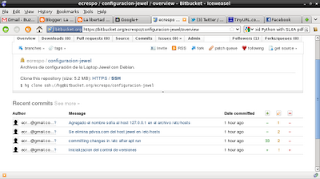
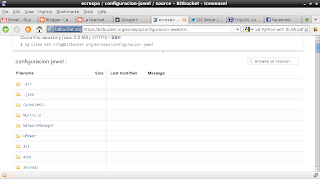
If you want to back up the files on a server you can use bitbucket as an example: create the project configuracion-jewel and push the contents of the /etc/ directory with the hg push command:
hg push https://bitbucket.org/ecrespo/configuracion-jewel
http authorization required
realm: Bitbucket.org HTTP
user: ecrespo
password:
pushing to https://bitbucket.org/ecrespo/configuracion-jewel
searching for changes
remote: adding changesets
remote: adding manifests
remote: adding file changes
remote: added 4 changesets with 5764 changes to 5759 files
remote: bb/acl: ecrespo is allowed. accepted payload.
The following figure shows a screenshot of the project's changes on bitbucket.
With this guide you can now keep track of the changes made in the /etc/ directory with a distributed version control system such as mercurial.
===
Make a donation! If you liked the article you can make a donation with Bitcoin (BTC) using the digital wallet of your choice to the following address: 17MtNybhdkA9GV3UNS6BTwPcuhjXoPrSzV
Or by scanning the QR code from your wallet:
